

Sometimes a mailbox migration fails for reasons unrelated to mailbox size, corrupt items, or connectivity. We recently encountered this while migrating mailboxes from Exchange Server SE to Exchange Online. The migration of mailbox sharedbox1 failed with:
Cannot get ID from name. –> MapiExceptionNamedPropsQuotaExceeded: GetIdsFromNames operation has failed (hr=0x80040900, ec=-2147219200) 1.84300:0A000000, 1.84300:56000000, 1.73948:00000000, 5.71140:67000000446F526F70730000, 1.108572:00000000, 0.117068:090
The migration was stuck. Searching for MapiExceptionNamedPropsQuotaExceeded returns enough leads on the problem. In your search for an answer, you may have ended up on this article, or the CSS Exchange (Customer Support Services) site covering several scripts, that might solve this issue when your mailbox is in Exchange Online. There are a few scripts for Exchange Server, but they didn’t work or weren’t optimized, and they were more of a support tool than a user-friendly solution. So, while Exchange Online has CSS scripts, Exchange Server lacks a proper toolset to support analysis and remediation.
This gap led to the creation of ExchangeMEPTools, a PowerShell module that brings this functionality to Exchange Server. The goal was to offer the same cmdlets and process as the CSS support scripts for Exchange Online.
But first, what exactly are named properties, and how can a mailbox accumulate thousands of them completely out of sight?
Named Properties
Messages and other MAPI objects in a mailbox store information in properties. Applications can extend the predefined set using named properties, also called extended properties, to store custom data. Exchange maintains mappings for named properties within the mailbox, and those mappings are subject to quotas. Named properties also store metadata derived from Internet message headers. Microsoft explains the underlying limit here, noting that Outlook may also encounter quota issues.
This might become a silent killer when applications send messages using unique Internet headers. These aren’t necessarily your applications; external senders, or the applications they use, can also add the so-called X-headers to messages. Consider an application stamping 1,000 messages with:
X-MyApplication-TrackingId: <unique value>
There may be 1,000 different values, but there is still only one header name: X-MyApplication-TrackingId. Exchange can reuse the same named-property mapping.
Now put the unique identifier in the header name:
X-MyApplication-Attachment-<GUID>: <unique value>
Every GUID now produces a different header name:
X-MyApplication-Attachment-7f148c33-...
X-MyApplication-Attachment-c87e93dc-...
X-MyApplication-Attachment-41509641-...
Those aren’t different values of one property. They are different properties. If thousands of uniquely named headers are promoted to MAPI properties, the mailbox can consequently accumulate thousands of named-property mappings and eventually hit its quota. This set of named properties might be from last year, but it might also concern a mailbox that has been accumulating messages for decades. The latter is becoming less uncommon nowadays, especially with generic shared mailboxes such as info@<domain> without any retention applied whatsoever. So, this is the pattern we are going to look for and, perhaps, identify the cause.
With Exchange Server, you can increase the quota using Set-Mailbox with ExtendedPropertiesCountQuota. We strongly advise against that, as the quota is still a limit and would potentially only postpone problems to a later moment.
Exchange Mailbox Extended Property Tools
Exchange Online already offers cmdlets to investigate mailbox extended properties, including functionality corresponding to:
- Get-MailboxExtendedProperty is a somewhat undocumented cmdlet that retrieves the named properties for a mailbox.
- Test-MailboxExtendedProperty tests the retrieved properties against the applicable named-property quotas to identify where limits are being approached or exceeded.
- Search-MailboxExtendedProperty searches the mailbox for items containing the selected named properties, mapping problematic properties back to the messages or other items on which they occur.
- Remove-MailboxExtendedProperty removes the selected properties from those mailbox items, providing the actual remediation step.
Together, these cmdlets form a sequential cleanup flow: discovering, assessing, locating, and removing these named properties. Unlike Get-MailboxExtendedProperty, which is an Exchange Online cmdlet for retrieving named properties, the other three are CSS scripts using Microsoft Graph, so you must identify the extended properties before you can locate and remove them.
As stated earlier, Exchange Server doesn’t provide equivalent cmdlets for its on-premises mailboxes. We therefore created Exchange Mailbox Extended Property Tools (ExchangeMEPTools) to provide similar functionality for Exchange Server. Also, since Exchange Server doesn’t have Microsoft Graph, we leveraged the trusted, proven API, Exchange Web Services (EWS).
Requirements:
- PowerShell 5.1 or later.
- Exchange Management Shell for inventory and mailbox resolution. If the module detects that you are not running from Exchange Management Shell, the module attempts to locate the Exchange installation and loads the required Exchange functionality into the scope of the module.
- Installed EWS.WebServices.Managed.API or its Microsoft.Exchange.WebServices.dll file residing in the current folder. This offers the required support for the mailbox-level operations.
ExchangeMEPTools is a PowerShell module available from the PowerShell Gallery. To install and load the module:
Install-Module ExchangeMEPTools
Import-Module ExchangeMEPTools
Now to the good stuff. After loading our module, we should have the following cmdlets at our disposal:
- Get-MailboxExtendedProperty similar to CSS script.
- Test-MailboxExtendedProperty similar to CSS script, but with an ExchangeOnlineQuotas switch to make Test-MailboxExtendedProperty verify against the fixed quotas for Exchange Online.
- Search-MailboxExtendedProperty similar to CSS script.
- Remove-MailboxExtendedProperty similar to CSS script.
- Connect-EWSSession to set up an EWS session to Exchange Server. It uses one session per specified identity during connection.
- Disconnect-EWSSession to clear all EWS sessions.
- Get-EWSSession to show details for a specific EWS session.
Start by inspecting a mailbox’s named properties. This uses Exchange cmdlets, so no need to connect to EWS at this stage:
Get-MailboxExtendedProperty -Identity sharedbox1@myexchangelabs.com | Test-MailboxExtendedProperty -ExchangeOnlineQuotas
This fetches the named properties for sharedbox1 using Exchange store cmdlets, then passes them through to start grouping and counting. We also specified ExchangeOnlineQuotas to verify the results against the Exchange Online quotas. For a test mailbox, the result was:
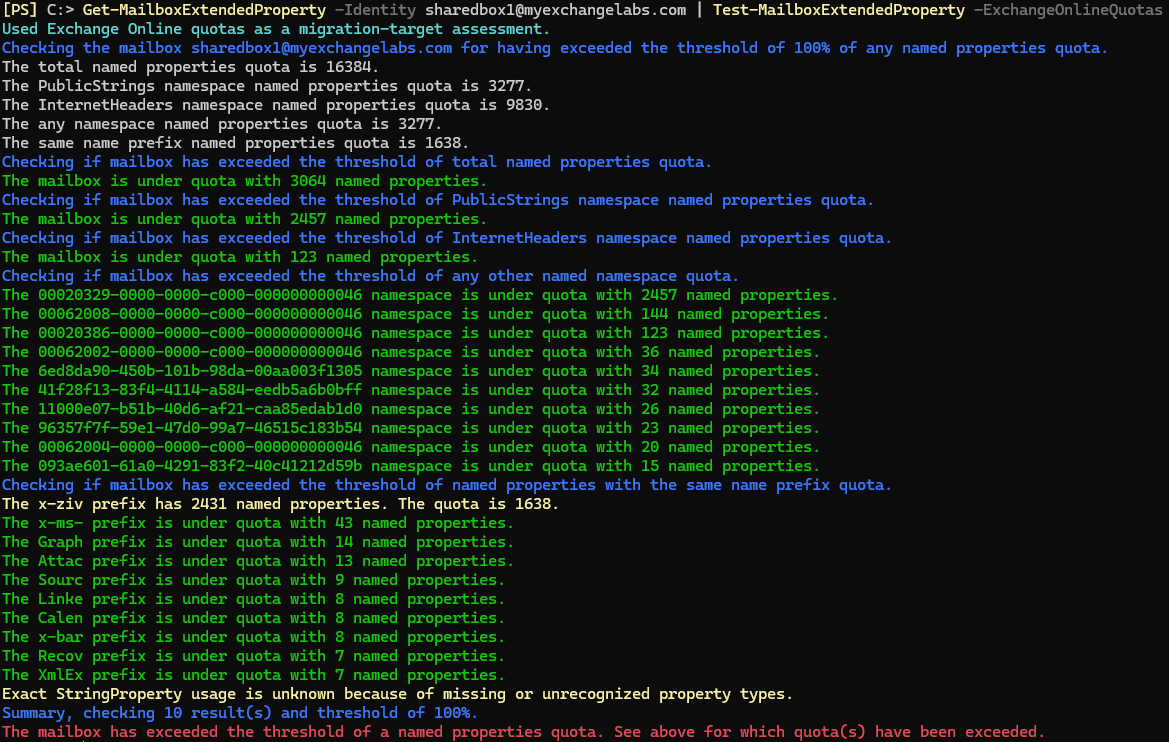
As in the Test-MailboxExtendedProperty script from CSS, we grouped named properties by the first 5 characters. As you can see, properties starting with “x-ziv” exceeded the quota. This means there are 2,431 unique properties, all starting with “x-ziv”. We may need more detailed information to identify the potential culprit and hint at the source of the issue. For this, we inspect the output of Get-MailboxExtendedProperty and look for clues. The PropertyName parameter accepts wildcards, so the command to fetch all properties starting with “x-ziv”, keep only the unique property names, and display the first 5 entries, is:
Get-MailboxExtendedProperty -PropertyName x-ziv* | Sort-Object -Property -Unique | select -first 5 PropertyName
PropertyName
------------
x-zivver-AddedAttachment
x-zivver-AddedAttachment-002e74c2-a4e2-4b88-99a3-6a36a9967fca
x-zivver-AddedAttachment-003ff7ad-8917-46e4-b579-784155a9506f
x-zivver-AddedAttachment-00845b32-2c37-4bd6-b076-9d9670357ae9
x-zivver-AddedAttachment-00e33eb4-ded8-49c7-8bed-c352499bb6ad
See the pattern? Apparently, Zivver, a platform many organizations use for secure email, adds internet headers to email messages to reference attachments. Which, of course, is fine unless you use GUIDs that make these headers unique. That could make you reach named property quotas real quick, or at least turn the quotas into a lurking issue.
Using the longer prefix confirmed it was the culprit:
Get-MailboxExtendedProperty -PropertyName x-zivver-addedattachment | Sort-Object -Property -Unique | measure-object
The result I got: 2,420 unique properties.
Cleaning Up
Now, before we can scan and remove these properties using our module, we need to authenticate to Exchange using EWS with Connect-EWSSession. The syntax of Connect-EWSSession using the most common parameters is:
Connect-EWSSession -Identity <Identity> -EwsUrl <url> -Credential <PSCredential> -UseDefaultCredentials -Impersonate -TrustAll
- Identity is the mailbox to authenticate against. Needed when using Impersonation.
- EwsUrl is used to override Autodiscover and set the endpoint for EWS operations.
- Credential is a secure credential to use for authentication, e.g., fetched using Get-Credential.
- UseDefaultCredentials is used when you want to use the current security context.
- Impersonate should be specified when using Application Impersonation permissions.
- TrustAll is to be used when you need to accept any certificate, including self-signed certificates.
When the connection is successful, we can start clearing mailbox items from those named properties. To achieve this, we need the output of Get-MailboxExtendedProperty. However, that output consists of named property-to-ID mappings, taken from the Exchange store. To process them, we also need to know the property type. We can add this to the output by adding the ResolvePropertyType switch. For this example, we will fetch the X-Zivver-AddedAttachment* properties and resolve them:
$properties= Get-MailboxExtendedProperty -Identity sharedbox1@myexchangelabs.com -PropertyName X-Zivver-AddedAttachment* -ResolvePropertyType
Do note that resolving adds time to fetching the property information. To show the resolution progress, Get-MailboxExtendedProperty displays a progress bar, including a resolution rate and a rough estimate of the time remaining.

The next step is to have the Search-MailboxExtendedProperty map the named properties collected by Get-MailboxExtendedProperty, and map them to the items within the mailbox:
$items= Search-MailboxExtendedProperty -MailboxExtendedProperty $properties
This requires crawling the mailbox. The time the search takes depends on how many properties Search-MailboxExtendedProperty has to match. A progress bar will display the folder being processed and the overall progress:

When all the mapping has been done, we can then put Remove-MailboxExtendedProperty to work by feeding Remove-MailboxExtendedProperty the results of the search:
Remove-MailboxExtendedProperty -MailboxExtendedProperty $items
Remove-MailboxExtendedProperty supports WhatIf if you first want to see what will happen. If you add the switch Passthru, Remove-MailboxExtendedProperty will return an object related to the item, such as Subject and FolderPath. To verify the result, specify the Verify switch to confirm removal.
The examples above use variables to pass data, which helps explain what happens at each step. The commands support pipeline operation, so discovery, searching, and removal can be combined in a single operation, e.g.
Get-MailboxExtendedProperty -Identity sharedbox1@myexchangelabs.com -PropertyName X-Zivver-AddedAttachment* -ResolvePropertyType | Search-MailboxExtendedProperty | Remove-MailboxExtendedProperty
Also, you can store the intermediate results in external files for inspection, and read those files for the next step, e.g.
$props= Get-MailboxExtendedProperty -Identity sharedbox1@myexchangelabs.com -ResolvePropertyType
$props | ConvertTo-Json | Set-Content .\sharedbox1-properties.json

$props= Get-Content .\sharedbox1-properties.json -Raw | ConvertFrom-Json
$items= $props | Search-MailboxExtendedProperty
$items | ConvertTo-Json | Set-Content .\sharedbox1-items.json

$items = Get-Content .\sharedbox1-items.json -Raw | ConvertFrom-Json
$items | Remove-MailboxExtendedProperty -Confirm:$false
For an actual production mailbox, I would prefer separating the operations.
Final Words
One final consideration for this whole process: cleaning up does not remove the cause. If an application generates unique named properties, perhaps unknowingly, Exchange Server may eventually hit the quota again. And since these cmdlets and support scripts exist for Exchange Online, the problem isn’t restricted to on-premises environments. Once you’ve identified a suspicious property family such as X-Application-<unique value>, it may be worth investigating and contacting the vendor, if needed, to prevent current and possible future problems.
The module has also been published on GitHub.
