Security Updates Exchange 2013-2019 (Nov2020)


A quick blog on security updates for Exchange Server 2013, 2016 and 2019 released November 10th. These fixes address the following vulnerability:

  • CVE-2020-17085: Microsoft Exchange Server Denial of Service Vulnerability
  • CVE-2020-17084: Microsoft Exchange Server Remote Code Execution Vulnerability
  • CVE-2020-17083: Microsoft Exchange Server Remote Code Execution Vulnerability

The exploits can be fixed by single security update, which you can find in the table below per current Exchange version.

ExchangeDownloadBuildKBSupersedes
Exchange 2019 CU7Download15.2.721.4KB4588741KB4581424
Exchange 2019 CU6Download15.2.659.8KB4588741KB4581424
Exchange 2016 CU18Download15.1.2106.4KB4588741KB4581424
Exchange 2016 CU17Download15.1.2044.8KB4588741KB4581424
Exchange 2013 CU23Download15.0.1497.8KB4588741KB4581424

Be advised that these security updates are Cumulative Update level specific. You cannot apply the update for Exchange 2016 CU17 to Exchange 2016 CU16. Also, the security update download has the same name for different Cumulative Updates, and I would suggest tagging the file name with the CU level, e.g. Exchange2019-CU6-KB4588741-x64-en.msp.

Also, run the Security Update from an elevated command prompt, to prevent issues during installation. And on a final note, as with any patch or update, I’d recommend to apply this in a acceptance environment first, prior to implementing it in production.


Security Updates Exchange 2013-2019 (Oct2020)


A quick blog on security updates for Exchange Server 2013, 2016 and 2019 released October 13th. These fixes address the following vulnerability:

  • CVE-2020-16969: Microsoft Exchange Information Disclosure Vulnerability
    An information disclosure vulnerability exists in how Microsoft Exchange validates tokens when handling certain messages. An attacker who successfully exploited the vulnerability could use this to gain further information from a user.

    To exploit the vulnerability, an attacker could include specially crafted OWA messages that could be loaded, without warning or filtering, from the attacker-controlled URL. This callback vector provides an information disclosure tactic used in web beacons and other types of tracking systems.

    The security update corrects the way that Exchange handles these token validations.

The exploits can be fixed by single security update, which you can find in the table below per current Exchange version.

ExchangeDownloadBuildKBSupersedes
Exchange 2019 CU7Download15.2.721.3KB4581424KB4577352
Exchange 2019 CU6Download15.2.659.7KB4581424KB4577352
Exchange 2016 CU18Download15.1.2106.3KB4581424KB4577352
Exchange 2016 CU17Download15.1.2044.7KB4581424KB4577352
Exchange 2013 CU23Download15.0.1497.7KB4581424KB4536988

Be advised that these security updates are Cumulative Update level specific. You cannot apply the update for Exchange 2016 CU17 to Exchange 2016 CU16. Also, the security update download has the same name for different Cumulative Updates, and I would suggest tagging the file name with the CU level, e.g. Exchange2016-CU17-KB4581424-x64-en.msp.

Also, run the Security Update from an elevated command prompt, to prevent issues during installation. And on a final note, as with any patch or update, I’d recommend to apply this in a acceptance environment first, prior to implementing it in production.

EWS.WebServices.Managed.Api


A short blog on the EWS Managed API and using the latest version with scripts leveraging Exchange Web Services (EWS), such as my Remove-DuplicateItems script. The installable EWS Managed API library was last updated in 2014 (version 2.2, reports as v15.0.913.22), and there have been few enhancements since then. These are included in the EWS.WebServices.Managed.Api package, which carries version 2.2.1.2.

Although this library was last updated in 2019, you might still need it to successfully run EWS scripts. The EWS.WebServices.Managed.Api package supports some Exchange Web Services calls which are not supported in the 2.2 version, and may lead to error messages like Exception calling “FindFolders” with “2” argument(s) or other messages related to the (number of) arguments. This may be an indication a particular call was used to one of the EWS functions, but which is not supported by the installed EWS Managed API library. In those cases, installing this updated library might help.

The library is published on NUGet as a package. To install the package, we first need to register NuGet as a Package Source:

Register-PackageSource -provider NuGet -name nugetRepository -location https://www.nuget.org/api/v2

Next, install the package from the newly defined NuGet source:

Install-Package Exchange.WebServices.Managed.Api

The package installs by default under C:\Program Files\PackageManagement\NuGet\Packages. I have updated my scripts to include this location when searching for the required Microsoft.Exchange.WebServices.dll as well. Alternatively, you can copy this DLL from the ..\Exchange.WebServices.Managed.Api.<Version>\lib\net35 folder to the location where the script resides. When running my EWS-based scripts in Verbose mode, it will report as version 2.2.1.0.

Hopefully this blog will potentially save you some time troubleshooting, and myself answering some support messages. Enjoy!

Exchange Announcements @ Ignite 2020


Last Update: Added points from Exchange Online Transport – Manage Email, Optics, End User Experiences.

It shouldn’t come as a surprise that this year’s Ignite event is very different than previous years. However what is also different is that at this year’s digital experience, product groups lined up articles and pre-recorded sessions with deep-dive level 300-400 contents as well as articles to accompany those. The sessions, which are available through the Virtual Hub, were all launched right after the start of the event, including the prepared articles. Speaking of a flood flood of contents to digest.

To ease digesting all this information related to Exchange without going through all the videos and blogs, I prepared a summary of all the announcements made at and during Ignite for your reference. For reference, links to the original articles and sessions are at the bottom of this article. The list might not be conclusive; if you find something missing, let me know.

Exchange vNext

  • Exchange Server vNext is scheduled for H2/2021, and will be subscription-based.
  • Will support in-place upgrades from Exchange Server 2019, just like installing another Cumulative Update. Which makes you think, maybe it is just a CU with a high version offset to avoid clashing with its predecessor.
  • Support for this in-place upgrade process is limited to 2 years after release of vNext. If everything goes to plan, this means upgrades will be supported from Exchange 2019 CU11/12-CU19/20 to Exchange vNext RTM-CU8/9.
  • Will support co-existence with Exchange Server 2013, 2016 and 2019, which is 1 down-level more than previous editions (n-3 support instead of n-2).
  • Customers staying on-premises are recommended to upgrade to Exchange Server 2019 today, so they can benefit from an in-place upgrade to vNext when it gets released.
Image Source: Exchange – Here, There and Everywhere

Exchange Online

  • Exchange Online Management PowerShell module is now GA (v2.0.3). This module contains cmdlets leveraging Graph which can show significant performance enhancements in larger tenants, supports certificate-based authentication a.o.
  • Exchange Online Management PowerShell preview module (v2.0.4) supports Linux and PowerShell Core.
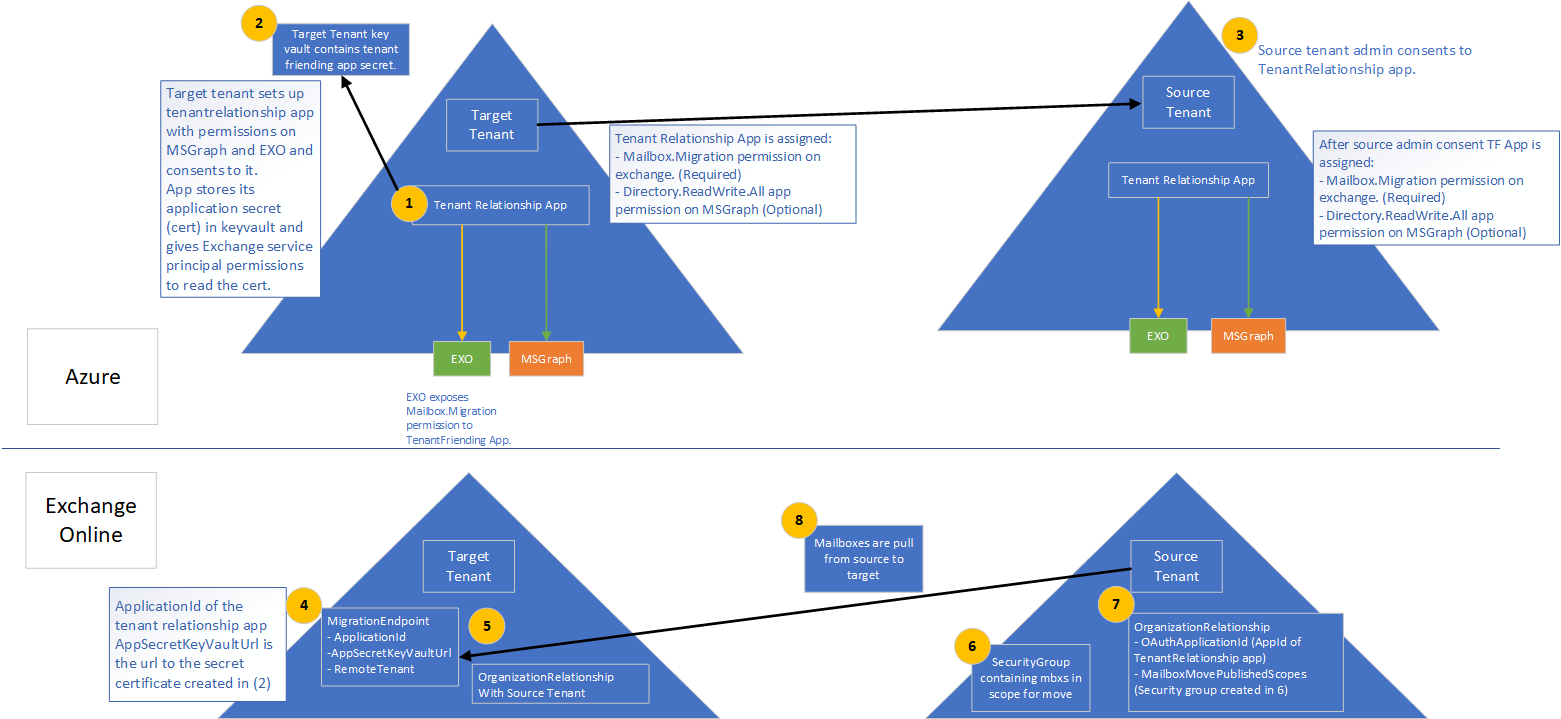
  • Cross-tenant migration of mailboxes is now in Public Preview. Separate programs for cross-tenant SharePoint Online and OneDrive for Business will also launched (register for private preview at aka.ms/SPOMnAPreview). An Azure Key Vault subscription is required on the target tenant. Management of these moves is done from PowerShell, after setting things up with some MSFT scripts which you can grab from GitHub here.
Tenant preparation for mailbox migration.
Image Source: Cross-tenant mailbox migration, process overview
Set-OrganizationConfig -AllowPlusAddressInRecipients $true
  • Message Recall to orchestrate recall of message in Exchange Online as announced at Ignite 2019 is expected later this year (Q4/2020).
  • Admins can toggle the new Exchange Admin Center (was already in preview). It will become the default in Q1/2021.
  • The new Exchange Admin Center is also tailored for use on mobile browsers.
  • Outbound mail flow now supports MTA-STS (MTA Strict Transport Security).
  • The new Exchange Admin Center will host all mail flow related management options, which will be consolidated from the earlier Admin Center as well as the Security & Compliance Center.
  • The new Exchange Admin Center will get new mail flow insights and notifications, such as early certificate expiration notifications or detected reply-to-all storms.
  • Option to reduce message expiration timeout interval from the current default of 24 hours.
  • Administrators get the option to block users from moving groups (distribution groups as well as Microsoft 365 Groups) to the BCC line, which might break receivers’ inbox rules (Q1/2021).
  • Entitled organizations can appoint Priority Users. Priority Users are critical mailboxes that are monitored for mail flow issues. Requires minimum of 10,000 Office 365 E3 or E5 or Microsoft 365 E3 or E5 licenses with at least 50 monthly active Exchange Online users.
  • Microsoft 365 Network Connectivity functionality goes into preview, which is accessible via the admin portal (Health > Network Connectivity).
  • The stand-alone Network Connectivity test tool also goes in preview, and is available from connectivity.office.com.
  • Notifications for expired or soon to expire SSL certificates and Domains (Q4/2020).
  • Customizable message expiration (8-24hours, Q4/2020).
  • Reply-to-All storm protection v2 with customizable thresholds and reports (Q4/2020-H1/2021).
  • Client-agnostic improved Message Recall (Q4/2020).

Exchange 2019

  • Exchange Server 2019 Server Role Requirements Calculator or just Capacity Calculator is now available as separate download (v10.5, link).

Exchange Hybrid

  • New Exchange Hybrid Configuration Wizard, which will become available later month, will support connecting your Exchange on-premises environment to multiple tenants. Note that multiple Exchange organizations connecting to a single tenant was already an option, as mentioned in the supported Azure AD Connect topologies document (link).
Image Source: September 2020 Hybrid Configuration Wizard Update – Microsoft Tech Community
  • Multitenancy Exchange Hybrid will support up to 5 tenants.
  • Setting multitenancy up requires Exchange Server 2019 CU7 or Exchange Server 2016 CU18 or later.
  • Multitenancy does not enable SMTP domain sharing, which is logical as you can only setup domain once in Office 365.
  • Exchange Hybrid Modern Authentication (HMA) can only be configured with one single tenant.

Outlook Desktop/Mac

  • Office will get perpetual release (Windows & Mac) in H2/2021.
  • Attendees who left company get removed from meeting after first NDR.

Outlook Mobile

  • Play My Emails coming to Canada, Australia, India and the United Kingdom (Outlook for iOS and Android).
  • Option to ask Cortana to read out emails from specific people, time frame and topics in (Outlook for iOS, September).
  • Voice commands for email composition, calling and scheduling (October).
  • Sync contact folders with your phone by category (October).
  • Reactions to emails with emojis without filling your inbox (Q4)
  • QR connect to simplify work account setup (October).
  • Outlook for Mac will start using Microsoft Sync technology for enhanced performance and reliability. 
  • Widget support for iOS14 across apps.
  • Option to toggle new Outlook for Mac via in-app switch.

References to official sources

Security Updates Exchange 2016-2019 (Sep2020)


A quick blog on security updates for Exchange Server 2016 and Exchange Server 2019 released September 8th. These fixes address the following vulnerability:

  • CVE-2020-16875: Exchange Memory Corruption Vulnerability
    A remote code execution vulnerability exists in Microsoft Exchange server due to improper validation of cmdlet arguments. An attacker who successfully exploited the vulnerability could run arbitrary code in the context of the System user. Exploitation of the vulnerability requires an authenticated user in a certain Exchange role to be compromised. The security update addresses the vulnerability by correcting how Microsoft Exchange handles cmdlet arguments.

The exploits can be fixed by single security update, which you can find in the table below per current Exchange version.

ExchangeDownloadBuildKBSupersedes
Exchange 2019 CU6Download15.2.659.6KB4577352KB4540123
Exchange 2019 CU5Download15.2.595.6KB4577352KB4540123
Exchange 2016 CU17Download15.1.2044.6KB4577352KB4540123
Exchange 2016 CU16Download15.1.1979.6KB4577352KB4540123

Be advised that these security updates are Cumulative Update level specific. You cannot apply the update for Exchange 2016 CU17 to Exchange 2016 CU16. Also, the security update download has the same name for different Cumulative Updates, and I would suggest tagging the file name with the CU level, e.g. Exchange2016-CU17-KB4577352-x64-en.msp.

Also, run the Security Update from an elevated command prompt, to prevent issues during installation. And on a final note, as with any patch or update, I’d recommend to apply this in a acceptance environment first, prior to implementing it in production.