Michel de Rooij, with over 25 years of mixed consulting and automation experience with Exchange and related technologies, is a consultant for Rapid Circle. He assists organizations in their journey to and using Microsoft 365, primarily focusing on Exchange and associated technologies and automating processes using PowerShell or Graph. Michel's authorship of several Exchange books and role in the Office 365 for IT Pros author team are a testament to his knowledge. Besides writing for Practical365.com, he maintains a blog on eightwone.com with supporting scripts on GitHub. Michel has been a Microsoft MVP since 2013.
A new Microsoft MVP award cycle, a new moment to have a look at the MVP statistics. Below numbers are taken from the public MVP site. July 1st is normally the day of the award cycle, but this year got delayed for a few days due to unknown circumstances. Because people get awarded every month, the comparison to July of every year should give an idea of the yearly trend.
Few points of attention:
Apparently, during the award cycle MVP’s located in Russia or Belarus were removed, including MVP’s that were awarded in the first half of 2022 and thus not up for renewal.
19 anonymous MVP awardees do not disclose location. Those are not represented in below numbers.
The Office Development category was rebranded M365 Development.
The Office Apps & Services category was rebranded M365 Apps & Services.
Awardees per Category
The following table contains the awardees per award category from July of 2019 up to 2022, plus change percentage. It therefor does not reflect on changes during the year (people newly awarded or moving to Microsoft). I will leave the interpretation up to you.
Expertise
Jul’19
Jul’20
%
Jul’21
%
Jul’22
%
Cloud and Datacenter Management
232
209
-10%
219
5%
164
-25%
Microsoft Azure
409
463
13%
534
15%
546
2%
M365 Apps & Services
491
512
4%
556
9%
492
-12%
Business Applications
166
240
45%
323
35%
351
9%
Data Platform
332
358
8%
392
9%
364
-7%
Developer Technologies
644
697
8%
770
10%
715
-7%
Enterprise Mobility
106
103
7%
133
18%
149
12%
AI
84
122
45%
138
13%
128
-7%
M365 Development
47
64
36%
69
8%
59
-14%
Windows Development
119
110
-8%
120
9%
92
-23%
Windows and Devices for IT
57
43
-25%
42
-2%
45
7%
Total no. of Awards
2687
2931
9%
3296
12%
3105
-6%
Total no. of MVP’s
2634
2850
8%
3224
13%
3024
-6%
Note: The difference between total number of awards and total number of MVP’s is caused by MVP’s awarded in multiple categories. A total of 124 MVP’s were awarded in two or more categories.
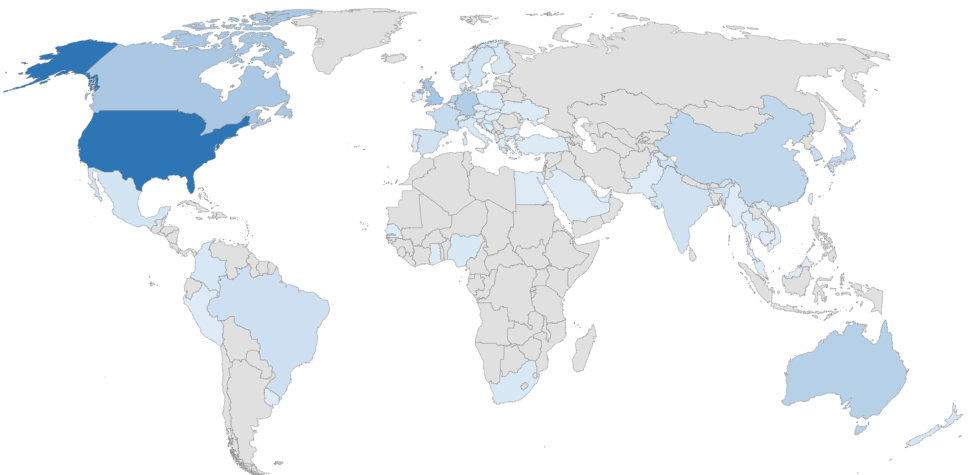
M365 Apps & Services per Country
When zooming in on the M365 Apps & Services category, the awards per country are shown below, including the % change compared to last year. As you might notice, there are quiet a number of countries without MVP’s compared to last year.
Country
Number
Country
Number
Country
Number
Country
Number
AUS
26 (-4%)
FRA
16 (-34%)
NZL
6 (0%)
ESP
10 (-34%)
AUT
3 (-25%)
DEU
30 (-4%)
NGA
4 (0%)
LKA
0 (-100%)
BEL
5 (0%)
GHA
1 (0%)
NOR
5 (-29%)
SWE
8 (-20%)
BIH
1 (0%)
GRC
1 (0%)
PAK
1 (0%)
CHE
2 (-50%)
BRA
12 (-15%)
HUN
1 (-50%)
PER
1 (0%)
TWN
4 (0%)
BGR
3 (0%)
IND
10 (-29%)
POL
5 (-38%)
THA
2 (0%)
KHM
1 (0%)
IRL
1 (-75%)
PRT
3 (0%)
NLD
22 (4%)
CAN
34 (-15%)
ISR
3 (0%)
RUS
0 (-100%)
TUR
2 (0%)
CHN
19 (0%)
ITA
4 (0%)
SAU
1 (-50%)
UKR
2 (0%)
COL
5 (-29%)
JPN
17 (-15%)
SEN
1 (0%)
ARE
1 (-50%)
HRV
5 (0%)
KOR
14 (-18%)
SRB
0 (-100%)
GBR
37 (-16%)
CZE
2 (0%)
MKD
2 (0%)
SGP
4 (0%)
USA
112 (-16%)
DNK
5 (-29%)
MYS
1 (0%)
SVK
1 (0%)
URY
1 (0%)
EGY
1 (0%)
MEX
8 (0%)
SVN
2 (0%)
VNM
1 (0%)
SLV
1 (0%)
MMR
1 (0%)
ZAF
4 (0%)
FIN
5 (-17%)
NPL
0 (-100%)
If you have questions or comments, please leave them in the comments below.
Few days ago, the Exchange Product made several announcements related to Exchange Server and its future. The overall message throughout these announcements can be interpreted as that Microsoft is publicly declaring to be committed to developing and supporting the Exchange Server product. This is especially of interest to those customers running it as part of their on-premises infrastructure. It is also assuring those that believe the road ahead was a dead end, eventually forcing them to move to Exchange Online, or look for alternatives.
The announcements made were in the area of:
Lifecycle policies remain intact for current versions of Exchange Server.
The next version of Exchange Server, also known as Exchange vNext, will move to a continuous support model, but comes with requirements.
Upgrade path for Exchange vNext.
Modern Authentication support for non-hybrid Exchange 2019 deployments.
Exchange 2019 support for TLS 1.3.
Possibility to receive pre-release builds of Exchange server through Microsoft’s TAP program.
Exchange Admin Center will receive overview section for Exchange servers update status in Exchange hybrid deployments.
HCW will allow admins to skip configuration steps.
Script to remove obsolete mitigations from EEMS.
Microsoft Exchange Conference Community Virtual Airlift (MEC) for September 13-14! (register)
Updated: 1.2 adds default ExchangeOnlineManagement cmdlets scanning and authentication options.
Since the original announcement on deprecation of Basic Authentication, organizations had time to analyze their environment which may include Exchange-related procedures and tools. These usually also contain scripts or commands, which depend on the Exchange Online Management module. A previous blog on its history and how version 2 of this module lends itself for unattended operation with certificate-based modern authentication support can be found here.
The initial release of the Exchange Online Management v2 – or EXOv2 – module offered a an additional small set of cmdlets which utilized REST-based services. Apart from the functional discrepancies, such as having to specify a property set to indicate which properties to return, the big advantage of these added commands was that they did not depend on the Windows Remote Management (WinRM) client using Basic Authentication for token exchange. Disabling Basic Authentication on WinRM client lead to messages such as:
Connecting to remote server outlook.office365.com failed with the following error message : The WinRM client cannot process the request. Basic authentication is currently disabled in the client configuration.
This dependency makes it challenging for organizations to turn off Basic Authentication altogether, or lead to problems when they did. Fast forward to the present, where the Exchange Online Management module in its current release is offering nearly all Exchange cmdlets in REST-based form, with full functional parity.
While I expect Microsoft to reach full command parity before they flick the Basic Authentication switch to off, there are also other use cases for which analyzing scripts might be helpful:
Ths initial purpose was identifying commands which require RPS (Remote PowerShell), and thus thus require WinRM Basic Authentication enabled. Because the Exchange Team did an amazing job in catching up in the recent months, only few Exchange Online cmdlets are still lacking REST support in my tenant at this moment, e.g. New-ApplicationAccessPolicy. But then again, your mileage may vary, as the recent Preview 7 module removed few UnifiedGroup related cmdlets which had issues.
New Exchange Online commands may not receive immediate REST support.
Organizations might want to cross-reference commands with scripts.
Identifying Exchange Online commands and parameters in scripts helps in determining the minimum set of permissions required to run the script.
To analyze and report on Exchange Online scripts, I created a simple script Analyze-ExoScript.ps1. This script, which is available on GitHub here, does the following:
Connect to Exchange Online using RPS and inventory the commands available. Note that this requires the UseRPSSession switch when connecting, which is only available per 2.0.6-Preview3 of the module. If your organization only runs GA versions of the module, this script cannot be used.
Connect to Exchange Online using REST and inventory the commands available. It will re-use the account used for authenticating the RPS session, which should prevent receiving another authentication dialog or MFA challenge.
Cache cmdlet information in an external file to prevent having to connect to Exchange Online for every run. The file is named EXO-CmdletInfo.xml and will be stored in the same folder as the script.
Process the script and report on the Exchange-related commands used.
Usage Calling Analyze-ExoScript is straightforward:
File is the name of one or more files which you want to analyze. Note that the script accepted pipeline output, so you can also feed it filenames using Get-ChildItem for example.
The ShowAll switch tells the script to output all found commands, not only the Exchange ones.
The switch Refresh tells the script to ignore saved command information, trigger reconnecting to Exchange Online in order to refresh the command sets.
Credential specifies the (Basic Authentication) credential to pass to Connect-ExchangeOnline.
Organization and AppId can be used to specify the tenant ID (x.onmicrosoft.com) and registered application ID to use with Connect-ExchangeOnline using Modern Authentication. This also requires one of the following:
CertificateThumbprint of the certificate to use for authentication.
CertificateFile of the file containing the certificate to use, together with CertificatePassword to specify its password.
When asked to authenticate, make sure your role has the necessary Exchange-related permissions as that will determine the Exchange Online cmdlets available to you, and consequently also the commands which Analyze-ExoScript will recognize in scripts to process.
For example, to process a script Fix-MailboxFolders.ps1, use:
The output consists of objects, which allow for further filtering:
The returned properties are:
Command is the Exchange Online command identified
Type will tell you if the command supports REST or requires RPS.
Parameters are the parameters used together with the command. This includes common parameters, which might be less usable for role assignment purposes.
Alt contains alternative REST-based cmdlet you could consider using for performance reasons, e.g. Get-EXOMailbox instead of Get-Mailbox.
File and Line are the file containing the command and on which line it is located.
AST To analyze code, I leveraged PowerShell feature called Abstract Syntax Tree, which was an interesting exploration in itself. PowerShell AST can be used to decompose PowerShell code into tokens. This is way better than simply looking for strings, and does away with having to interpret code yourself to see if something is a command, comment or just some string. AST allows for analysis of these tokens, in this case filtering on commands which are related to Exchange Online. If you want to get started on AST, check out this article, or plunge in the PowerShell SDK straightaway.
Final Words When every Exchange Online command discovered is found to be offering REST support, you can turn off Basic Authentication on the client, for example through GPO or by reconfiguring WinRM:
winrm set winrm/config/client/auth @{Basic="false"}
Only thing you might need to refactor is if and how the script connects to Exchange Online, as Basic Authentication allowed for connecting to Exchange Online using (stored) credentials for example. Examples on how to use more secure Modern Authentication-based methods to connect can be found in an earlier article here.
The Exchange PG released May updates for Exchange Server 2013, 2016 and 2019.
Note that per this cycle, Security Updates will be packaged in an executable wrapper. This should trigger the running elevated prompt, thus preventing any potential issues from simply double-clicking the .MSP file. More about the new package format, options for logging and command-line switches are mentioned in an article dedicated to the change of distribution method here.
The vulnerability addressed in the Security Updates for May is:
KB5013118 Exchange Service Host service fails after installing March 2022 security update
Important: As mentioned in the announcement, you must run /PrepareAllDomains after deploying the SU because of hardening measures. Exception is when you have multiple domains and some of them are never prepped; in that case prepare the individual domains required. Using your currently deployed binaries, run the following command, where the /IAccept switch you need to use depends on the Exchange version deployed and whether you provide diagnostics information:
Be advised that these security updates are Cumulative Update level specific. You cannot apply the update for Exchange 2019 CU12 to Exchange 2019 CU11. Also, the security update download has the same name for different Cumulative Updates, and I would suggest tagging the file name with the CU level, e.g. Exchange2019-CU10-KBXXXXXX-x64-en.msp.
Exchange servers running as part of hybrid deployment are running services, and thus need to be included in the patch cycle. If you are running Exchange 2019 CU12 Management Tools-only (for recipient management), you do not need to deploy this SU.
On a final note, as with any patch or update, I’d recommend to apply this in a test environment first, prior to implementing it in production. However, it is not recommended to wait for regular maintenance cycles when it concerns security updates, and follow a more agile approach; the ratings are an indication of the urgency.
In the announcement of the most recent set of Cumulative Updates for Exchange Server 2019 and 2016, Microsoft introduced some changes – features if you will – as well, which were received with enthusiasm. An overview of these Cumulative Updates and the features introduced was given in an earlier article. In this article however, I would like to zoom in on one of those features, which also happens to be a popular topic among customers running Exchange Hybrid deployments, “The Last Exchange Server”.
Up to Exchange 2019 CU12 (2022 H1), customers that migrated to Exchange Online were still required to leave Exchange-related components running on-premises. Even today, with all the information published around this topic, I am surprised this still surprised customers. This Exchange server running on-premises is to be used for managing recipients which have their source of authority in Active Directory, leveraging Active Directory Connect to propagate objects to Azure Active Directory and thus Exchange Online. Also, when there is a need to relay messages from applications or multi-functional devices, customers often need to have an Exchange server on-premises to accept these messages, as Exchange is the only supported mail relay product for hybrid deployments.







 EighTwOne (821)