Unknown's avatar

About Michel de Rooij

Michel de Rooij, with over 25 years of mixed consulting and automation experience with Exchange and related technologies, is a consultant for Rapid Circle. He assists organizations in their journey to and using Microsoft 365, primarily focusing on Exchange and associated technologies and automating processes using PowerShell or Graph. Michel's authorship of several Exchange books and role in the Office 365 for IT Pros author team are a testament to his knowledge. Besides writing for Practical365.com, he maintains a blog on eightwone.com with supporting scripts on GitHub. Michel has been a Microsoft MVP since 2013.

Exchange Updates – Sep. 2019


Exchange2019LogoToday, the Exchange Team released the quarterly Cumulative Updates for Exchange Server 2019 as well as Exchange 2016. The fixes in each release, product downloads are described below:

VersionBuildKBDownloadUMLPSchema
Exchange 2019 CU315.2.464.5KB4514141VLSC N
Exchange 2016 CU1415.1.1847.3KB4514140DownloadUMLPN

Exchange 2019 CU3 fixes:

  • 4515257 Hash mismatch is reported for Exchange DLLs in the bin directory of Exchange Server 2019
  • 4502159 Adding or removing mailbox permission in EAC doesn’t address the msExchDelegateListLink attribute in Exchange Server 2019 and 2016
  • 4515276 Room mailbox accepts a meeting as “Free” if a booking delegate is set in Exchange Server 2019 and 2016
  • 4515275 Enable Get/Restore-RecoverableItems to work with Purges folder in Exchange Server 2019 and 2016
  • 4515274 AutodiscoverV2 request returns REST API endpoint not AutoDiscoverV1 endpoint in Exchange Server 2019 and 2016
  • 4515269 SentToMemberOf shows every recipient type not distribution groups when you create transport rule in Exchange Server 2019 and 2016
  • 4515272 Message is blocked in “SMTP Delivery to Mailbox” queue if exchange server is added in groups of a child domain in Exchange Server 2019 and 2016
  • 4515271 Can’t convert a migrated remote user mailbox to shared in Exchange Server 2019 and 2016
  • 4515270 SubmissionQueueLengthMonitor shows “System.ArgumentException: Transition timeout…” in Exchange Server 2019 and 2016
  • 4515267 NDR occurs when you resend message from alternate journaling mailbox to journaling mailbox in Exchange Server 2019 and 2016
  • 4515265 Removing In-Place Hold doesn’t work for mailboxes in different domains in Exchange Server 2019 and 2016
  • 4515264 FindPeople request from Skype for Business on Mac fails with “Invalid Shape Specification” in Exchange Server 2019 and 2016
  • 4515263 Hide the “Validate-MailFlowThroughFrontDoor” command for Exchange Server 2019 and 2016
  • 4515262 Enable Remove-MobileDevice to delete mobile devices after migrating to Office 365 from Exchange Server 2019 and 2016
  • 4515261 Can’t copy eDiscovery search results for mailboxes with Exchange online archives in Office 365 in Exchange Server 2019 and 2016
  • 4515273 Mailbox auditing fails when using SHA1Managed in Exchange Server 2019 and 2016
  • 4515266 Infinite loop in Recurrence.GetNumberOfYearsBetween() with the Japanese calendar in Exchange Server 2019 and 2016
  • 4520319 S/MIME signed reply draft behaves like the first message in conversation in Exchange Server 2019 and 2016
  • 4515832 Description of the security update for Microsoft Exchange Server 2019 and 2016: September 10, 2019

Exchange 2016 CU14 fixes:

  • 4515255 â€śX-InnerException: Microsoft.Mapi.MapiExceptionRpcServerTooBusy” error when you try to use a mailbox in Exchange Server 2016
  • 4515254 Event 1009 frequently occurs in application logs for lagged database copies in Exchange Server 2016
  • 4502159 Adding or removing mailbox permission in EAC doesn’t address the msExchDelegateListLink attribute in Exchange Server 2016
  • 4515276 Room mailbox accepts a meeting as “Free” if a booking delegate is set in Exchange Server 2016
  • 4515275 Enable Get/Restore-RecoverableItems to work with Purges folder in Exchange Server 2016
  • 4515274 AutodiscoverV2 request returns REST API endpoint not AutoDiscoverV1 endpoint in Exchange Server 2016
  • 4515269 SentToMemberOf shows every recipient type not distribution groups when creating transport rule in Exchange Server 2016
  • 4515272 Message is blocked in “SMTP Delivery to Mailbox” queue if exchange server is added in groups of a child domain in Exchange Server 2016
  • 4515271 Can’t convert a migrated remote user mailbox to shared in Exchange Server 2016
  • 4515270 SubmissionQueueLengthMonitor shows “System.ArgumentException: Transition timeout…” in Exchange Server 2016
  • 4515267 NDR occurs when you resend message from alternate journaling mailbox to journaling mailbox in Exchange Server 2016
  • 4515265 Removing In-Place Hold doesn’t work for mailboxes in different domains in Exchange Server 2016
  • 4515264 FindPeople request from Skype for Business on Mac fails with “Invalid Shape Specification” in Exchange Server 2016
  • 4515263 Hide the “Validate-MailFlowThroughFrontDoor” command for Exchange Server 2016
  • 4515262 Enable Remove-MobileDevice to delete mobile devices after migrating to Office 365 from Exchange Server 2016
  • 4515261 Can’t copy eDiscovery search results for mailboxes with Exchange online archives in Office 365 in Exchange Server 2016
  • 4515273 Mailbox auditing fails when you use SHA1Managed in Exchange Server 2016
  • 4515266 Infinite loop in Recurrence.GetNumberOfYearsBetween() with the Japanese calendar in Exchange Server 2016
  • 4520319 S/MIME signed reply draft behaves like the first message in conversation in Exchange Server 2016
  • 4515832 Description of the security update for Microsoft Exchange Server 2019 and 2016: September 10, 2019

Notes:

  • These Cumulative Updates do not contain schema changes compared to their previous Cumulative Update.
  • When upgrading from an n-2 or earlier version of Exchange, or an early version of the .NET Framework, consult Upgrade Paths for CU’s & .NET.
  • Don’t forget to put the Exchange server in maintenance mode prior to updating. Regardless, setup will put the server in server-wide offline mode post-analysis, before making actual changes.
  • When using Exchange hybrid deployments or Exchange Online Archiving (EOA), you are required to delay installing at most one version (n-1).
  • If you want to speed up the update process for systems without internet access, you can follow the procedure described here to disable publisher’s certificate revocation checking.
  • Cumulative Updates can be installed directly; no need to install RTM prior to installing Cumulative Updates.
  • Once installed, you can’t uninstall a Cumulative Update nor any of the installed Exchange server roles.
  • The order of installation shouldn’t matter with the “every server is an island” concept, yet recommended is to upgrade internet-facing, non-internet-facing servers first, followed by Edge Transports.

Caution:

As for any update, I recommend to thoroughly test updates in a test environment prior to implementing them in production. When you lack such facilities, hold out a few days and monitor the comments on the original publication or forums for any issues.

Security Updates Exchange 2016 & 2019 (Sep2019)


Today, Microsoft published security fixes for Exchange Server 2016 and 2019. These fixes address the following vulnerabilities:

The CVE documents contain more details on the vulnerabilities. These exploits can be fixed by single security updates; you can download them here:

VersionLinksBuildKB
2019 CU2Download15.2.397.6KB4515832
2019 CU1Download15.2.330.10KB4515832
2016 CU13Download15.1.1779.5KB4515832
2016 CU12Download15.1.1713.9KB4515832

Note: KB4515832 supersedes KB4509409 and KB4509408.

Be advised that these Security Updates are Cumulative Update level specific. Unfortunately, the security update carries the same name for different CU’s, and you cannot apply the same update for Exchange 2016 CU13 to Exchange 2016 CU12. I would suggest tagging the Cumulative Update in the file name when you store it, e.g. Exchange2016-KB4515832-x64-en_CU11.msp.

As with any patch or update, I’d recommend to apply this in a acceptance environment first, prior to implementing it in production.

Teams Mobile & Account Switching


Teams

Update: Added note about Intune App Protection policies.

One of the most requested features for Microsoft Teams on UserVoice is the ability to switch accounts. When you are working in consulting like me, chances are you need to switch accounts very often. This means you need to log in and out of every account to interact with their or guest access teams. Meanwhile your company might also be sending you messages, so you have to log in there as well. Now, on desktops one can leverage browsers’ private mode to accomplish simultaneous logons, but for mobile clients such alternative does not exist. All in all, this situation is far from ideal.

Now, the mobile workforce can rejoice, as iOS and Android received a client update (1.0.8.0 on iOS, don’t have Android device at hand currently). The updated client allows them to add more than one account, and quickly (and I mean quickly) switch between these accounts and guest accounts.

image
More button

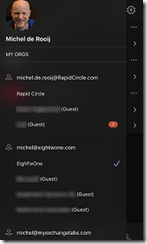
To add an account, open the menu (), open Settings and select Add account at the bottom to add an existing account to your configuration.

After you finish adding accounts, you can switch between accounts by opening the menu, and selecting one of the accounts or guest access which are shown at the bottom, grouped with the account they belong to. Example is shown right (yes, this is dark mode).

To remove an account, activate the account (by selecting it or one guest access), open the menu, and select Settings and Sign Out.

Another benefit is when your tenant is Azure Information Protection enabled. After logging in, you get prompted and need to restart the Teams app. That annoyance doesn’t happen when switching accounts, as the app remains logged in when switching.

Note that at the moment, badges are only updated within the same account and guest access.

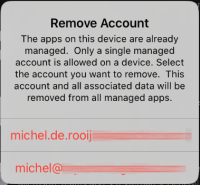
raNote that you cannot configure more than one account which has Intune App Protection configured. If you already have an IAP-enabled account and another gets IAP enabled, Teams requires you to pick one of the IAP accounts to be removed from the Teams app configuration.

Now, the only thing left to do is hope this functionality will arrive for Teams Desktop soon.

Security Updates Exchange 2010-2019


A quick blog that rather silently, Microsoft published hotfixes for a number of products few days ago, including Exchange Server 2010 up to Exchange Server 2019. These fixes address the following vulnerabilities:

  • CVE-2019-1084: Microsoft Exchange Information Disclosure Vulnerability, allowing non-printable characters to be added to Display Names.
  • CVE-2019-1136: Microsoft Exchange Server Elevation of Privilege Vulnerability, allowing NTLM MITM elevation permissions or impersonation through Exchange Web Services. This sounds like a variation on the NTLM MITM exploit which was fixed earlier this year with the February update cycle.
  • CVE-2019-1137: Microsoft Exchange Server Spoofing Vulnerability, allowing for cross-site scripting (XSS).

The CVE documents contain more details on the vulnerabilities. These exploits can be fixed by single security updates; you can download them here:

VersionCVE
2019
1084
CVE
2019
1136
CVE
2019
1137
DownloadBuildKB
2019 CU2XXLink15.2.397.54509408
2019 CU1XXLink15.2.330.94509408
2016 CU13XXXLink15.1.1779.44509409
2016 CU12XXXLink15.1.1713.84509409
2013 CU23XXXLink15.0.1497.34509409
2010 SP3 RU29XXLink14.3.468.04509410

Be advised that the Security Updates for Exchange 2013-2019 are Cumulative Update level specific. Unfortunately, the security update carries the same name for different CU’s, and you cannot apply the update for Exchange 2016 CU12 to Exchange 2016 CU11. I would suggest tagging the Cumulative Update in the file name when you store it, e.g. Exchange2016-KB4503027-x64-en_CU11.msp.

As with any patch or update, I’d recommend to apply this in a acceptance environment first, prior to implementing it in production.

Exchange Hybrid Agent GA


Ex2013 LogoIn February, Microsoft released the initial public preview version of the Hybrid Agent. The purpose of the Hybrid Agent, also branded as the “Exchange Modern Hybrid Topology”, is to simplify the process of setting up and deploying Microsoft Exchange Hybrid for Exchange 2010 and later deployments, where full “classic” Exchange Hybrid is not an option.

It can also address scenarios where deploying the Hybrid Agent would satisfy organizational migration requirements. For example, moving mailboxes between Exchange Online and Exchange on-premises while providing rich-coexistence features, but without requiring (re)configuration of the publishing of Exchange services. Other functionality the Hybrid Agent doesn’t offer is mail transport. Future builds of the Hybrid Agent might introduce cross-premises functionality, such as Send As delegations as demonstrated at Microsoft Ignite last year.

This week, the Hybrid Agent Public reached General Availability status. In the following article for ENow, I discuss the major changes in the agent since the initial Preview release.

Read the full article on the ENow Software blog.