Unknown's avatar

About Michel de Rooij

Michel de Rooij, with over 25 years of mixed consulting and automation experience with Exchange and related technologies, is a consultant for Rapid Circle. He assists organizations in their journey to and using Microsoft 365, primarily focusing on Exchange and associated technologies and automating processes using PowerShell or Graph. Michel's authorship of several Exchange books and role in the Office 365 for IT Pros author team are a testament to his knowledge. Besides writing for Practical365.com, he maintains a blog on eightwone.com with supporting scripts on GitHub. Michel has been a Microsoft MVP since 2013.

Security Updates for Exchange 2016, 2013 and 2010


Ex2013 LogoA quick heads-up as during my vacation Microsoft released security updates for supported releases of Exchange Server 2016 and 2013 as well as Exchange Server 2010.

The security updates patch issues as reported in the following Microsoft Common Vulnerabilities and Exposures:

  • CVE-2018-8302 Microsoft Exchange Memory Corruption Vulnerability
  • CVE-2018-8374 Microsoft Exchange Server Tampering Vulnerability (Exchange 2016 only)

You can download the security updates here:

Notes:

  • Be advised that Exchange 2010 SP3 Rollup 23, like recent Cumulative Updates of Exchange 2016 and 2013, requires Visual C++ Redistributable Packages for Visual Studio 2013 (download).
  • KB4340731 supersedes the previous security update KB4092041 for Exchange 2016 and Exchange 2013.

Be advised that for Exchange 2013 and 2016, Security Updates are Cumulative Update level specific. While the downloaded security updates may carry the same name, the files are different and you cannot apply the downloaded security update file for Exchange 2016 CU8 to Exchange 2016 CU9. I suggest adding some form of identification of the Cumulative Update to the file name when you archive it, e.g. Exchange2016-KB4340731-x64-en-CU10.msp.

As with any patch or update, I’d recommend to thoroughly test this in a test and acceptance environment first, prior to implementing it in production.

Exchange Server 2019 Preview is here!


Ex2013 LogoToday, long after its announcement at Ignite 2017, finally Exchange Server 2019 Public Preview was released. The Product Groups’ post contains information on the changes and features introduced with this Exchange 2019 Public Preview version, some of which were already teased at at Ignite 2017, e.g. session BRK3222 (announcement) and BRK3249 (Modern Authentication on-premises).

The most noticeable changes included in this Public Preview are summarized below. But before continuing, you can start downloading the Exchange 2019 Public Preview bits here.

Deployment
No official statement on required Forest and Domain Functional Levels, so it’s the same for Exchange 2019 Preview as for Exchange 2016, which is Windows Server 2008 R2 minimum. That might change at release time though, as Windows Server 2008 R2 is already in extended support. With WS2012 going out of mainstream support in October, WS2012 R2 is the most likely FFL/DFL requirement.

The build number of the preview is 15.2.191.1; the schema version for Exchange 2019 Public Preview is the same as Exchange 2016 CU7 and later, 15332.

Operating Systems
Exchange 2019 Public Preview can be installed on Windows Server 2016 as well as Windows Server 2019 Preview, both Desktop Experience and Core editions. Yes, Exchange 2019 runs on Server Core! In fact, the Exchange team really want you to try running it on Server Core. Also, by running on Server Core, you are reducing the potential attack surface, which makes it more secure system.

Scaling
Exchange 2019 can take advantage of hardware developments, and will support a larger number of cores as well as memory. Where Exchange 2016 scaling support was limited to 24 cores and 192GB of memory, Exchange 2019 will happily support up to 48 CPU cores and 256GB of memory.

Search and Indexing
Search will leverage yet another a new engine, Big Funnel, which is already being used for Exchange Online. Result of this change is that indexes will no longer be a separate ecosystem of files per database copy, but will be stored within the mailbox database. The advantages of this are that indexes will leverage the existing replication mechanism and protection offered by the Database Availability Group, and as indexes replicate with the data, this also means no more rebuilding of unhealthy indexes or trailing content indexes. This is also beneficial for fail-over times.

Storage
Exchange 2019 will support tiering of storage using SSD’s at release time, but that is currently not enabled for the Public Preview release. SSD’s are going to be used to store (read/write) hot data in a sort of intelligent cache, lowering overall latency and in the end benefitting user experience.

Calendaring
imageThe new Calendar Sharing model from Office 365 will be ported to Exchange on-premises. More information on this feature in Exchange Online here.

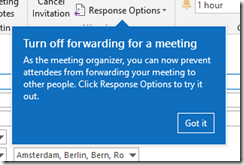
Also in the ported functionality department, it will be possible for meeting organizers to set Do not Forward for meeting requests, preventing attendees from forwarding those meeting requests to others.

And last but not least, administrators will receive some convenient PowerShell cmdlets to manage Calendars, such as Remove-CalendarEvents for cancelling future meetings on attendee and resource calendars, and Add-MailboxFolderPermission gets the SharingPermissionFlags parameter to assign delegate permissions.

Unified Messaging
Exchange 2019 will no longer support Unified Messaging. If you’re using a 3rd party PBX or Skype for Business Server, that will no longer work with Exchange 2019. In those circumstances, apart from staying on or migrating to Exchange 2016 for the time being depending on your scenario, steps to take when you want to migrate to Exchange 2019 in those circumstances will be:

  • Migrate to Skype for Business Server 2019 using Cloud Voice-Mail.
  • Migrate to Office 365 with Cloud Voice-Mail.

Co-existence
No official statement yet, but if the policy set by Exchange 2016 and Exchange 2013 continues, only Exchange major version n-2 will be supported for co-existence, meaning Exchange 2013 and later for co-existence, and the need to leverage Exchange 2016 when migrating from Exchange 2010 (EOL April 2020).

.NET Framework
No word yet on supportability, so assume the same policy as for the latest Exchange 2013 and Exchange 2016 CU’s, which require .NET Framework 4.7.1. No information yet if .NET Framework 4.7.2 is or will be supported.

UCMA
The required UCMA for Server Core is provided with the ISO, and is located in the UCMAredist subfolder.

Concluding
Of course, with Ignite coming up end of September, it is expected a lot more will be disclosed on the new Exchange release, such as guidance on the deprecation of UM, deploying Modern Authentication, storage tiering and Core support.

Needless to say, this is a preview. It’s great to play with in a lab, but don’t install it in your production environment unless you are part of the TAP program. I repeat, this is not intended for your production deployment.

Apart from Exchange 2019 Preview, other previews of wave 2019 products were also released today (or earlier):

Finally, the update of the Hybrid Configuration Wizard app with integrated Licensing feature was released today as well. You can access it at http://aka.ms/HybridWizard.

Issues with July Updates of Windows


bandaidLast Update July 19th: Corrected Update information.

About a week ago, Microsoft released the July Updates for Windows systems. Unfortunately, something must have gone wrong in quality control, because people were reporting all sorts of issues, mostly related to IIS and Exchange servers.

The issue is created at the operating system level, probably due to changes in networking as mentioned in the July update notes. Therefor, symptoms can be experienced on systems running Exchange Server 2016 or even back to Exchange Server 2007.

Some of the symptoms are:

  • The World Wide Web Publishing Service – W3SVC – won’t come up, remains in a “stopping” state, but cannot fully stop or it cannot be restarted.
  • Exchange Transport and SMTP services becomes unresponsive or stops, causing mail flow issues (Source).

The issues were serious enough to have the Exchange PG publish a notice.

Meanwhile, Microsoft has released a superseding update for Windows Server 2016, and updates for older operating systems. However, looking at the information provided with updates for older operating systems, there are fixes for the original security updates, and (previews of) Monthly Rollups for the July updates. Replacements and updates may manifest themselves in Windows Update only after installing the original – faulty – update, meaning you might have to go through more than one Windows Update cycle (and possibly reboot) for the updates to become visible and installable. This applies to the Monthly Rollups as well.

The table below contains information on the original rollups and updates, the update you need to apply, and the type of update.

Operating System Original Update Update Type Comments
Windows Server 2016 KB4338814 KB4345418 Monthly Rollup Replacement
Windows Server 2012 R2 KB4338815 KB4338831 Monthly Rollup Replacement
KB4338824 KB4345424 Security Update Update for v1
Windows Server 2012 KB4338830 KB4338816 Monthly Rollup Replacement
KB4338820 KB4345425 Security Update Update for v1
Windows Server 2008 R2 KB4338823 KB4345459 Security Update Update for v1
KB4338818 KB4338821 Monthly Rollup Replacement
Windows Server 2008 KB4295656 KB4345397 Security Update Update for v1

Finally, apart from adopting a less aggressive updating strategy, this again shows unfortunately that having a separate production environment next to your test environment is no frivolous luxury.

MVP’s around the World


mvpUpdated July 3rd:  Includes newly registered awardees and awardees who changed category. Added overview of Office Servers and Services numbers over last couple of years.

With the latest annual award cycle, one might be curious which impact it had on the MVP population. I performed a similar exercise last year to compare the impact of the start of the new award cycle. This year, all the MVP’s previously on the January and October cycles were also included in the reviews, making this year the first one where MVP leads and others had to perform the dauntless task of reviewing community contributions of over 3,500 people.

For comparison, I had a look at the public MVP statistics of July 1st against those of June 26th, to exclude significant noise from the monthly awardees. To start, let us first have a look at the total population of MVP’s. From the numbers, it is clear some type of correction took place, as the total number of MVP’s went down from 3,815 last month to 3,025 now (-21%).

As big changes might be a result of change of focus, the following table contains the changes per award category from June 2018 to July 2018. Note that the total number of MVP’s doesn’t equal the total number of awardees, as people can be awarded in more than one category; there are 50 MVP’s with multiple award categories.

Competence Jun2018 July2018 Change
Access 39 29 -26%
AI 28 58 107%
Business Solutions 221 184 -17%
Cloud and Datacenter Management 410 302 -26%
Data Platform 442 366 -17%
Enterprise Mobility 159 122 -23%
Excel 103 84 -18%
Microsoft Azure 370 368 -1%
Office Development 44 33 -25%
Office Servers and Services 490 383 -22%
OneNote 15 12 -20%
Outlook 14 11 -21%
PowerPoint 40 34 -15%
Visio 15 10 -33%
Visual Studio and Development
Technologies
1043 780 -25%
Windows and Devices for IT 136 87 -36%
Windows Development 273 186 -32%
Word 23 19 -17%
Total 3865 3066 -21%

Except for the AI MVP’s, all the numbers are down. Way down. Word is quite a number of long-standing MVP’s have not been re-awarded this cycle. One could only guess for the motivation (only Microsoft knows), but it could be due to the ongoing shift from on-premises technology to cloud-based technology.

When zooming in on the Office Servers and Services MVP’s category, the awards per country is shown in the following heath map and table. Be advised that MVP’s that are anonymous or have profiles without location (~23 for Office Servers and Services), are not taken into account since their location is unknown.

image

Country Number Country Number Country Number
Argentina 0 (-100%) Ireland 1 (0%) Saudi Arabia 1 (0%)
Australia 17 (-40%) Israel 0 (-100%) Serbia 1 (0%)
Austria 2 (0%) Italy 8 (-20%) Singapore 3 (-25%)
Belgium 8 (0%) Japan 11 (-45%) Slovakia 1 (0%)
Bosnia-Herzegovina 2 (0%) Jordan 1 (0%) Slovenia 1 (-50%)
Brazil 2 (-34%) Korea 6 (-15%) South Africa 4 (-20%)
Bulgaria 1 (0%) Latvia 1 (0%) Spain 5 (-17%)
Canada 29 (-24%) Macedonia F.Y.R.O 2 (0%) Sri Lanka 4 (-43%)
Chile 1 (0%) Malaysia 1 (-50%) Sweden 6 (-25%)
China 14 (-13%) Mexico 2 (-50%) Switzerland 5 (0%)
Colombia 2 (0%) Nepal 1 (0%) Thailand 1 (0%)
Croatia 5 (-17%) New Zealand 4 (-20%) The Netherlands 13 (-8%)
Czech Republic 3 (-25%) Norway 5 (-17%) Turkey 4 (-20%)
Denmark 2 (-50%) Pakistan 2 (0%) Ukraine 1 (-50%)
Egypt 1 (-50%) Peru 1 (-50%) United Arab Emirates 1 (-50%)
Finland 2 (0%) Poland 2 (0%) United Kingdom 23 (-15%)
France 15 (-12%) Portugal 3 (-25%) United States 90 (-19%)
Germany 16 (-20%) Romania 1 (-50%) Uruguay 1 (0%)
Greece 1 (0%) Russia 5 (-50%) Vietnam 0 (-100%)
Hungary 2 (-50%) TOTAL 383 (-22%)
India 12 (-8%)

As shown, some countries have lost their Office Servers and Service MVP’s completely. Looking at the total number of Office Servers and Services MVP’s over the year, the number went a little up again due to monthly awardees, but with the July cycle, the number of Office Servers and Services MVP’s went from 490 to 383 (-22%).

The number of Office Servers and Services and total number of MVP’s over the last years (since award restructuring).

Month oct2016 jan2017 jun2017 jul2017 jan2018 jun2018 jul2018
OSS 538 505 (-7%) 532 (+5%) 449 (-16%) 480 (+6%) 490 (+2%) 383 (-21%)
Total N/A N/A 4134 3490 (-16%) 3747 (+7%) 3815 (+2%) 3030  (-21%)

Unfortunately, I have no data on the other categories from before june 2017.

If you have questions or comments, please discuss in the comments.

2018-2019 Microsoft MVP Award


With great joy and honor I can announce that I have been awarded the Microsoft Most Valuable Professional Award in the category Office Servers and Services (localized e-mail):

image

MVP awards are given to individuals by Microsoft in recognition of their contributions to the community, such as:

  • Writing blogs, articles, books.
  • Speaking engagements or podcasts.
  • Supporting others, e.g. forum or TechCommunity contributions.
  • Code contributions.
  • Product feedback.

This is my 5th consecutive year as an MVP. I used to be an “October MVP”, which meant my award was up in October every year. After the award cycle changed to a yearly one for everyone, this year was the first time all MVP’s who fell under the old quarterly cycles, were being up for renewal. It also meant, contributions of a longer period of time were being evaluated. So lots of kudos to the MVP leads and other folks that had to go through the monstrous task of reviewing thousands of contributions for this cycle.

Many thanks to the community, readers, followers, fellow MVP’s and friends, peers, product groups and other Microsoft employees for their encouragement, inspiration and support over all those years.

My MVP profile can be found here.