Unknown's avatar

About Michel de Rooij

Michel de Rooij, with over 25 years of mixed consulting and automation experience with Exchange and related technologies, is a consultant for Rapid Circle. He assists organizations in their journey to and using Microsoft 365, primarily focusing on Exchange and associated technologies and automating processes using PowerShell or Graph. Michel's authorship of several Exchange books and role in the Office 365 for IT Pros author team are a testament to his knowledge. Besides writing for Practical365.com, he maintains a blog on eightwone.com with supporting scripts on GitHub. Michel has been a Microsoft MVP since 2013.

The UC Architects Podcast Ep33


UC2A quick post to announce the availability of episode 33 of The UC Architects podcast.

This episode is hosted by Steve Goodman who’s joined by Michael Van Hoorenbeeck, Dave Stork, Johan Veldhuis and John Cook. Editing was done by Andrew Price.

Some of the topic in this episode are:

  • Lync Conference Sessions from The UC Architects
  • Lync Conference Parties EventZero, LyncdUp, eNow
  • Lync Conference Giveaway – 35 items so far!
  • Microsoft Exchange Conference (MEC) Sessions from The UC Architects
  • The UC Architects Live From MEC
  • So long RPC/HTTP, Hello MAPI/HTTP
  • Exchange 2010 mailflow troubleshooting guide
  • Exchange 2010 TIFF iFilters (OCR Tiff -> Exchange Search)
  • Slow Response To Exchange Virtual Directory Cmdlets
  • Cmdlet Extension Agents & XML Case Sensitivity
  • Steve Goodman’s MSExchange.org Guide for migrating from Exchange 2007 to 2013
  • Use these ideas from Steve Goodman to troubleshoot slow mailbox moves to Office365
  • Dave’s Stork’s From open source groupware solution Zarafa to Exchange Part 1
  • Common mailbox / folder sharing scenarios Guided Walkthroughs now available
  • Exchange 2010 and 2013 Database Growth Reporting Script
  • Stale’s Exchange Integrations and Lync session visions from NIC
  • Get-umAutoAttendantDiagram: Auto Diagram Your Exchange Auto Attendants
  • Lync Meeting Update Tool
  • New blog LyncServer Design/Planning and Policies
  • Worlds first Twitter to Lync IM Bridge
  • Managing Office 365 e-mail addresses easy with PowerShell when using DirSync

More information on the podcast including references and a link to download the podcast here or you can subscribe to the podcasts using iTunes, Zune or use the RSS feed.

About
The UC Architects is a bi-weekly community podcast by people with a passion for Unified Communications; our main focus is on Exchange, Lync or related subjects.

So long RPC/HTTP, Hello MAPI/HTTP


Ex2013 LogoMicrosoft published three sessions from the Redmond Interoperability Protocols Plugfest 2013 on Channel 9 on the protocol MAPI over HTTP or MAPI/HTTP which looks scheduled to arrive with Exchange 2013 Service Pack 1.

This protocol is set to (over time!) replace the RPC/HTTP protocol we all know. RPC/HTTP, or Outlook Anywhere, is used by Outlook to communicate with Exchange Server and is most often seen with clients working remotely. With Exchange Server 2013, support for MAPI was dropped and RPC/HTTP became the only protocol. With Exchange 2013 SP1 it seems we will receive an alternative which is set to replace RPC/HTTTP, MAPI/HTTP.

Of course, the information is preliminary and subject to change as Exchange 2013 SP1 hasn’t been released yet, but it won’t harm to get familiar with the planned changes. It also remains to be seen how quick organizations will adopt this new protocol, which I’m pretty sure we will soon see getting supported by Office 365.

MapiHttp in Exchange 2013 SP1
Joe Warren, Principal SDE at Microsoft delivering a presentation covering the Exchange 2013 MapiHttp protocol implementation in Exchange 2013 SP1. Topics: What is MAPI-HTTP?, Why do MAPI-HTTP?, Goal of MAPI-HTTP, Why not rebuild with EWS?, Existing RPC-HTTP, New MAPI-HTTP, What does a MAPI-HTTP request look like?, What does a MAPI-HTTP response look like?, Session Context, Request Types, Sequencing & Protocol Failures. Click here.

Outlook 2013 Client Protocols
Shri Vidhya Alagesan, SDE at Microsoft presenting on Outlook 2013 Client Protocols from a client’s perspective. Topics: Client side view of Outlook-Exchange MAPI-HTTP protocol using WinHTTP, Error Handling & RPC Vs. MAPI-HTTP with sub-topics of Architecture Overview, Outlook & WinHttp, Cookies, Connection Status Dialog, Timeout, Pause/Resume & Protocol Switching. Click here.

Exchange 2013 Protocols
Andrew Davidoff, Senior Software Developer Engineer in Test at Microsoft presenting on the Exchange 2013 protocol families and important protocol updates for Exchange 2013. Click here.

Apart from these sessions on protocol change announced for Exchange Server 2013 SP1, Microsoft also published some other interesting Exchange-related sessions:

Exchange 2013 Web Services Overview
Harvey Rook, Principal Development Lead, and Naveen Chand, Senior Program Manager Lead, deliver a presentation on Exchange Web Services best practices. Click here.

Exchange RPC and EWS Protocol Test Suites
Jigar Mehta, Software Development Engineer in Test provides an in depth overview of the test suite packages for the Exchange RPC and Exchange Web Services protocols. Click here.

Cmdlet Extension Agents & XML Case Sensitivity


Ex2013 LogoOccasionally, I get requests to come to the aid of a fellow IT professional (I seldomly get requests to come to the aid of fair maidens. Oh, well). This weekend I responded to one of those distress calls by someone who couldn’t get his Cmdlet Extension Agent to work. This post is a quick heads-up for the collective memory of IT Professionals as it took me quiet a bit of screen staring to spot the issue.

For those unfamiliar with Cmdlet Extension Agents, they are modules which allow you to enhance or customize the behavior of cmdlets in Exchange. For example, the built-in Mailbox Resources Management agent is responsible for picking the database when creating new mailboxes when a database hasn’t been specified. By means of the Script Agent and an XML file named ScriptingAgentConfig.xml containing PowerShell code fragments, you can enhance and tailor Exchange cmdlets to your own needs. For those interested in Cmdlet Extension Agents, I did two earlier articles on Cmdlet Extension Agents, here and here.

The code provided was a simple agent to enhance New-Mailbox with enabling SingleItemRecovery after the mailbox was created:

<?xml version="1.0" encoding="utf-8" ?>
<Configuration version="1.0">    
        <Feature Name="Mailbox Provisioning" cmdlets="new-mailbox">
         <ApiCall Name="OnComplete">
             if($succeeded) {
                $newmailbox = $provisioningHandler.UserSpecifiedParameters["Name"]
                set-mailbox $newmailbox -SingleItemRecoveryEnabled $true
                }
        </ApiCall>
        </Feature>
</Configuration>

The Scripting Agent was enabled using Enable-CmdletExtensionAgent. Yet, for some reason after creating a new mailbox, SingleItemRecoveryEnabled wasn’t enabled. Running New-Mailbox in Verbose mode showed that the Scripting Agent did not come into play:

Capture1Now know that debugging and troubleshooting Cmdlet Extension Agents can be an unpleasant task since you put PowerShell code in XML files and there is no way to easily perform simple tests except running the Cmdlet you’re customizing or developing script fragments in an external PowerShell script and copy/paste it in the Scripting Agent XML file when you think it’s ready for and want to perform some final tests.

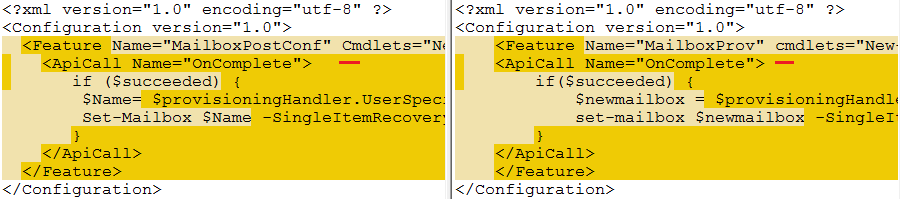
I didn’t immediately spot it, so to see if the problem was actually in the XML I picked the example of my 2nd article on Cmdlet Extension Agents and I compared it with the non-working XML using WinMerge (which by the way is an excellent tool to compare code or plain texts):

WinMergeIt took some time to discover why the Scripting Agent wouldn’t pick up the XML and it can be easily overlooked. The culprit in underlined in red: the C of the Cmdlets attribute in the Feature tag should be uppercase. Doh! This case sensitivity is perhaps not a primary suspect by Windows folks, as mostly we don’t have to worry about it and things “just work”, but in the case of XML it is essential. The XML standard prescribes that element names (<Feature> .. </Feature>) and attribute names (<Feature Cmdlets=..>) are case-sensitive entitling the Scripting Agent to be strict.

Can’t Create Mailboxes in Remote Sites


Ex2013 LogoRecently I got an e-mail from someone who had problems creating mailboxes in a new environment. When trying to create a mailbox, he received a following message stating, “Load balancing failed to find a valid mailbox database.” Apparently, the Mailbox Resources Management Agent (a Cmdlet Extension Agent) could not find an eligible mailbox database candidate.

image

The MRMA uses the following selection process when picking a candidate for mailbox creation or moving:

  1. Create a list of all mailbox databases;
  2. Remove databases marked for exclusion;
  3. Remove databases out of the management scope;
  4. Remove databases from remote (AD) sites;
  5. Pick a random online, healthy database from the list.

This person had a DAG, two mailbox databases (MDB1, MDB2) and two sites (AMS and LON).

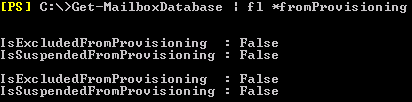
We first checked the more or less obvious, which is to see if databases are not excluded from the provisioning process, so we entered Get-MailboxDatabase | fl *FromProvisioning:

image

Databases seemed enabled for provisioning. We then checked the status of the active database copies:

image

The copies looked healthy, but we noticed all databases were mounted in a remote site (derived from the server name starting with LON; we’re working from AMS). Looking back at the database selection process, it explained why it probably didn’t work and since the active copies should be moved back to the preferred site AMS anyway we moved the active copies back:

image

After moving the active database copies back to the location where we were performing our cmdlets from solved things.

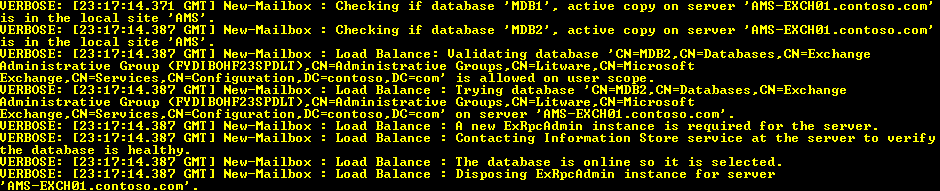
Note that we could have discovered the issue using the Verbose parameter with the cmdlet. For example, New-Mailbox in conjunction with Verbose will show the selection process. The following screenshot shows an unsuccessful selection process considering available databases:

image

This screenshot shows a successful selection process.

image

More information on automatic mailbox distribution and controlling its behavior here.

The UC Architects Podcast Ep32


UC2We’re glad to announce the availability of episode 32 of The UC Architects podcast.

This episode is hosted by Pat Richard who’s joined byJohn Cook, Michael van Hoorenbeeck, Serkan Varoglu, Tom Arbuthnot, Justin Morris, Tim Harrington and Ståle Hansen.Special guest is Jamie Stark who’s Product Manager on Lync at Microsoft. Editing was done by Andrew Price.

Some of the topic in this episode are:

  • SharePoint teams POV on use of SharePoint branding by evangelists
  • Important Changes to the Forefront Product Line
  • Lync Conference
  • TechEd being discontinued?
  • Limit access to Office Web Apps Server (OWAS)
  • Searching for that LineURI – again
  • Conferencing MCU issues with Lync 2013 on Windows Server 2012 R2
  • Telefonica Shuts Down Jajah
  • L+ Extending Lync for large meetings Lync
  • Polycom VVX Manager Tool
  • Improving Quality of Meeting Recordings
  • Lync and Software-Defined Networking
  • Stale’s LyncConf session
  • Can you use ActiveSync to estimate market shares?
  • Estimating the size of an Exchange Online Archive
  • Office 365 token disclosure
  • Exchange security updates and more
  • Publishing multiple services using only a single IP w/ Kemp
  • Exchange 2013 to 2007 Outlook Anywhere Proxy Issue

More information on the podcast including references and a link to download the podcast here or you can subscribe to the podcasts using iTunes, Zune or use the RSS feed.

About
The UC Architects is a bi-weekly community podcast by people with a passion for Unified Communications; our main focus is on Exchange, Lync or related subjects.