Unknown's avatar

About Michel de Rooij

Michel de Rooij, with over 25 years of mixed consulting and automation experience with Exchange and related technologies, is a consultant for Rapid Circle. He assists organizations in their journey to and using Microsoft 365, primarily focusing on Exchange and associated technologies and automating processes using PowerShell or Graph. Michel's authorship of several Exchange books and role in the Office 365 for IT Pros author team are a testament to his knowledge. Besides writing for Practical365.com, he maintains a blog on eightwone.com with supporting scripts on GitHub. Michel has been a Microsoft MVP since 2013.

A Short 2012 Retrospective


statistic-150x150[1]Happy new year to all my dear readers and followers. It’s been a busy and interesting year for various reasons:

  • The release of the Wave 15 products (e.g. Exchange 2013, Lync 2013);
  • The start of the UC Architects podcasts;
  • Return of the MEC (which unfortunately I was unable to attend);
  • Working with people like Jaap Wesselius on several interesting projects;
  • My employer ceasing their UC activities forcing me to change jobs sooner than expected.

The end of a year is also a time of lists. I’d like to share with you some of EighTwOne statistics of 2012, the blog’s 3rd year running:

  • Number of views in 2012: 284,198 (+30% compared to 2011, total 582,849)
  • Number of posts in 2012: 76 (total 319)
  • Busiest day of 2012 : July 18th (1,358 views)
  • Top post of 2012: Changes in Exchange 2013 Preview

Next to the Main, Versions, Builds and Dates, Schema Versions and Toolkit pages, these were the Top 5 posts of 2012:

Top 5 posts of all time:

GeoStats2012Top 5 visitor countries of 2012:

  • United States of America (29,7%)
  • United Kingdom (8,7%)
  • Germany (7,1%)
  • The Netherlands (4,9%)
  • Australia (4,3%)

Top 5 referrers of 2012:

Top 5 search terms of 2012:

  • isinteg exchange 2010
  • limit exchange 2010 memory usage
  • msexcheseparamcachesizemax exchange 2010
  • exchange 2010
  • exchange 2007 version 8.3 build 83.6

The UC Architects Podcast S01E14


iTunes-Podcast-logo[1]The 14th episode of The UC Architects podcast is online. The UC Architects is a bi-weekly podcast on Unified Communications in the Microsoft domain, i.e. Exchange and Lync, or related subjects.

This episode is hosted by Steve Goodman who’s joined by John Cook, Johan Veldhuis, Serkan Varoglu and Ståle Hansen.

Amongst the topics discussed in this episode are:

  • Windows Management Framework (PoSH3)
  • Releases of Exchange Updates
  • Lync Conference Session Info
  • Lync Pilot Kit
  • Lync 2013 Early Adopters
  • Live @ EDU to Office 365
  • Outlook for 2013

You can directly listen or download the episode here, or subscribe to the podcasts using iTunes, Zune or RSS.

Discontinued support of ActiveSync in GMail


TechTarget QuoteFew days ago, Stuart J. Johnston of TechTarget approached me and several other Exchange fellows to ask how we thought the discontinued support of ActiveSync in GMail, part of Google’s “Winter Cleaning” operation, would impact users. You can read Stuart’s article here.

For reference and because Stuart only used a single quote from my (I think) extensive response, I’ve included my take on the situation below. Interestingly, today it turns out Google lost an ActiveSync patent case against Microsoft in a British court. Exchange fellow Tony Redmond did a nice writeup on that case and his personal involvement in that case here.

PS: I’ve already asked Stuart to fix my last name in the quote.

Regarding the discontinued support of ActiveSync in GMail, I think impact on both the Exchange as well as the GMail population varies.

First of all, the measure is aimed at new, free GMail accounts. I don’t know exact numbers, but I can imagine the number of people still not having a free GMail account is relatively minimal. Also, EAS will remain available to paid accounts.

Second, EAS is a means – no end – to synchronize information like mail, contacts or agenda. Consumers will adapt and switch to alternative protocols (or plugins) to synchronize this information between their Google account and their device. I think the effect of the information exchange becoming less efficient and the lack of information push is negligible.

Thirdly, Android and iPhone – covering 85% over the smartphone market – provide apps specifically aimed at GMail or other Google services. For those not using Google’s apps, the end user experience may be affected and all the additional tools required to fully synchronize with desktops won’t help.

Worst off are Windows Phone users or Windows 8 users using the built-in Mail app (Surface RT). While the Windows Phone user base may be relatively small, the Windows 8 user base is growing and they are both forced to use IMAP, which only does mail and there are – AFAIK – no *DAV apps in the Store to synchronize calendar or contact information.

While I do understand Google’s case, which is probably more a cost reduction and (resource) focus shift measure rather than another act in the Google vs Microsoft war, I also believe there might be a fair chance of Google shooting itself in the foot by dropping EAS. Microsoft’s free outlook.com service keeps supporting EAS (not surprisingly) and Microsoft has already taken up on plugging outlook.com as the alternative for Google

Finally, I’m in favor of competition which drives innovation. The whole GMail versus Hotmail/Office365 is no exception. However, it gets annoying when vendors drop functionality end users are accustomed to, making them have to put energy into looking at solutions or alternatives, which may become tiresome at some point.

Cluster Name Object Pre-staging


Ex2013 LogoWhen creating a Database Availability Group (DAG) in Exchange 2010 or Exchange 2013 you leverage Fail-over Clustering from the operating system, e.g. Windows Server 2008 R2.

Behind the scenes Kerberos authentication is used, for which a so called Cluster Name Object (CNO) has to be created in Active Directory. This CNO will be associated with the Cluster Name Resource.

Depending on the situation, like having the ability to create computer accounts in the domain, you may need to create – or pre-stage – the cluster name object as  computer account upfront. For Exchange 2013 on Windows Server 2012, pre-staging the CNO is a requirement. This manual task is described here.

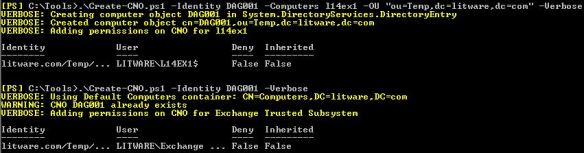
However, there may be circumstances where having the ability to automate the process would be more appropriate, like when you want a fully automated setting up a DAG for example. For this purpose I have created a small script, Create-CNO.ps1. The syntax is as follows:

Create-CNO.ps1 [-Identity] <String> [[-Computers] <Array>] [[-OU] <String>

A small explanation of the available parameters:

  • The Identity is used to specify the name of the CNO;
  • The optional Computers parameter can be used to specify the computer account which should be granted permissions on the CNO. You can specify multiple accounts seperated by commas (when for example you’re not sure which your will be used to create the DAG). When the Computers parameter is omitted, the Exchange Trusted Subsystem will be granted permissions on the CNO;
  • OU is the name of the container to create the CNO in. When not specified, the default container for computer accounts will be used. This is done by querying for the Well-Known GUID for the computers container, aa312825768811d1aded00c04fd8d5cd (more on Well-Known GUIDs here). Note that when specifying the OU, you need to enclose it in quotes otherwise PowerShell will assume the parameter is an array;
  • The Verbose parameter is supported.

So, for example assume you want to create a DAG called DAG001 and the first Mailbox Server will be L14Ex1. The computer object for the cluster is to be stored in the OU ou=Temp,dc=litware,dc=com. In that case, you would call the script as follows:

Create-CNO.ps1 –Identity DAG001 –Computers L14EX1 –OU “ou=Temp,dc=litware,dc=com” –Verbose

If you want to grant Exchange Trusted Subsystem permissions as well and let the script look up the CNO name, you can use:

Create-CNO.ps1 –Identity DAG001 –Verbose

create-cno-1You can download the script from the TechNet Gallery here.

The UC Architects Podcast S01E13


iTunes-Podcast-logo[1]The 13th episode of The UC Architects is online. The UC Architects is a bi-weekly podcast on Unified Communications in the Microsoft domain, i.e. Exchange and Lync, or related subjects.

This episode is hosted by Pat Richard who’s joined by John Cook, Tom Arbuthnot, Justin Morris and Dave Stork. Special guest is Rick Kingslan (Senior Technical Writer for Lync at Microsoft).

Amongst the topics discussed in this episode are:

  • Who’s Rick Kingslan;
  • Greg Taylor’s article on Exchange 2013 and TMG;
  • Lync-Yahoo! Federation EOL;
  • System Center Advisor for Lync 2010;
  • Surface Pro;
  • UAG 2010 SP3;
  • Improved Exchange/Lync Connectivity Analyzer;
  • Withdrawal of Exchange 2010 SP2 Rollup 5;
  • Outlook Configuration Analyzer Tool (OCAT) 2.0;
  • Lync 2013 Basic Client;
  • Q&A with Rick Kingslan (call handling, supportability, technical writing a.o.);
  • Microsoft Lync Conference.

You can directly listen or download the episode here, or subscribe to the podcasts using iTunes, Zune or RSS.