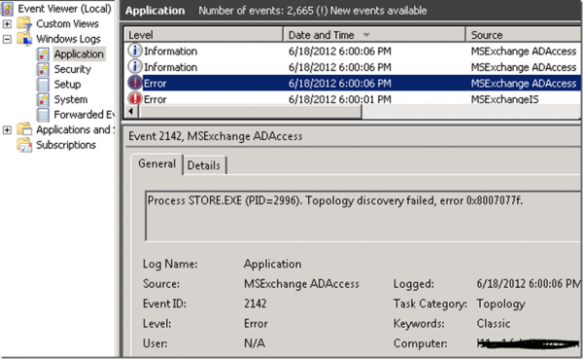
 Recently, a customer had issues with their Exchange server which didn’t start properly after rebooting. After checking out the Eventlog, I noticed the it was full of messages, generated by all services. The most interesting events were the ones generated by MSExchange ADAccess:
MSExchange ADAccess, EventID 2141
Process STORE.EXE (PID=2996). Topology discovery failed, error 0x8007077f
MSExchange ADAccess, EventID 2142
Process MSEXCHANGEADTOPOLOGYSERVICE.EXE (PID=1760). Topology discovery failed, error 0x8007077f
Also, the results of the active directory discovery process generated every 15 minutes, which are normally logging in event 2080, “Exchange Active Directory Provider has discovered the following servers with the following characteristics”, was missing.
Note that because the system could start the Microsoft Exchange Active Directory Topology service (until it failed and is restarted by dependent services), Exchange’s other services were also triggered, leading to almost indefinitely restarting services as configured in their corresponding service recovery actions sections.
Now, since I had connected to a domain controller using an RDP session from my client, and I was able to connect to port 389 (Global Catalog) from Exchange using LDP, so communications looked ok. Then, I switched to Active Directory Sites and Services:
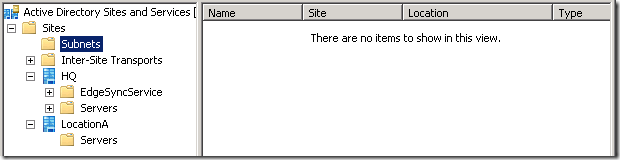
As you can see from the shot, here was a potential cause of the problem. First, there was a site without domain controllers. Second, there were no subnets defined. So, in this situation, it is undetermined in which site Exchange is located.
When a system can’t be determined to which site a computer belongs, the function DSGetSiteName, used to retrieve the current site, returns an error 1919 0x77f (ERROR_NO_SITENAME). Consequently, the Exchange Active Directory discovery process fails and eventually Exchange fails. You can inspect the current discovered site using nltest /dsgetsite or by having a peek in the registry at HKLM\System\CurrentControlSet\Services\Netlogon\Parameters\DynamicSiteName.
Now, to solve the situation we have three options:
- Making the site association static using a registry key, which isn’t a best practice.If you must, set registry key HKLM\SYSTEM\CurrentControlSet\Services\Netlogon\Parameters\SiteName (REG_SZ) to the desired site name;
- Adding proper subnet definitions;
- Remove the empty site definition.
It turned out the empty site was a place holder for a future site, so we went with the option of adding proper subnet definitions. After adding subnet definitions, like you normally should when working with multiple sites, including the scopes where the Exchange servers and domain controllers were located, and associating it with the main site, things started working again.
Note that the NetLogon service determines site association membership at startup and every 15 minutes. The Microsoft Exchange Discovery Topology service maintains this information by caching the information in the msExchServerSite attribute of the Exchange server object, in order to reduce load on active directory and DNS. Therefor, you might need to wait or restart Microsoft Exchange Discovery Topology if you want to renew site association membership.


 Today, the inaugural episode of the UC Architects went online, a bi-weekly podcast on the subjects of Exchange and Lync Server.


 EighTwOne (821)