
Cmdlet Extension Agents Part 2: Postconfiguring Mailboxes


Cmdlet Extension Agents Part 1: Automatic archive creation

Almost a year ago, I posted an article in which I tried to show the power of Cmdlet Extension Agents in Exchange 2010, or more specifically, the Scripting Agent. Unfortunately, the Cmdlet Extension Agents are often overlooked or ignored, despite customers having requirements to customize things immediately after creating a mailbox. Therefor, I decided to write another article on this topic, hoping people take up using Scripting Agents.

Now while you can also put all sorts of post-configuration tasks in provisioning scripts, using the Scripting Agent when possible has a big bonus, because those additional actions not only run when you run the cmdlet directly from the Exchange Management Shell but also when you run them indirectly by using the Exchange Management Console.

So, as this follow up of the previous article, in which I explained what the CmdLet Extension Agents are and how to utilize the Scripting Agent to automate tasks, I’ll show you another example of a Scripting Agent and quickly walk you through it, so you can experiment with it (first in a lab of course) and tune it to your own requirements.

In this example, we’ll disable ActiveSync and configure SingleItemRecovery when creating a new user with a mailbox or mailbox-enabling an existing user. Therefor, the cmdlets we’re going to customize are New-Mailbox and Enable-Mailbox.

Open up Notepad and create a file \bin\CmdletExtensionAgents\ScriptingAgentConfig.xml located in Env:ExchangeInstallPath, e.g. C:\Program Files\Microsoft\Exchange Server\V14\Bin\CmdletExtensionAgents, using the following contents:

Note: If you’ve already got a ScriptingAgentConfig.xml file, you need to integrate the following content.

<?xml version="1.0" encoding="utf-8" ?>
 <Configuration version="1.0">
 <Feature Name="Mailboxes" Cmdlets="New-Mailbox,Enable-Mailbox">
 <ApiCall Name="OnComplete">
   if($succeeded) {
     $Name= $provisioningHandler.UserSpecifiedParameters["Name"]
     Set-Mailbox $Name -SingleItemRecoveryEnabled $true
     Set-CASMailbox $Name -ActiveSyncEnabled $false
   }
 </ApiCall>
 </Feature>
 </Configuration>

As you can see, you’re not limited to 1 action or related cmdlets (*-Mailbox). A small explanation:

  • The Cmdlets specified in this feature extension dictates which cmdlets will be extended, in this case New-Mailbox and Enable-Mailbox;
  • OnComplete dictates that our script will fire when the cmdlet has finished;
  • We check for OnComplete parameter $succeeded, only configuring the mailbox when the preceding events were successful;
  • $provisioningHandler.UserSpecifiedParameters contains user provided parameters passed to the cmdlet. So, $provisioningHandler.UserSpecifiedParameters[“Name”] will return the value of –Name;
  • We set SingleItemRecovery to $true for the mailbox specified by $Name;
  • We disable ActiveSync client access for this mailbox as well.

As mentioned in part 1, distribute this XML file to all your Exchange servers in the local CmdletExtensionAgents folder. When you haven’t already enabled the Scripting Agent, do so by running the following cmdlet:

Enable-CmdletExtensionAgent “Scripting Agent”

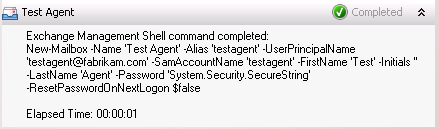
Now, when we create a new mailbox or mailbox-enable an existing user:
image

.. you’ll see the SingleItemRecovery has been enabled and ActiveSync has been disabled for this mailbox by the scripting agent:

image

I recommend you start checking out the Scripting Agent if you haven’t already done so. You can use these examples as a starting point and work from there. More information on the Scripting Agent, alternative APIs etc. can be found here.

The UC Architects Podcast S01E01


Today, the inaugural episode of the UC Architects went online, a bi-weekly podcast on the subjects of Exchange and Lync Server.

The UC Architects team consists of Pat Richard, Johan Veldhuis, Ståle Hansen, Tom Arbuthnot, Mahmoud Magdy, Paul Cunningham, Andrew Prics and yours truly, Michel de Rooij.

The first episode is hosted by Steve Goodman, who’s joined by John A Cook, Michael van Hoorenbeek, Dave Stork and Serkan Varoglu.

Topics discussed are Exchange 2010 SP2 Update Rollup 3, rumors around Exchange 15,  TechEd and MEC and Exchange or Lync related news.

You can get the podcast through here.

Exchange can’t start due to misconfigured AD sites


Recently, a customer had issues with their Exchange server which didn’t start properly after rebooting. After checking out the Eventlog, I noticed the it was full of messages, generated by all services. The most interesting events were the ones generated by MSExchange ADAccess:

MSExchange ADAccess, EventID 2141
Process STORE.EXE (PID=2996). Topology discovery failed, error 0x8007077f

MSExchange ADAccess, EventID 2142

Process MSEXCHANGEADTOPOLOGYSERVICE.EXE (PID=1760). Topology discovery failed, error 0x8007077f

Also, the results of the active directory discovery process generated every 15 minutes, which are normally logging in event 2080, “Exchange Active Directory Provider has discovered the following servers with the following characteristics”, was missing.

Note that because the system could start the Microsoft Exchange Active Directory Topology service (until it failed and is restarted by dependent services), Exchange’s other services were also triggered, leading to almost indefinitely restarting services as configured in their corresponding service recovery actions sections.

Now, since I had connected to a domain controller using an RDP session from my client, and I was able to connect to port 389 (Global Catalog) from Exchange using LDP, so communications looked ok. Then, I switched to Active Directory Sites and Services:

image

As you can see from the shot, here was a potential cause of the problem. First, there was a site without domain controllers. Second, there were no subnets defined. So, in this situation, it is undetermined in which site Exchange is located.

When a system can’t be determined to which site a computer belongs, the function DSGetSiteName, used to retrieve the current site, returns an error 1919 0x77f (ERROR_NO_SITENAME). Consequently, the Exchange Active Directory discovery process fails and eventually Exchange fails. You can inspect the current discovered site using nltest /dsgetsite or by having a peek in the registry at HKLM\System\CurrentControlSet\Services\Netlogon\Parameters\DynamicSiteName.

Now, to solve the situation we have three options:

  1. Making the site association static using a registry key, which isn’t a best practice.If you must, set registry key HKLM\SYSTEM\CurrentControlSet\Services\Netlogon\Parameters\SiteName (REG_SZ) to the desired site name;
  2. Adding proper subnet definitions;
  3. Remove the empty site definition.

It turned out the empty site was a place holder for a future site, so we went with the option of adding proper subnet definitions. After adding subnet definitions, like you normally should when working with multiple sites, including the scopes where the Exchange servers and domain controllers were located, and associating it with the main site, things started working again.

Note that the NetLogon service determines site association membership at startup and every 15 minutes. The Microsoft Exchange Discovery Topology service maintains this information by caching the information in the msExchServerSite attribute of the Exchange server object, in order to reduce load on active directory and DNS. Therefor, you might need to wait or restart Microsoft Exchange Discovery Topology  if you want to renew site association membership.

TechEd North America 2012 sessions


With the TechEd North America 2012 event still running, recordings and slide decks of finished sessions are becoming available online. Here’s an overview of the Exchange-related sessions:


Exchange 2010 SP2 Rollup 3


Today the Exchange Team released Rollup 3 for Exchange Server 2010 Service Pack 2 (KB2685289). This update raises Exchange 2010 version number to 14.2.309.2.

Here’s the substantial list of changes included in this Rollup:

  • 2510607  “Cannot open the free/busy information” error message when you try to view folder permissions in Outlook
  • 2514700  Extra.exe does not trace a single user whose legacyExchangeDN attribute contains one or more special characters in an Exchange Server 2010 environment
  • 2571342  The Folder contacts list is empty when a user views the properties of a mail-enabled public folder in an Exchange Server 2010 environment
  • 2572029  Synchronization of an organizational forms library fails when you use Outlook in Cache mode in an Exchange Server 2010 environment
  • 2586828  The EdgeTransport.exe process consumes 100 percent of CPU resources on an Exchange Server 2010 Edge Transport server
  • 2589233  Meeting requests bypass the requirement for delegate approval and instead book resource mailboxes automatically in an Exchange Server 2010 environment
  • 2633043  “There were no writeable domain controllers found in Active Directory site” error message when you run the ExBPA tool in an Exchange Server 2010 organization
  • 2647396  You cannot disable a public folder by using the “Disable-MailPublicFolder” cmdlet in an Exchange Server 2010 environment
  • 2648263  You cannot open routing log files on Exchange Server 2010 Hub Transport servers in a mixed Exchange Server 2003 and Exchange Server 2010 environment
  • 2667120  MSExchangeAutodiscoverAppPool application pool crashes on an Exchange Server 2010 Client Access server when you try to view the free/busy information about a user in a trusted domain
  • 2668900  Event ID 2915 is logged when you apply a fallback policy to a service account in an Exchange Server 2010 environment
  • 2670099  You cannot open calendar folders that are shared by hidden users in an Exchange Server 2010 environment
  • 2671128  RPC Client Access Cross-Site connectivity issues occur in an Exchange Server 2010 environment
  • 2673542  MRM retention policy in the Junk E-Mail folder does not work when you manually move email messages in an Exchange Server 2010 environment
  • 2673591  Crash occurs in the Autodiscover application pool in an Exchange Server 2010 environment
  • 2674185  MAPI_E_CALL_FAILED errors occur when a MAPI application that uses the MAPI function in Outlook 2007 MAPI or in Outlook 2010 tries to access an Exchange Server 2010 server
  • 2674445  You cannot change the access permissions of a Calendar folder in an Exchange Server 2010 environment
  • 2677872  You cannot use a distribution group in the hierarchical address book when you create the group in Exchange Server 2003
  • 2681250  “550 5.6.0” NDR when a journal report is sent to an external contact in an Exchange Server 2010 environment
  • 2682047  You cannot access a mailbox for several hours after you disconnect and then reconnect the mailbox in an Exchange Server 2010 SP2 environment
  • 2682408  AddOrganizerToSubject parameter does not take effect when a recurring meeting conflicts with another meeting in an Exchange Server 2010 environment
  • 2682895  Error message when a role assignee runs the Get-MailboxExportRequestStatistics cmdlet in an Exchange Server 2010 environment
  • 2684583  You cannot delete an empty folder in a .pst file by using Outlook in an Exchange Server 2010 environment
  • 2689810  A meeting request that you send from an EWS application is in plain text format instead of HTML format when an attendee opens the request by using Outlook in online mode
  • 2695011  Junk Email settings do not work as expected after you migrate or move a mailbox to an Exchange Server 2010 SP1 Mailbox server
  • 2695022  The E-mail Signature text box is not editable in Outlook Web App when you use Google Chrome in an Exchange Server 2010 environment
  • 2695836  You cannot move a mailbox in an Exchange Server 2010 environment that has a message size limit configured
  • 2696642  An additional line of space is added in each paragraph in an email message when you click the Printable View icon in Outlook Web App in an Exchange Server 2010 environment
  • 2698927  Resource mailbox that has AutoAccept configured does not process a meeting request that contains custom code or script in Exchange Server 2010
  • 2698960  You cannot move some users’ mailboxes from one Exchange Server 2010 mailbox database to another
  • 2698976  Managed Folder Assistant does not process a mailbox that has external contacts in another tenant organization in an Exchange Server 2010 environment
  • 2699023  Event ID 9646 is logged on the Exchange Server 2010 mailbox server when you access a mailbox that has more than 250 folders by using an IMAP4 client
  • 2699577  GAL-related client-only message rule is not applied in Outlook after you apply RU1 for Exchange Server 2010 SP2 in an Exchange Server 2010 environment
  • 2699582  Error message when you play a voice mail by using Outlook 2007 in an Exchange Server 2010 environment
  • 2700544  Multiple recovery items are added to a subfolder of the Recoverable Items folder in an Exchange Server 2010 environment
  • 2705425  UMWorkerProcess.exe consumes large amounts of memory when you try to listen to voice messages by using Outlook Voice Access in an Exchange Server 2010 environment
  • 2705555  The Set-Mailbox cmdlet takes a long time to complete configuration in an Exchange Server 2010 environment
  • 2705570  An error occurs when a user whose mailbox is hidden from the Exchange address list tries to open the Scheduling Assistant tab by using the light version of Outlook Web App
  • 2705647  A user cannot log on to a mailbox that is full by using Outlook Web App in an Exchange Server 2010 environment
  • 2705682  Post-reform spelling rules are not used in the Portuguese (Portugal) dictionary in Outlook Web App in an Exchange Server 2010 environment
  • 2706523  You cannot create a mailbox or mail-enable a mailbox for a disabled user account in an Exchange Server 2010 environment
  • 2708880  You cannot set the “Country/region” attribute of a user mailbox to “Curaçao,” “Bonaire, Sint Eustatius and Saba,” or “Sint Maarten (Dutch part)” by using the Exchange Management Console on an Exchange Server 2010 server

When running ForeFront Protection for Exchange, make sure you disable ForeFront before installing the rollup and re-enable it afterwards, otherwise the Information Store and Transport services may not start. You can disable ForeFront using fscutility /disable and enable it using the fscutility /enable command.

Note that Rollups are cumulative, i.e. they contain fixes released in earlier Rollups for the same product level (RTM, SPx). This means you don’t need to install previous Rollups during a fresh installation but can start with the latest Rollup.

You can download Exchange 2010 SP2 Rollup 3 here.