In case you missed it, a new video was posted on the Ask Perry blog where Perry Clark, general manager Exchange, answers questions asked by Exchange customers and partners who visited TechEd in Berlin. As always, the lovely Ann Vu hosts the Q&A.
Category Archives: Exchange Server
Exchange 2010 Network Ports
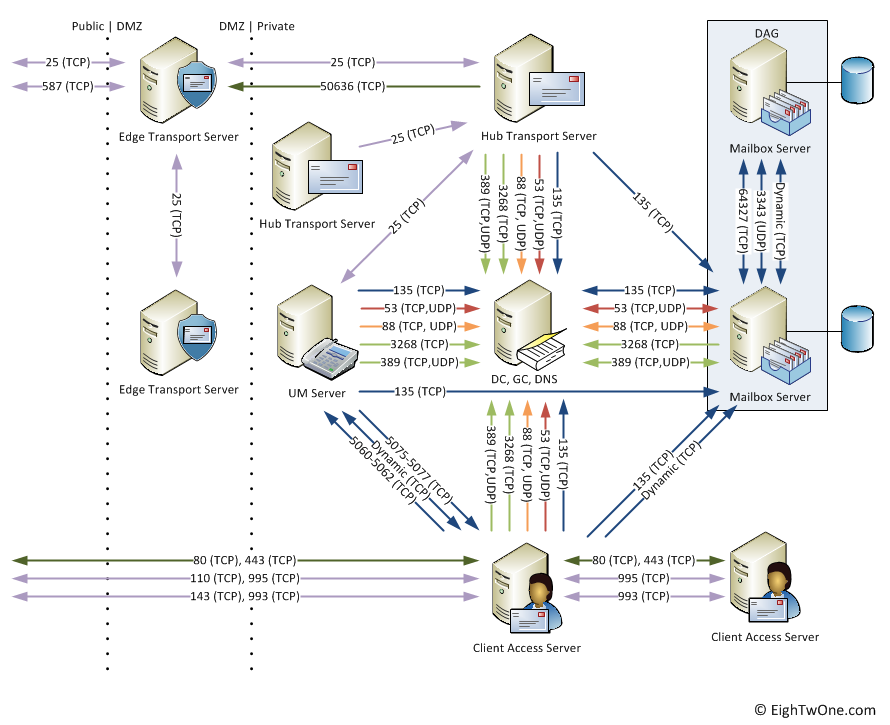
When looking for which ports Exchange 2010 uses, you probably already read the excellent Exchange 2010 Network Port Reference TechNet article located here.
However, at some point, like when discussing things with the network/firewall people or documenting your design, it might be required to visualize things. For this purpose I created the following diagram:
Note that it’s a v1 and not all things are included, e.g.
- Internal clients, e.g. Outlook, OWA;
- UM connections to PBX;
- Client Access Server connections to OCS;
- For Hub-Hub, CAS-CAS or Edge-Edge, I’ve included a 2nd Hub/CAS/Edge server only mentioning ports used for Hub-Hub, CAS-CAS and Edge-Edge communications.
Also, all ports are left at their default values and the diagram doesn’t reflect the fact that you can fix certain ports like the one for the DAG or the MAPI RPC port; that might be added in a later version.
When you got feedback, fill in a comment. Otherwise, feel free the use it; crediting or a reference would be nice.
Updated Exchange 2010 Architecture Poster
Microsoft updated the Exchange 2010 Architecture poster yesterday. No major changes, only a small correction as far as I can tell (Edge Transport Server Role SMTP Send and Receive connectors were mislabeled).
You can download the poster here.
MS publishes Exchange 2010 Tested Solutions
Microsoft published several technical solution papers on how to design, test and verify Exchange 2010 solutions for a certain number of mailboxes for a few vendors. The papers are as follows:
- Single site, 16,000 mailboxes
Solution based on IBM X3650 M3, XIV Storage System 2810 and Brocade ServerIron ADX 1008-1 Load Balancers - Single site, 500 mailboxes
Virtualized solution based on on Dell T610, Windows Network Load Balancing - Two sites, 9,000 mailboxes
Virtualized solution based on Dell M610, Equalogic and F5 BIG-IP 3900 Load Balancers
The documents walk you through the steps regarding design decisions, challenges while meeting customer requirements.
Outlook 2007 archive KB published, omits archive function
After releasing the hotfix for enabling Exchange 2010 personal archives for Outlook 2007 users yesterday, the related knowledgebase article was published today (KB2458611).
What you might notice when reading the list of fixed issued is that the article doesn’t mention the included support for archives. Interesting. One might wonder what that implies from a support perspective.
Update: There are reports of issues with Outlook 2007 after installing update KB2412171, like Loss of Archive/Auto-Archive functions (not to be confused with personal archives), performance issues and Outlook Anywhere/NTLM issues. Since KB2458611 is based on that update, so you might expect similar issues. More information here by Outlook MVP Ben Schorr.
Update: Official information confirms three issues have been identified with this fix:
- Secure Password Authentication issues when configured but server doesn’t support it (e.g. GMail);
- If you haven’t configured an Exchange account,
- Performance issues;
- Inability to configure AutoArchive for IMAP/POP3 or Outlook Live accounts.
More information on the Outlook Product Team blog here.
Update: The Microsoft Exchange team blogged about the December 2010 update for Office 2007 here. They state that “This update extends archive support to Outlook 2007”. In the same blog, the archiving functionality I described earlier here is hereby also officially confirmed.
Update: The Outlook team re-released the hotfix which addresses the 3 issues mentioned above (and on which the Outlook team blogged here). You can download the updated KB2412171 hotfix here.