Hybrid Configuration Wizard & F12


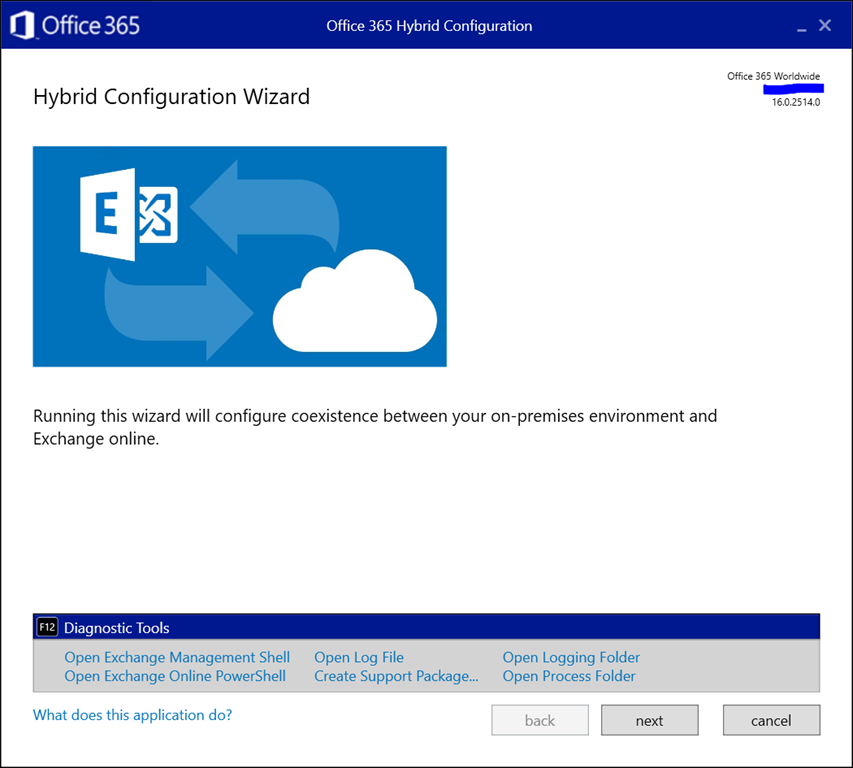
A small tip for those running the Exchange Hybrid Configuration Wizard. As announced at Ignite yesterday, a convenient feature was added to the HCW and is available now. Pressing F12 in the HCW will now open up a panel with shortcuts to the following tools and locations:

  • Exchange Management Shell
  • Exchange Online PowerShell
  • (current) Hybrid Configuration Wizard Log File
  • Create Support Package (to zip HCW logs for support)
  • Open Logging folder (of HCW)
  • Open Process Folder (of the HCW app)

Here is how it looks:

image

This might save you an occasional click or two.

Support Lifecycle changes for Office ProPlus & 2016 (a.o.)


Outlook 2013 IconIn a surprise – but welcomed – move, Microsoft announced yesterday that the office support lifecycle for Office 365 ProPlus on Windows 8.1 and Windows Server 2016 are extended to January 2023 (EOL of Windows 8.1) and October 2025 respectively. In addition, Office 2016 connectivity support for Office 365 services will be extended to October 2023 (was 2020).

Other announced changes in product support lifecycles were extending Windows 10 Enterprise & Education support from 18 to 30 months. Also, for Windows 7 Professional & Enterprise, paid security updates (Extended Security Updates) will be offered, and those Windows 7 ESU devices will be supported through January 2023 – parallel to Windows 8.1 – with Office 365 ProPlus.

The intention of these changes is to provide customers more flexibility in adopting modern desktops on the client end (i.e. Windows 10) and upgrade their Office suite, preferably to the susbscription-based ProPlus. The release cadence of the cloud has significant impact on organizations, which were told in February to keep in line with product releases as a lot of product support lifecycles were going to end in 2020.

Extending those dates not only gives them more flexibility to plan and upgrade, but also might prevent organizations to do only to the minimum, which is likely the reason many organizations are still on Windows 7 and why it took many organizations a long time to get rid of Windows XP.


Exchange Mailboxes and Signatures


vote!One of the longest standing requests of the community regarding Exchange features is the request to have the ability to share e-mail signatures between Outlook for desktop, Outlook Web Access (OWA) and mobile clients like Outlook for iOS. Several 3rd party vendors have been filling this gap with solutions with the possibility of adding standardized signatures on the transport layer or through application add-ins for the WYSIWYG approach.

The Outlook products don’t share signatures; Outlook Web Access does store the signature in a so-called Folder Associated Item (FAI) in the mailbox, making the signature persist when moving the mailbox around. But that unfortunately is only for Outlook Web Access; Outlook for desktop signatures are stored in files in one’s user profile, and Outlook for iOS only allows you to configure a single line, which often is used to apologize for any typos in the message, more common when using mobile devices, by setting it to ‘Mail sent using mobile’ or text of similar nature.

However, after a recent discussion with the relevant product groups by Jeff Guillet, the product groups challenged MVPs that there is indeed a significant demand for this feature by getting people to vote on UserVoice. Jeff with the MVPs designed a functional specification for this feature, which will be shared with the product groups at a later date. There is no reason why we can’t expect this feature to work for both Exchange Online as well as Exchange on-premises. Part of the request will also be to be able to manage the signature through PowerShell, similar to how the Outlook Web Access signature can now be managed using Set-MailboxMessageConfiguration.

So, power to the community and get your voice heard if you want this feature. You can vote on UserVoice here. Thank you.

Comparing Sets of Cmdlets


powershellWith the speed of development in Office 365, it is sometimes hard to track which changes have been made to your tenant. Of course, there is the roadmap and message board which you can use to keep up to date, but those are in general high level descriptions. Sometimes you may want to see what are the changes at the cmdlet level in your tenant, between tenants, or Azure Active Directory module. And there is also the occasional gem in the form of a yet undocumented cmdlet or parameter which could hint at upcoming features.

For this purpose I have created a simple script which has two purposes:

  1. Export information on the current cmdlets available through Exchange Online or Azure Active Directory.
  2. Compare two sets of exported information, and display changes in a readable way.

The script is in PowerShell (of course), and is called Compare-Cmdlets.ps1. To export information, you need to be already connected to either Exchange Online or Azure Active Directory (or both).

To export cmdlet information, use:

.\Compare-Cmdlets.ps1 –Export

For Exchange Online and Azure Active Directory, separate export files are created. The files are prefixed with a timestamp and postfixed with the Exchange Online build or Azure Active Directory module version, e.g. 201803121814-ExchangeOnline-15.20.548.21.xml or 201803121815-AzureAD-2.0.0.137.xml.

After a few days/week, or when connected to another tenant or using a new Azure Active Directory PowerShell module, run the export again. You will now have 2 sets of Exchange Online or Azure Active Directory cmdlets, which you can compare using the following sample syntax:

Compare-Cmdlets.ps1 -ReferenceCmds .\201801222108-ExchangeOnline-15.20.428.21.xml -DifferenceCmds .\201803120926-ExchangeOnline-15.20.548.21.xml

image

A progress bar is shown as comparison might take a minute. When the script has finished checking the two sets, you will see output indicating changes in cmdlets, parameters or switches, e.g.

image

Download
You can find the script on the TechNet Gallery or GitHub.

The UC Architects Podcast Ep64


iTunes-Podcast-logo[1]Episode 64 and last episode of The UC Architects podcast is now available. Contrary to the belief of some, people’s agendas rather than lack of contents made it more and more difficult to get sufficient people together for recording. Thanks for the great 5 year ride, people!

This episode is hosted by Pat Richard, who is joined by Tom Arbuthnot, Stale Hansen and John Cook. Editing was done by Andrew Price.

Topics discussed in this episode are:

  • 5 years of The UC Architects podcast.
  • What made it fun, the friendships, the guests, the topics, and how social media has changed how info gets disseminated about Skype for Business, Exchange, Office 365, Teams, and more.
  • We talk about what the crew are up to these days, and their involvement/sessions at Ignite.
  • Skype for Business v.Next and Teams.
  • Some of the issues that arise when deploying Skype for Business when there is no Exchange in the org.
  • The upcoming Ignite and UCDay events.

You can download the podcast here or you can subscribe to the podcasts using iTunes, Zune or use the RSS feed.

About
The UC Architects is a community podcast by people with a passion for Unified Communications; our main focus is on Exchange, Skype for Business or related subjects.