
 Update Feb6: Added MSRC security advisory ADV190007 .
Update Feb13: February updates comment.
A short notice on the zero-day vulnerability in the Exchange ecosystem as reported by researcher Mollema last week. Through a man-in-the-middle setup, one can exploit the permissions Exchange has with regards to Active Directory in conjunction with NTLM as well as Exchange Web Services (EWS). This 3-stage missile allows one to elevate their privileges in Active Directory, and thus to grant themselves administrative access.
The issue was already logged at 13 november in the Microsoft Security Response Center (MSRC) as CVE-2018-8581, Microsoft Exchange Server Elevation of Privilege Vulnerability. An uptake on the public attention for the issue was generated after the Mollema article, and media like The Register started publishing about it. Meanwhile Exchange fellow Tony Redmond also wrote a short note on the issue as well.
At this moment, Microsoft is fully aware of the issue, and is actively working on resolving the issue as soon as possible. Meanwhile, the mitigation mentioned in CVE-2018-8581 can be considered, which is to remove the DisableLoopbackCheck key from HKLM:\SYSTEM\CurrentControlSet\Control\Lsa. The effect of removing this key is that it’s no longer possible to make NTLM connections on the loopback adapter (localhost), which should be OK for Kerberos authenticated sessions as they are name-based. Again, test this as for example platforms like SharePoint will break when setting this key, but nobody runs SharePoint on the same box, so for Exchange this is a valid mitigation.
Organizations are advised not to blindly implement mitigations mentioned in Mollema’s article or elsewhere in the field, as they might not be applicable to every deployment out there, or have unforseen side-effects. Then again, organizations might already have things deployed SMB signing, in which case the exploit does not apply.
Update (Feb6): Meanwhile, Microsoft Security Response Center published an advisory (ADV190007) containing guidance on how to deal with the issue at this moment. MSRC takes the EWS Throttling Policy route to block EWS Subscriptions at the original level, which of course breaks Outlook for Mac functionality (e.g. new mail notifications as the client can no longer subscribe to receive updates), or other applications which rely on this mechanism (e.g. meeting room systems). This can be mitigated by explicitly allowing EWS subscriptions for trusted users and applications.
Update (Feb13): Today the quarterly cumulative updates for Exchange 2019/2016/2013 were released, which will remove the DisableLoopbackCheck key (when present).

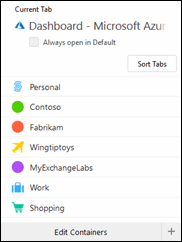 Unlike the Chrome extension, FireFox’ Multi-Account Containers allows you to have multiple sessions from within the same browser. For this purpose, tabs are used to arrange sessions in what’s called containers. Each container shares the same set of site preferences, sessions, cookies etc. To identify containers, they can be assigned a (new) name, color and symbol.
 Now, when you go to portal.office365.com, the Office 365 account picker may show up when connected before using this container. Pick one, or enter a new set of credentials. This account will be stored in this container. The question of wanting to stay signed in makes more sense now, as the token will be stored within the container, happily coexisting with other Keep-Me-Signed-In settings and sessions from other containers.
 EighTwOne (821)