Exchange Server Role Requirements Calculator 8.4


Exchange 2010 Mailbox Role Sizing Calculator 16.4Last week, the Exchange team published an update for the Exchange Server Role Requirements Calculator, the tool to aid you in properly sizing your Exchange Server 2013 or Exchange Server 2016 deployments.

The new version number is 8.4, and it contains the following changes since version 8.3:

New Functionality

  • Added support for ReplayLagMaxDelay
  • Added support for SafetyNetHoldTime in CreateDAG.ps1

Bug Fixes

  • Improved the DAG auto-calculation results display to highlight deployment configuration in both datacenters
  • Fixed an issue that prevented DAG auto-calculation in single site DAG deployments
  • Fixed a SPECInt2006 validation issue with DAG auto-calculation
  • Fixed a bug with the DAG auto-calculation with Active/Passive deployments
  • Fixed conditional formatting issues with the transaction log table
  • Removed data validation from certain unused cells on the Input tab
  • Fixed bug in calcNumActiveDBsSF formula

You can download the calculator here. For more information, please consult the list of changes here or Read Me here.
Exchange Server Role Requirements Calculator 8.3


Exchange 2010 Mailbox Role Sizing Calculator 16.4The Exchange team published an update for the Exchange Server Role Requirements Calculator, the tool to aid you in properly sizing your Exchange Server 2013 or Exchange Server 2016 deployment.

The new version number is 8.3, and it contains two major enhancements compared to version 7.9:

  • Added ability for the calculator to automatically determine the number of Mailbox servers and DAGs that need to be deployed to meet the chosen input requirements
  • Added Read from Passive support for Exchange 2016 deployments which results in decreased bandwidth utilization for HA copies

You can download the calculator here. For more information, please consult the list of changes here or Read Me here.

Exchange Server Role Requirements Calculator 7.9


Exchange 2010 Mailbox Role Sizing Calculator 16.4The Exchange team published an update for the Exchange Server Role Requirements Calculator, the tool to aid you in properly sizing your Exchange Server 2013 or Exchange Server 2016 deployment. The new version number is 7.9, and it contains mainly bug fixes.

Functionality changes and bug fixes since version 7.8:

  • Added support for 1.8TB disk capacity
  • Added color formatting for when memory exceeds the maximum recommended value
  • Fixed calcNumDBCopyInSDC formula to take into account proper number of lagged copies
  • Fixed calcActDBPDCWorst formula to take into account non-HA deployments
  • Fixed an issue where ReplayLagManager calculated field did not take into account the user disabling JBOD
  • Fixed version mismatch and added Add-PartitionAccessPath in Diskpart.ps1 script
  • Fixed issue with export CreateDAG.ps1 script where it defined Alternate Witness in single datacenter deployments
  • Fixed diskpart.ps1 script to sleep 10s after creating partition but prior to formatting to minimize error condition
  • Fixed RetainDeletedItemsUntilBackup to be set to $false for NDP deployments

You can download the calculator here. For more information, please consult the list of changes here or Read Me here.

Exchange Server Role Requirements Calculator 7.8


Exchange 2010 Mailbox Role Sizing Calculator 16.4The Exchange team today published an update for the Exchange 2013 Server Role Requirements Calculator as well. The new version number is 7.8. This version incorporates sizing for Exchange 2016 as well and includes support for ReFS (default for Exchange 2016). The version number is also dropped from the calculator.

More or less complementary to the calculator is the updated sizing guidance for Exchange 2016, which was also published today here. No big changes here, apart from multi-role only option and a slight increase in CPU requirements to cover for unforeseen circumstances as the team is still learning from real-world behavior. This makes sense, looking at the speed in which the calculator was released compared to the one for Exchange 2013. Kudos to the Exchange team!

New and enhanced functionality since version 7.6:

  • Added support for Exchange 2016
  • Included CPU utilization guidance changes for Exchange 2016
  • Diskpart.ps1 and CreateDAG.ps1 now support ReFS
  • Moved DataMoveReplicationConstraint setting from CreateMBDatabases.ps1 to CreateMBDatabaseCopies.ps1
  • Revised all of the Distribution dialog controls to load their defaults from variables rather than use hard-coded values
  • The DAG name from the Input tab now flows through as the default on the Export DAG dialog
  • Updated Distribution tab dialog controls to persist the global catalog value during a session
  • Added conditional formatting for ReplayLagTime and SafetyNetThreshold
  • Removed 2013 from the name of the calculator

Fixes since version 7.6:

  • Fixed inaccuracies with “Number of Exchange Data Volumes per Server” input
  • Fixed calcActDBPDCWorst formula to take into account non-HA deployments
  • Fixed multiple dbs / volume calculation to take into account ReplayLagManager
  • Fixed calcNumDBCopyInSDC formula to take into account proper number of lagged copies
  • Fixed MaxPreferredActive not being displayed for A/A (Single DAG) site resilient solutions
  • Fixed an issue with Fail* buttons on Distribution tab when using some regional settings
  • Fixed an issue with volume path persistence on the Distribution tab Mount Points dialog

You can download the calculator here. For more information, please consult the list of changes here or Read Me here.

Exchange 2013 Server Role Requirements Calculator 6.6


Ex2013 LogoNote: Shortly after publishing, a minor update was made in to fix circular referencing in the sheet.

Next to an updated Exchange 2010 Server Role Requirements calculator, the Exchange team published an update for the Exchange 2013 Server Role Requirements Calculator as well. The new version number is 6.5.

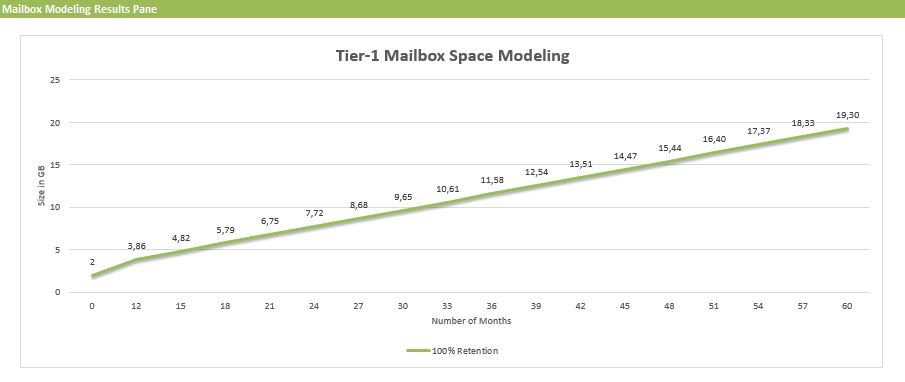
This new version includes a nice new feature, courtesey of Excel, which will plot mailbox usage using the provided input. You can find this chart on the Mailbox Space Modeling tab.

msm

Changes since version 6.5:

  • Fixed circular logic issue with initial mailbox size calculation

Changes since version 6.3:

  • New: The calculator now includes mailbox space modeling graphs that extrapolates (for each mailbox tier) the projected amount of time it will take to consume the mailbox quota.
  • Fixed “Number of Exchange Data Volumes per Server” to support more than 50 volumes.
  • Optimized memory sizing for FAST which reduces memory requirements for small mailbox server designs.
  • Added the ability to specify multiple AutoReseed volumes per DAG server to calculator and scripts.
  • Fixed 3 database/volume layout scenario involving 100 copies/server.
  • Fixed rounding error in calculating number of databases/volume in “2 Volumes / Backup Set”
  • Log isolation is now a calculated property to align with best practices guidance.
  • Changed “Disk” to “Vol” in left column of Distribution tab to align with scenarios that do not involve JBOD configurations.
  • Added additional processor core options.
  • Fixed JBOD storage design results table to accurately account for Restore Disk capacity being set to “–” and for differences between PDC and SDC Restore Disk capacity settings.
  • Fixed Backup Requirements worksheet to expose Weekly Full backups correctly.
  • Various comment changes/corrections.

You can download the calculator here. For more information, please consult the list of changes here or Read Me here.