Exchange Server Role Requirements Calculator 8.3


Exchange 2010 Mailbox Role Sizing Calculator 16.4The Exchange team published an update for the Exchange Server Role Requirements Calculator, the tool to aid you in properly sizing your Exchange Server 2013 or Exchange Server 2016 deployment.

The new version number is 8.3, and it contains two major enhancements compared to version 7.9:

  • Added ability for the calculator to automatically determine the number of Mailbox servers and DAGs that need to be deployed to meet the chosen input requirements
  • Added Read from Passive support for Exchange 2016 deployments which results in decreased bandwidth utilization for HA copies

You can download the calculator here. For more information, please consult the list of changes here or Read Me here.

Exchange Server Role Requirements Calculator 7.9


Exchange 2010 Mailbox Role Sizing Calculator 16.4The Exchange team published an update for the Exchange Server Role Requirements Calculator, the tool to aid you in properly sizing your Exchange Server 2013 or Exchange Server 2016 deployment. The new version number is 7.9, and it contains mainly bug fixes.

Functionality changes and bug fixes since version 7.8:

  • Added support for 1.8TB disk capacity
  • Added color formatting for when memory exceeds the maximum recommended value
  • Fixed calcNumDBCopyInSDC formula to take into account proper number of lagged copies
  • Fixed calcActDBPDCWorst formula to take into account non-HA deployments
  • Fixed an issue where ReplayLagManager calculated field did not take into account the user disabling JBOD
  • Fixed version mismatch and added Add-PartitionAccessPath in Diskpart.ps1 script
  • Fixed issue with export CreateDAG.ps1 script where it defined Alternate Witness in single datacenter deployments
  • Fixed diskpart.ps1 script to sleep 10s after creating partition but prior to formatting to minimize error condition
  • Fixed RetainDeletedItemsUntilBackup to be set to $false for NDP deployments

You can download the calculator here. For more information, please consult the list of changes here or Read Me here.

Exchange Server Role Requirements Calculator 7.8


Exchange 2010 Mailbox Role Sizing Calculator 16.4The Exchange team today published an update for the Exchange 2013 Server Role Requirements Calculator as well. The new version number is 7.8. This version incorporates sizing for Exchange 2016 as well and includes support for ReFS (default for Exchange 2016). The version number is also dropped from the calculator.

More or less complementary to the calculator is the updated sizing guidance for Exchange 2016, which was also published today here. No big changes here, apart from multi-role only option and a slight increase in CPU requirements to cover for unforeseen circumstances as the team is still learning from real-world behavior. This makes sense, looking at the speed in which the calculator was released compared to the one for Exchange 2013. Kudos to the Exchange team!

New and enhanced functionality since version 7.6:

  • Added support for Exchange 2016
  • Included CPU utilization guidance changes for Exchange 2016
  • Diskpart.ps1 and CreateDAG.ps1 now support ReFS
  • Moved DataMoveReplicationConstraint setting from CreateMBDatabases.ps1 to CreateMBDatabaseCopies.ps1
  • Revised all of the Distribution dialog controls to load their defaults from variables rather than use hard-coded values
  • The DAG name from the Input tab now flows through as the default on the Export DAG dialog
  • Updated Distribution tab dialog controls to persist the global catalog value during a session
  • Added conditional formatting for ReplayLagTime and SafetyNetThreshold
  • Removed 2013 from the name of the calculator

Fixes since version 7.6:

  • Fixed inaccuracies with “Number of Exchange Data Volumes per Server” input
  • Fixed calcActDBPDCWorst formula to take into account non-HA deployments
  • Fixed multiple dbs / volume calculation to take into account ReplayLagManager
  • Fixed calcNumDBCopyInSDC formula to take into account proper number of lagged copies
  • Fixed MaxPreferredActive not being displayed for A/A (Single DAG) site resilient solutions
  • Fixed an issue with Fail* buttons on Distribution tab when using some regional settings
  • Fixed an issue with volume path persistence on the Distribution tab Mount Points dialog

You can download the calculator here. For more information, please consult the list of changes here or Read Me here.

Exchange 2013 Server Role Requirements Calculator 7.6


Exchange 2010 Mailbox Role Sizing Calculator 16.4The Exchange team published an update for the Exchange 2013 Server Role Requirements Calculator as well. The new version number is 7.6.

Changes since version 6.6:

  • Added support for ReplayLagManager
  • Added support for PreferredMaximumActiveDatabases
  • Added new table that exposes theoretical CPU utilization for each mode (normal runtime, first server failure, second server failure, site failure, site failure + 1 failure)
  • Added Restore-DatabaseAvailabilityGroup scenario support in Distribution algorithm
  • Added warning about designs that include more than24 processor cores / server and 96GB of memory
  • Added support for DAGs without Administrative Access Point (default behavior is no administrative access point) in the CreateDAG script
  • Changed default for Deleted Item Retention in export file to be the highest profile value for Deleted Item Retention
  • Changed default for Circular Logging in export file to be true when using Exchange Native Protection
  • Added ability to save scripts and CSV files to OneDrive for Business
  • Fixed CreateDAG.ps1 script error for DAG creation without administrative IP address
  • Modified CreateMBDatabases.ps1 to ignore CircularLogging choice and modified CreateMBDatabaseCopies.ps1 to enforce CircularLogging choice
  • Fixed Export DAG list function to use the correct value for MaximumActiveDatabases
  • Added support for MaximumPreferredActiveDatabases and AutoDatabaseMountDial in Export DAG List function and createdag.ps1
  • Modified CreateMBDatabaseCopies.ps1 to remove sleep timer, improving copy creation significantly
  • Fixed createdag.ps1 to not generate an error when there is no alternate witness server provided

Fixes since version 6.6:

  • Fixed an issue that prevented the calculator from displaying results when site resilience was disabled while Active/Active (Single DAG) was selected
  • Changed Processor Cores/Server to not use a list drop down, thereby enabling customers to enter in configurations they are deploying.
  • Fixed bugs in Diskpart script with PrepareAutoReseedVolume switch and WhatIf processing
  • Fixed bug in Diskpart with escaping quotes in some languages
    Fixed bug with display of lag copies in single site design
  • Fixed multiple databases / volume calculation to take into account symmetric designs that utilize an odd number of servers in a single site
  • Fixed scenario to count number of servers in A/P scenario where the only copy deployed in DR is a lagged copy
  • Fixed #NAME error in Database Copy Configuration table for standalone configurations
  • Updated DC1 memory sizing to take into account site failure mode for A/A (Single DAG) designs involving a 2 copy architectures
  • Updated Distribution Tab error reporting and Lastrow calculation
  • Fixed copy count validation formula for site resilient scenarios to not allow more copies in the primary datacenter than the number of servers
  • Added support for 10TB and 12TB capacity disks
  • Fixed run-time error on distribution tab when disabling site resilience
  • Fixed distribution error when disabling cross-site failover
  • Fixed bug in Distribution tab ActiveServer formula when modeling Cross Site Failover behavior
  • Fixed an issue with the distribution tab throwing an error when two files were opened at the same time
  • Fixed distribution algorithm where lagged copies were not always represented correctly
  • Blocked unsupported A/A (Single DAG) scenario where copy count is not the same in both datacenters

You can download the calculator here. For more information, please consult the list of changes here or Read Me here.

Exchange data: NTFS vs. ReFS


chartFor Exchange, NTFS has been the file system of choice since time immemorial. In 2012, Windows Server 2012 introduced a new file system: Resilient File System or just ReFS. ReFS was designed to overcome some of the limitations of NTFS, in particular in the area of maintaining data integrity. More information on ReFS in comparison to NTFS can be found here.

At that time Windows Server 2012 went RTM, the latest version of Exchange, Exchange 2010, was not supported to run on ReFS. Present day, Exchange 2010 still doesn’t support ReFS. However, when Exchange 2013 entered the arena shortly after Windows Server 2012, it came with support for both NTFS and ReFS file systems. NTFS was still considered best practice, with ReFS being a supported option with the added recommendation to turn off ReFS’ integrity checking feature, and disabling it for Content Index-exclusive volume is optional. It may therefor come as no surprise that nearly all customers are deploying Exchange 2013 on NTFS volumes only.

That may change with Exchange 2016. As announced at Ignite 2015, for Exchange 2016 more emphasis will be put on following the Preferred Architecture design when deploying Exchange on-premises. The Exchange 2016 Preferred Architecture contains guidance to use ReFS formatted, BitLocker encrypted data volumes with Exchange 2016. The latter option is of course to protect organizations against theft of physical storage devices.

With some time to spare, I was interested to see what the impact would be on the storage performance when using NTFS or ReFS, and especially the performance penalty when enabling BitLocker on a volume. Similar to a comparison I did between Exchange 2010 and Exchange 2013 on different operating systems, I ran a JetStress 2013 test utilizing these 3 file systems to get a sense of what to expect.

The ESE engine files from Exchange 2013 CU8 were used for testing, along with the following parameters:

Mode Test Disk Subsystem Throughput
Thread Count 12 (fixed)
Min/Max DB Cache 32 MB / 256 MB
Ins / Del / Repl / Read % 40/20/5/35
Lazy Commits 70%
Run Background DB Maintenance True
Databases 1 x DB (186GB), 3 Copies
Running Time 2 Hours

Databases and logs were stored on a DAS SSD drive, and the volume was GPT partitioned with 64K allocation units. ReFS Integrity checking was disabled for the volume using:

Format-Volume –DriveLetter X -FileSystem ReFS -AllocationUnitSize 65536 -SetIntegrityStreams $false

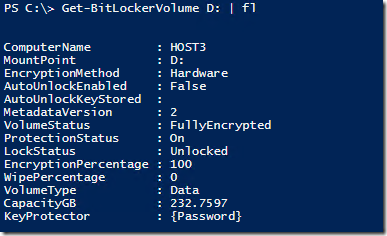
The drive supported hardware encryption for BitLocker, which offloads encryption to the drive. You can verify that hardware encryption is used after enabling BitLocker on the volume by inspecting the BitLocker status using the manage-bde utility or Get-BitLockerVolume cmdlet:
image

As you can see from the EncryptionMethod property, this volume is protected using hardware-based BitLocker encryption. Perhaps needless to say, but the CPU performance penalty is substantial when using BitLocker with software encryption, and this mode is not to be used with I/O intensive applications like Exchange.

Note that if you deploy a Database Availability Group on ReFS formatted storage, and you want to use AutoReseed, you need to create or configure your DAG using the FileSystem parameter specifying ReFS, e.g.

New-DatabaseAvailabilityGroup -Name DAG1 -FileSystem ReFS

This makes sure that AutoReseed prepares volumes using the proper file system.

The results from the JetStress tests are show in the following table:

Test

NTFS

ReFS

ReFS+BitLocker

JetStress Version

15.0.658.4

ESE.DLL

15.0.1076.9

Operating System

6.2.9200.0

Overall Test Result

Passed

Passed


Passed

Achieved Transactional IOPS

1,613.13

1,407.55

-13%

1,379.98

-14%

Database Reads Average Latency (msec)

8.53

10.50

-23%

9.73

-14%

Database Writes Average Latency (msec)

12.80

20.80

-63%

19.98

-56%

Database Reads/sec

895.25

787.08

-12%

769.47

-14%

Database Writes/sec

726.48

628.55

-13%

618.65

-15%

Database Reads Average Bytes

35,220.22

35,375.26

0%

35,437.64

1%

Database Writes Average Bytes

34,389.82

34,510.95

0%

34,496.88

0%

Log Reads Average Latency (msec)

4.64

5.06

-9%

5.00

-8%

Log Writes Average Latency (msec)

5.16

7.22

-40%

6.73

-30%

Log Reads/sec

18.64

16.29

-13%

16.08

-14%

Log Writes/sec

87.25

72.81

-17%

73.82

-15%

Log Reads Average Bytes

232,562.72

232,562.01

0%

232,562.30

0%

Log Writes Average Bytes

25,005.97

26,210.03

5%

25,589.45

2%

Avg. % Processor Time

4.28

3.66

14%

3.60

16%

Some observations and notes:

  • ReFS caused a ~13-14% IOPS drop when compared to NTFS.
  • Using ReFS resulted in increased I/O latencies, especially write operations.
  • ReFS had a positive impact on the processor utilization, lowering average utilization by around 15%.
  • For some reason, average write latencies were lower using ReFS with BitLocker rather than without it (~10%).

Given the impact of file system choice on I/O performance and CPU utilization, I hope next versions of Exchange Server Role Calculator will feature an option to select which file system will be used to store Exchange data, as the difference in I/O performance and CPU utilization between NTFS and ReFS seems significant. Though this small test was performed with Exchange 2013 running on Windows Server 2012 R2, It could be that Exchange 2016 or the next version of Windows Server 2016 contain changes that will diminish the differences or perhaps even grant ReFS an advantage over NTFS. This is something we will only know after these products have shipped, something worth investigating later this year.

The JetStress reports can be found here.

I will finish with a short disclaimer: This test was only performed to get an indication of performance impact of using different file systems with Exchange 2013 utilizing identical hardware. The results are purely indicative, and not necessarily representative for other configurations nor meant to provide guidance or proof. Always test and validate your configuration using tools like JetStress before putting Exchange in production.