Exchange 2010 Mailbox Role Calculator 17.2


Only 3 weeks after publishing version 16.5 of the Exchange Mailbox Role Calculator, the Exchange Team publishes an update bringing it to version 17.2.

Bug fixes since version 16.5:

  • Database Copy Distribution fixes:
    • Prevented distribution calculation when Input sheet values are invalid; added row in header for counters for databases assigned to a server;
    • Added conditional formatting to highlight error/problem status messages in white text on red background;
    • Corrected the issue where Non-English operating system locales could not execute the database copy distribution macro;
    • Increased the performance of the Server Failure buttons;
    • Corrected an issue that prevented the Diskpart.ps1 script from working when there was only one server line present.
  • Updated comments for processor input section to help customers understand the correct value to enter for SPECInt2006 rate value when deploying Mailbox servers as guest machines;
  • Fixed CPU percentage calculation formula for lagged database copy servers to use the available megacycles for the Lagged Copy servers as opposed to the primary datacenter Mailbox servers;
  • Added 900GB capacity as an option for disk drives.

You can download the calculator here or consult the changeblog here. Usage instructions can be found here.

Exchange 2010 Mailbox Role Calculator 16.5


The Microsoft Exchange Team published an updated of the Exchange Mailbox Role Calculator, bringing it to version 16.5.

Additions since version 14.4:

  • Added virtualization support;
  • Added database symmetrical distribution with resilience support, cross-site fail-over option;
  • Added exportable scripts to support preparation of storage and creation of database copies;
  • Added server failure simulations.
  • Added throughput requirements information.

Bug fixes since 14.4:

  • Fixed an issue with diskpart.ps1 that prevented the script from executing;
  • Fixed secondary datacenter disk calculations to use the correct formula for calculating the formatted disk capacity for the transaction log disks;
  • Fixed “—“ rounding logic error that could occur in the results tables of the Activation worksheet for site resilient scenarios;
  • Fixed a scenario where the calculator would report there were too many copies in the secondary datacenter validation checks.

You can download the calculator here or consult the changeblog here. Related announcement by Exchange team here. Usage instructions can be found here.

Exchange 2010 SP2 features, MCM:Exchange 2010 exam-only


The first day of TechEd NA 2011 brought us much exciting and some less exciting news on the Exchange frontier.

First, the announcement of changes in Exchange 2010 Service Pack 2. Besides some 500 bug fixes, SP2 contains the following new features:

  • Address Book Policies (also known as GAL segmentation). ABPs are meant to segmentize the address book, giving users a certain view of the address book like Address List Segregation did for Exchange 2003/2007. ABPs were already announced back in January. I wonder how this affects for instance MailTips, as MailTips might report on organization-wide figures (sending mail to X users) while the end user may only see a small fragment of the population. Also, be advised that clients bypassing the CAS server for directory lookups, e.g. LDAP queries, don’t benefit from ABPs. Think Outlook for Mac but also multifunctionals, fax solutions etc.;
  • OWA mini. This will be a lightweight browser like OMA in the past, meant for simple browsers;
  • Hybrid Configuration. This wizard is to make the configuration of an on-premises Exchange and Office 365/Exchange Online more simple, reducing the steps required from 49 to 6;
  • OWA Cross-Site redirection. This will allow clients to be silently redirected to the proper site if they log on to a CAS server located in a site different than the site where their mailbox is hosted and externalURL has been specified there. This greatly increases the single sign-on experience.

Be advised that Exchange Server 2010 Service Pack 2 will require schema changes to support the new features. SP2 is scheduled for the 2nd half of 2011.

Second, starting July 2011, Microsoft announced the exam-only Microsoft Certified Master: Exchange Server 2010 certification. This is for IT Professionals with 5 years of experience who think they can do the exams without the intensive 3 weeks training. Microsoft already did the same thing to the MCM: SQL Server 2008 program last year. The Exchange MCM exam is two-fold:

  1. MCM: Exchange Server 2010, Knowledge Exam. This exam will be offered by Prometric at select testing centers worldwide;
  2. MCM: Exchange Server 2010, Lab. This exam will be offered by Microsoft via direct remote proctoring at select Microsoft facilities worldwide.

I think while its great to have the option to take the exam in a facility in the region, but the absence of 3 week intensive training including meeting and being tutored by some people of the Exchange team and meeting Exchange fellows from all over the world seems a big miss. Also, how will the market respond to MCM’s who did the 3-week training versus MCM’s who didn’t; would the latter be considered inferior or less knowledgeable? If I had the choice, I’d go through the additional 3 weeks of training, extending your network and having a chance to ask your questions at the source.

Thanks to people like Dave Stork and Jeff Guillet for live reports through Twitter (#msteched).

You can watch a recording of Greg Taylor’s session on SP2 features here. The official related Exchange team blog is here. More information on the new Microsoft Certified Master: Exchange Server 2010 program here; the original announcement is here.

Besides all this, a recording of Scott Schnoll’s session on Exchange 2010 Tips & Tricks can be viewed here.

(Updated on May 17th with session links)

Virtualized Exchange 2010 SP1 UM, DAGs & Live Migration support


Today, just before TechNet North America 2011, Microsoft published a whitepaper on virtualizing Exchange 2010, “Best Practices for Virtualizing Exchange Server 2010 with Windows Server® 2008 R2 Hyper V“.

There are some interesting statements in this document which I’d like to share with you, also after the Exchange team published an article on supported scenarios regarding virtualized shortly shortly after this paper was published.

First, as Exchange fellow Steve Goodman blogged about, a virtualized Exchange 2010 SP1 UM server role is now supported, albeit under certain conditions. More information on this at Steve’s blog here.

The second thing is that live migration, or any form of live migration offered by products validated through the Windows Server Virtualization Program (SVVP) program, is now supported for Exchange 2010 SP1 Database Availability Groups. Until recently, the support statement for DAGs and virtualization was:

“Microsoft does not support combining Exchange high availability (DAGs) with hypervisor-based clustering, high availability, or migration solutions that will move or automatically failover mailbox servers that are members of a DAG between clustered root servers. DAGs are supported in hardware virtualization environments provided that the virtualization environment doesn’t employ clustered root servers, or the clustered root servers have been configured to never failover or automatically move mailbox servers that are members of a DAG to another root server.”

The Microsoft document on virtualizing Exchange Server 2010 states the following on page 29:

“Exchange server virtual machines, including Exchange Mailbox virtual machines that are part of a Database Availability Group (DAG), can be combined with host-based failover clustering and migration technology as long as the virtual machines are configured such that they will not save and restore state on disk when moved or taken offline. All failover activity must result in a cold start when the virtual machine is activated on the target node. All planned migration must either result in shut down and a cold start or an online migration that utilizes a technology such as Hyper-V live migration.”

The first option, shutdown and cold start,  is what Microsoft used to recommend for DAGs in VMWare HA/DRS configurations, i.e. perform an “online migration” (e.g. vMotion) of a shut down virtual machine. I blogged about this some weeks ago here since VMWare wasn’t always clear about this. Depending on your configuration, this might not be a satisfying solution when availability is a concern.

The online migration statement is new as well as the host-based fail-over clustering. In addition, though the paper is aimed at virtualization solutions based on Hyper-V R2, the Exchange Team article is more clear on supported scenarios for Exchange 2010 SP1 with regards to 3rd party products (VMware HA); if the product is supported through the SVVP program, usage of Exchange DAGs are supported. Great news for environments running or considering virtualizing their Exchange components.

Be advised that in addition to the Exchange team article, the paper states the following additional requirements and recommendations as best practice:

  • Exchange Server 2010 SP1;
  • Use Cluster Shared Volumes (CSV) to minimize offline time;
  • The DAG node will be evicted when offline time exceeds 5 seconds. If required, increase the heartbeat timeout to maximum 10 seconds;
  • Implementation of latest patches for the hypervisor;
  • For live migration network:
    – Enable jumbo frames and make sure network components support it;
    – Change receive buffers to 8192;
    – Maximize bandwidth.

Note that on May 17th the DAG support statement for Exchange 2010 SP1 on TechNet was updated to reflect this. However, the last two sentences might restart those “are we supported” discussions again:

“Hypervisor migration of virtual machines is supported by the hypervisor vendor; therefore, you must ensure that your hypervisor vendor has tested and supports migration of Exchange virtual machines. Microsoft supports Hyper-V Live Migration of these virtual machines.”

So, if vendor A, e.g. VMWare, has tested and supports vMotioning DAGs with their hypervisor X, Microsoft will support Live Migration for virtual machines on hypervizor X using Hyper-V? Now what kind of statement is that?

(Updates: May 16th – statements from EHLO blog, May 17th – mention updated TechNet article)

Updating Exchange 2010 DAG Members


With all the (re-)releases of rollups, the question might rise on how to perform a proper up or downgrade of all DAG configuration members.

Basically, the procedure is straightforward and should be followed per DAG member:

  1. Appoint (next) DAG member;
  2. Move away all active copies on that DAG member;
  3. Prevent copies from activating on that DAG member;
  4. Perform maintenance, e.g. down or upgrade DAG member;
  5. Enable possible activation on that DAG member again;
  6. Optionally redistribute database copies.

Note that in a DAG configuration with 2 members, you need to be aware that during maintenance you have a temporary situation with no fail-over options. If that’s undesirable, consider implementing a 3rd DAG member.

To make the above procedure  easier and automated regarding moves and activation (un)blocking, additional scripts are available since SP1 for Exchange 2010. These scripts are located in the Scripts folder, below the Exchange installation folder. By default the location of the scripts will be C:\Program Files\Microsoft\Exchange Server\v14\Scripts.

Utilizing them, the procedure is quite easy as you can see below. Note that the example uses a DAG named DAG1 with nodes ex2010a and ex2010b as members. They both host 2 databases, ex2010mdb1 and ex2010mdb2; both host 1 active copy and a passive copy of the other database.

  1. Appoint (next) DAG member, e.g. ex2010a;
  2. Run StartDagServerMaintenance.ps1 targeting that DAG member, e.g.:
    .\StartDagServerMaintenance.ps1 –server ex2010a

    image
  3. Perform maintenance;
  4. Run StopDagServerMaintenance.ps1 targeting that DAG member, e.g.:
    .\StopDagServerMaintenance.ps1 –server ex2010a
  5. Repeat steps 2-3 for the other DAG member(s):image
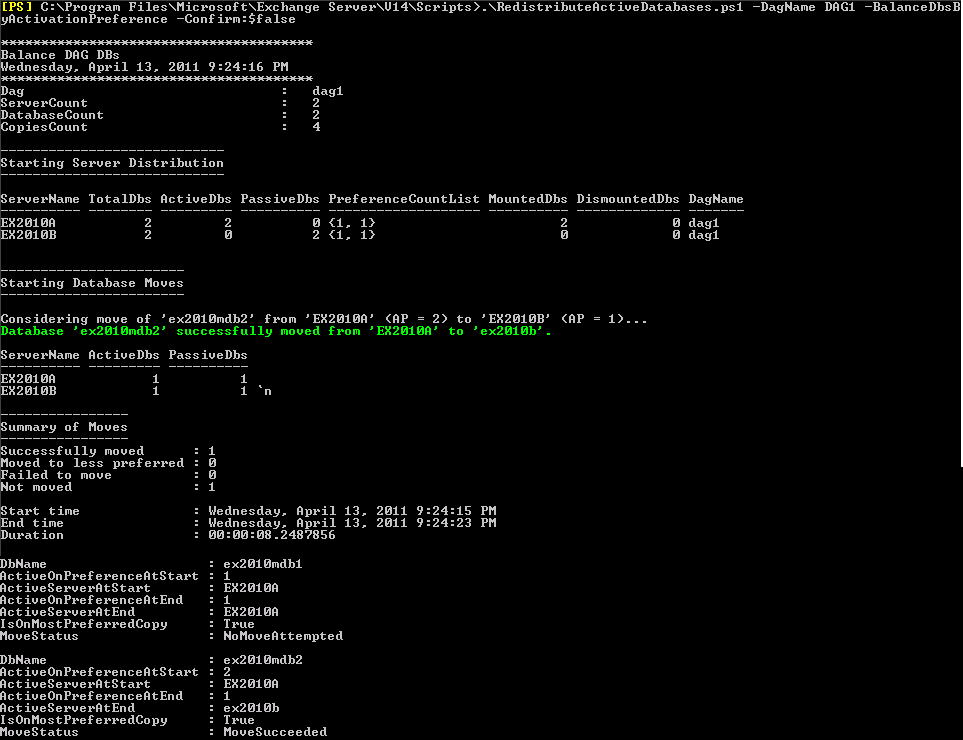
  6. Optionally run RedistributeActiveDatabases.ps1 for the DAG, e.g.:
    .\RedistributeActiveDatabases.ps1 –DagName DAG1 –BalanceDBsByActivationPreference –Confirm:$false

    image

Be advised that when upgrading on major levels (RTM to SP1 or SP1 to SP2), you can’t move a database to a lower level host. This means that when upgrading a node from SP1 to SP2 and moving a database to that SP2 node in the process, you can’t move that database to any SP1 nodes in the DAG. Keep this in mind when planning your upgrade, because it will impact the availability level by limiting your fallback options, albeit temporarily.