
Exchange Server 2013 Architecture Poster


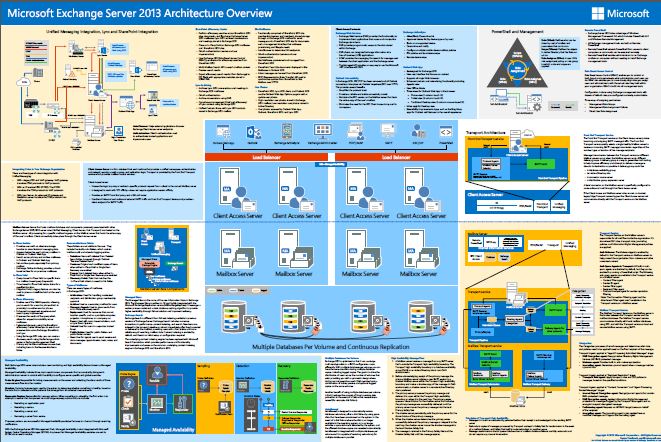
Already available at TechEd NA 2013 in hardcopy, but now also available in PDF: the long awaited Exchange Server 2013 Architecture Poster!

Ex2013ArchThis poster (PDF) contains the architecture highlights and feature set of Microsoft Exchange Server 2013. You can download the Microsoft Exchange Server 2013 Architecture poster here.

Exchange 2013 Server Role Requirements Calculator 5.6


Ex2013 LogoOnly 10 days after the release of the first public version of the Exchange 2013 Server Role Requirements Calculator, the calculator gets an update. The new version number is 5.6.

Changes since version 5.1:

  • Optimized Volume Design Architecture Formula
  • Fixed Recommended Min Number of GC Cores (Secondary Datacenter)” calculation to use SDC instead of PDC CAS count.
  • Fixed CPU comments and removed erroneous information.
  • Fixed multiple conditional formatting bugs.
  • Fixed problem where this workbook had to be the active workbook at all times.
  • Fixed problem with extra-wide Fail Server button on the distribution worksheet.
  • Enabled variable based tracing.
  • Resolved VBA Divide by Zero error caused by DiskGroup = 0.
  • Fixed problem with lagged copies in conjunction with multiple databases per volume.
  • Fixed missing “\” character in path names in MailboxDatabases.csv file.
  • Fixed problem with WAN failure simulation.
  • Fixed calcNumAMBXServersDC2 to ensure it cannot have more servers that primary site.
  • Fixed calculated IO Multiplication factor formulas to take into consideration IOPS override.
  • Added condition to validate that there are enough copies for multiple databases/volume scenario.
  • Fixed conditional formatting and JBOD storage results when JBOD evaluation is disabled.

You can download the calculator here. For more information please consult the release notes and read me.

Exchange 2013 Server Role Requirements Calculator v5.1


Ex2013 LogoIt’s been long wait since the release of Exchange 2013, but today the Exchange Team finally released the first version of the Exchange 2013 Server Role Requirements Calculator. This initial release is numbered version 5.1.

Some of the highlights over the Exchange 2010 calculator, mostly due to changes in the architecture, are:

  • The calculator includes transport sizing (hence the name, I guess);
  • Accommodating for Client Access Server role with sizing for multi-role server deployments;
  • Support for multiple databases / JBOD volumes;
  • Configurable witness server location (primary, secondary or tertiary data center);
  • Configurable server names and database prefixes for generated scripts;
  • Generated scripts include script for DAG creation;
  • Support for single HA, Act/Pas and Act/Act distribution models.

You can download the calculator here. For more information, please consult the documentation here.

Exchange 2013 Unattended Installation Script v1.1


Ex2013 LogoComing back from a nice vacation to the beautiful Brittany in France, I thought it was time to collect and process feedback and suggestions on several scripts, starting with the Exchange 2013 unattended installation script for Windows Server 2012.

Changes in version 1.1 of the script:

  • When the script was used to also prepare Active Directory, RSAT-ADDS-Tools was uninstalled as part of the cleanup. Per request, I’ve removed the uninstallation of that feature;
  • The script now detects pending reboots after installing the required features. When ran in AutoPilot mode, the script will reboot and restart the phase (preparing Active Directory, which can’t be run with pending reboots because Exchange’s Setup won’t like it). When not running in AutoPilot mode, you need to start the script manually. You can omit providing installation parameters as they are saved, even a pending is detected;
  • The Windows feature Server-Media-Foundation will be installed explicitly as it is an UCMA 4.0 requirement;
  • The credentials provided for AutoPilot mode will be validated;
  • The OS version check is changed to a string which should enable installation on non-US Operating Systems.

You can download the updated version of the script via the original Exchange 2013 Unattended Installation Script page or directly from the Technet Gallery. Enjoy!

Exchange 2013 CU1 Help File


Ex2013 LogoA quick post as the Exchange 2013 Cumulative Update 1 Help file (.CHM) file for offline usage has been released on the Microsoft Download Center.

The offline help files files are convenient if you’re on the road or in a location (yes, that happens sometimes) without internet connection.

You can download the Exchange 2013 Cumulative Update 1 .CHM Help file dated April 4th, 2013 for On-Premise and Hybrid deployments here.