Outlook Connectivity changes per Nov2021


In the past, using outdated clients with Microsoft 365 services was a matter of being in an unsupported state with all the risks that go with it. This meant, that things might not work or you could experience reduced functionality. Overall, things usually kept working with a few consequences or glitches here and there.

A change in this stance was announced today per Message Center bulletin MC229143:

To ensure that we meet performance expectations, we are updating the supported versions of Outlook for Windows that can connect to Microsoft 365 services. Effective November 1, 2021, the following versions of Outlook for Windows, as part of Office and Microsoft 365 Apps, will not be able to connect with Office 365 and Microsoft 365 services.

This means, running old unsupported Outlook versions will go from “possible performance and reliability issues” to becoming actively blocked. This block will apply to these versions in the table below; as indicated, these builds were surpassed somewhere in 2017:

ApplicationAffected BuildsBuild Superseded
Office 201315.0.4970.9999
and older
October 2017
Office 201616.0.4599.9999
and older
October 2015
Microsoft 365 Apps for Enterprise
(formerly Office 365 ProPlus)

Microsoft 365 Apps for Business
(formerly Office 365 Business

1705 and olderJune 2017

While it is true that many customers are stretching the lifetime of their on-premises products beyond their support dates, I’m sure – apart from functionality and management options – performance and reliability is becoming more and more of an issue.

Finally, when this notice concerns you, it means you have not been updating your clients for at least 3 years. So, get planning, as you have around 11 months to update your clients. It also may affect any existing plans of moving to Exchange Online in the future, as getting your client-base in a supported state will become a requirement, and will no longer be a serious recommendation.

Ignite: Outlook Calendaring Update


In the Ignite talk Outlook Calendar: Fundamentals and Collaboration, the unequaled Julia Foran laid out tons of new and coming features for the various Outlook platforms in relation to calendaring. You can watch the video on the Virtual Hub.

I tried to capture those in below table. For more information for some of these features, please watch the recording

FeatureWinMacOWAiOSAnd
Personal calendar side-by-side
(Hotmail/Live/MSN, Google)
Connect Shared & Delegated Mailboxes
Importing of ICS attachments🕒
Calendar To-Do pane (My Day)
Calendar To-Do pane showing Tasks (My Day)🕒
Calendar To-Do pane multiple Months support1
Suggested Times🕒🕒
Advanced Room Finder1
Room Suggestions for Recurring Meetings🕒
Room Suggestions showing Room Capabilities
(leverages Set-Place / Places REST API)
🕒
Room Suggestions and Policies integration
AllowRecurringMeeting, BookingWindowInDays, EnforceSchedulingHorizon, MaximumDurationInMinutes
🕒🕒🕒🕒🕒
Finding a Workspace
1
Teams meeting quick-join
In-Calendar, Inbox or Search
Online meetings by default – Outlook🕒
Built-in Breaks – End Late
Built-In Breaks – Start Late
Setting roams clients, org-wide config coming soon

🕒
🕒🕒🕒
Meeting Insights – Outlook
Meeting Insights – Teams
🕒
🕒

🕒


Full Mailbox Delegates
Delegates receive full calendar permissions instead of the organisation (default) permissions
Week Numbers
Setting not roaming yet
Scheduling with time zone selection
Sync local device calendars
Sync back in progress, controllable with InTune policy
Flexible Week View
Travel detection with time zone adjustment
Automatic Removal of orphaned attendees
Attendees that left company get removed from meeting after first NDR to organizer.
🕒🕒🕒🕒🕒

Legend
✔ : Already available
🕒 : Coming
⭐ : New Feature
❔ : Undetermined

Notes
1) Currently available to Office Insiders

Exchange Announcements @ Ignite 2020


Last Update: Added points from Exchange Online Transport – Manage Email, Optics, End User Experiences.

It shouldn’t come as a surprise that this year’s Ignite event is very different than previous years. However what is also different is that at this year’s digital experience, product groups lined up articles and pre-recorded sessions with deep-dive level 300-400 contents as well as articles to accompany those. The sessions, which are available through the Virtual Hub, were all launched right after the start of the event, including the prepared articles. Speaking of a flood flood of contents to digest.

To ease digesting all this information related to Exchange without going through all the videos and blogs, I prepared a summary of all the announcements made at and during Ignite for your reference. For reference, links to the original articles and sessions are at the bottom of this article. The list might not be conclusive; if you find something missing, let me know.

Exchange vNext

  • Exchange Server vNext is scheduled for H2/2021, and will be subscription-based.
  • Will support in-place upgrades from Exchange Server 2019, just like installing another Cumulative Update. Which makes you think, maybe it is just a CU with a high version offset to avoid clashing with its predecessor.
  • Support for this in-place upgrade process is limited to 2 years after release of vNext. If everything goes to plan, this means upgrades will be supported from Exchange 2019 CU11/12-CU19/20 to Exchange vNext RTM-CU8/9.
  • Will support co-existence with Exchange Server 2013, 2016 and 2019, which is 1 down-level more than previous editions (n-3 support instead of n-2).
  • Customers staying on-premises are recommended to upgrade to Exchange Server 2019 today, so they can benefit from an in-place upgrade to vNext when it gets released.
Image Source: Exchange – Here, There and Everywhere

Exchange Online

  • Exchange Online Management PowerShell module is now GA (v2.0.3). This module contains cmdlets leveraging Graph which can show significant performance enhancements in larger tenants, supports certificate-based authentication a.o.
  • Exchange Online Management PowerShell preview module (v2.0.4) supports Linux and PowerShell Core.
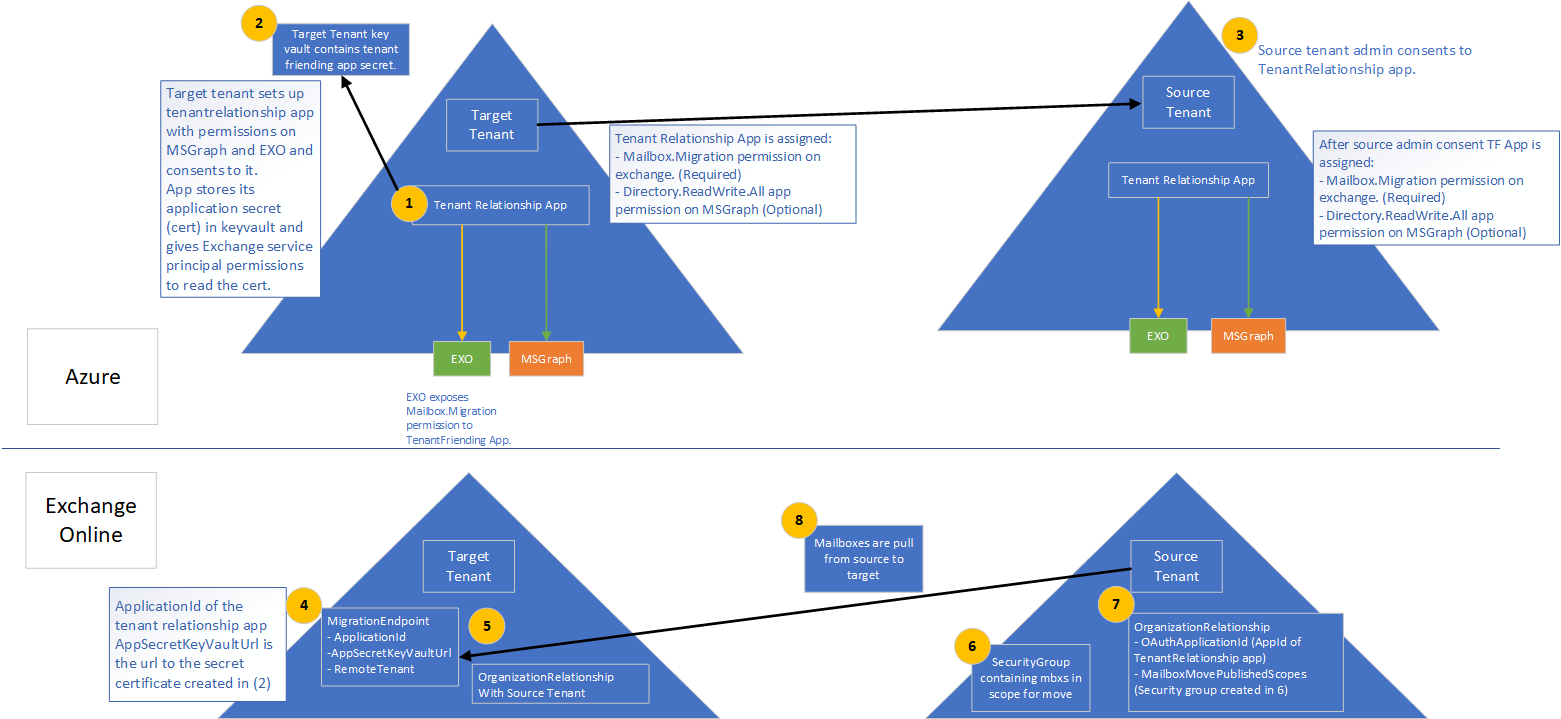
  • Cross-tenant migration of mailboxes is now in Public Preview. Separate programs for cross-tenant SharePoint Online and OneDrive for Business will also launched (register for private preview at aka.ms/SPOMnAPreview). An Azure Key Vault subscription is required on the target tenant. Management of these moves is done from PowerShell, after setting things up with some MSFT scripts which you can grab from GitHub here.
Tenant preparation for mailbox migration.
Image Source: Cross-tenant mailbox migration, process overview
Set-OrganizationConfig -AllowPlusAddressInRecipients $true
  • Message Recall to orchestrate recall of message in Exchange Online as announced at Ignite 2019 is expected later this year (Q4/2020).
  • Admins can toggle the new Exchange Admin Center (was already in preview). It will become the default in Q1/2021.
  • The new Exchange Admin Center is also tailored for use on mobile browsers.
  • Outbound mail flow now supports MTA-STS (MTA Strict Transport Security).
  • The new Exchange Admin Center will host all mail flow related management options, which will be consolidated from the earlier Admin Center as well as the Security & Compliance Center.
  • The new Exchange Admin Center will get new mail flow insights and notifications, such as early certificate expiration notifications or detected reply-to-all storms.
  • Option to reduce message expiration timeout interval from the current default of 24 hours.
  • Administrators get the option to block users from moving groups (distribution groups as well as Microsoft 365 Groups) to the BCC line, which might break receivers’ inbox rules (Q1/2021).
  • Entitled organizations can appoint Priority Users. Priority Users are critical mailboxes that are monitored for mail flow issues. Requires minimum of 10,000 Office 365 E3 or E5 or Microsoft 365 E3 or E5 licenses with at least 50 monthly active Exchange Online users.
  • Microsoft 365 Network Connectivity functionality goes into preview, which is accessible via the admin portal (Health > Network Connectivity).
  • The stand-alone Network Connectivity test tool also goes in preview, and is available from connectivity.office.com.
  • Notifications for expired or soon to expire SSL certificates and Domains (Q4/2020).
  • Customizable message expiration (8-24hours, Q4/2020).
  • Reply-to-All storm protection v2 with customizable thresholds and reports (Q4/2020-H1/2021).
  • Client-agnostic improved Message Recall (Q4/2020).

Exchange 2019

  • Exchange Server 2019 Server Role Requirements Calculator or just Capacity Calculator is now available as separate download (v10.5, link).

Exchange Hybrid

  • New Exchange Hybrid Configuration Wizard, which will become available later month, will support connecting your Exchange on-premises environment to multiple tenants. Note that multiple Exchange organizations connecting to a single tenant was already an option, as mentioned in the supported Azure AD Connect topologies document (link).
Image Source: September 2020 Hybrid Configuration Wizard Update – Microsoft Tech Community
  • Multitenancy Exchange Hybrid will support up to 5 tenants.
  • Setting multitenancy up requires Exchange Server 2019 CU7 or Exchange Server 2016 CU18 or later.
  • Multitenancy does not enable SMTP domain sharing, which is logical as you can only setup domain once in Office 365.
  • Exchange Hybrid Modern Authentication (HMA) can only be configured with one single tenant.

Outlook Desktop/Mac

  • Office will get perpetual release (Windows & Mac) in H2/2021.
  • Attendees who left company get removed from meeting after first NDR.

Outlook Mobile

  • Play My Emails coming to Canada, Australia, India and the United Kingdom (Outlook for iOS and Android).
  • Option to ask Cortana to read out emails from specific people, time frame and topics in (Outlook for iOS, September).
  • Voice commands for email composition, calling and scheduling (October).
  • Sync contact folders with your phone by category (October).
  • Reactions to emails with emojis without filling your inbox (Q4)
  • QR connect to simplify work account setup (October).
  • Outlook for Mac will start using Microsoft Sync technology for enhanced performance and reliability. 
  • Widget support for iOS14 across apps.
  • Option to toggle new Outlook for Mac via in-app switch.

References to official sources

Exchange 2019 Preferred Architecture


Ex2013 LogoMicrosoft has been promoting Docs as the new home of product documentation for a while now. And now a long awaited piece of Exchange 2019 documentation has been published, the Exchange 2019 Preferred Architecture.

The Preferred Architecture – or PA – contains information on how to plan and deploy Exchange 2019 using commodity hardware. It also contains more guidelines on deploying Exchange 2019 using its new Metacache database (MCDB) feature; SSDs to store meta data to speed up storage access, improving overall performance and user experience.

Still missing in the planning instruments is an updated Exchange role requirements calculator for Exchange 2019, incorporating things like the metacache database etc. I’m pretty sure that is being worked on to be released at a future date.

Also quiet convenient is that GitHub being the platform allows the team to provide a feed on Exchange content updates. Really nice to quickly see latest additions and changes in documentation.

Exchange Announcements @ Ignite


Ex2013 LogoUpdate Sep27th: Added Outlook 2013 to list of supported clients.

During Ignite 2018, details are announced to the public on Exchange Server 2019, Exchange Online, as well as Office 365 and related technologies. In this article I’ll try to summarize all the details in a readable format for your reference. The list is probably inconclusive; if you think anything is missing, let me know to I can update the article.

Exchange Server 2019

  • Distributed through Volume licensing only
    • Implication is that there will be no “Hybrid Server Key”
  • Release planned for later this year
  • Windows Server 2019 required
    • Windows Server Core recommended (security, smaller attack surface and disk footprint)
    • Exchange supports in-place upgrading of underlying operating system per Windows Server 2019.
  • Support for co-existence with n-2
    • Exchange Server 2016 and Exchange Server 2013.
    • Outlook 2013-Outlook 2019, Outlook 2016/Max and Outlook for Mac for Office 365.
  • Forest Functionality Level 2012R2 or later
  • Support for up to 48 CPU cores (Exchange 2016: 24)
  • Recommended minimum memory for Mailbox server 128GB, and 64GB for Edge Transport. Maximum memory is 256GB (Exchange 2016: 192GB). The reason for 128GB recommendation is that the .NET scaling benefits (see below) only work from around 100GB and up.
  • Page file 25% of installed memory (Exchange 2016: Maximized at 32GB).
  • .NET Framework 4.7.2, Visual C++ Redistributable and UCMA (Mailbox only)
  • Uses Server GC instead of Workstation GC for some IIS application pools. Better .NET memory management and improves CPU/memory scaling.
  • Will only use TLS 1.2 (there’s a transition mode supporting lower TLS versions, but for that all existing Exchange versions need to support 1.2 as well)
  • No more UM, options:
    • Move all users and mailboxes to Office 365
    • Migrate to Skype for Business Server 2019
    • Remain on Exchange 2016 (EOL 2026)
    • 3rd party VoiceMail solution
  • MetaCache Database uses storage tiering
    • Leverages SSD’s
    • Use SSD to spinning disk ratio 1:3
    • Caches indexes, mailbox folder structures and small items
    • Improves UX: faster logons, searches and small items retrieval
    • Allows for higher mailbox density per server (+20%
    • Utilize larger disks
  • Client Access Rules
    • Restrict external access to EAC and PowerShell
    • Evaluated at server level, so external connections need to hit Exchange 2019.
  • Additional perks for administration and end users
    • Remove-CalendarEvents to remove meetings from a person (e.g. leaver)
    • Recurring meetings will receive a default end date
    • Meetings can be restricted to prevent forwarding
    • Setting Out of Office in OWA allows for blocking calendar for that period, as well as decline current meetings and future meeting invites during that period.
  • Calculator and additional guidance on its way
  • On the Roadmap
    • On-premises Modern Authentication
    • Extending Client Access Rules to other protocols
    • Mailbox Encryption using Customer Keys
    • Monitoring and Analytics tools
    • Blocking legacy authentication methods
    • Removal of RPC/HTTP support (Outlook Anywhere)
    • Simplified Calendar Sharing

The Exchange Server 2019 documentation went live here. Some additional details were included in this list.

On another note: Greg Taylor gave an interview to Phoummala Schmitt (aka @ExchangeGodess) for Channel 9 on Exchange 2019. That replay can be watched here. Also, Scott Schnoll and JeffMealiffe as well as Greg Taylor and Ross Smith were interviewed by TheCube; those recordings can be watched here and here respectively.

Exchange Hybrid

  • Organization Configuration Transfer (OCT) version 2
    • Planned for October 2018
    • Adds the following to OCT v1 (current)
      • ActiveSync Device Access Rules
      • ActiveSync Organization Settings
      • Address Lists
      • DLP Policies
      • Malware Filter Policies
      • Policy Tips
      • Organization Config
    • Introduces conflict handling with review mode
    • Generates a script to undo changes
  • Exchange Hybrid deployment
    • Microsoft Hybrid Agent
    • Installed using HCW (‘Modern Hybrid’); ‘Classic Hybrid’ still an option
    • Hybrid Agent leverages Azure Application Proxy technology
      • Hybrid Proxy Service in the service will proxy requests between Exchange Online and Exchange on-premises.
      • No changes required to URLs or certificates
      • Hybrid Agent uses outbound connection only (port 80/443) to obfuscated unique URL (https://{GUID}.resource.{flow}.his.msappproxy.net. This URL is configured as TargetSharingEpr on the OrganizationalRelationship in Office 365
      • Running multiple agents is supported for availability and scaling
      • Outbound connections means less arrangements to make on (inbound) firewall rules (but another agent, like PTA, ADConnect Health Agent, regular Azure Application Proxy, to bypass security blockades may introduce other concerns)
    • Version 1 will support Free/Busy and MRSProxy and is in Private Preview now

The Exchange team published a quick blog on OCT and Hybrid Agent here.