Exchange 2010 Network Ports


When looking for which ports Exchange 2010 uses, you probably already read the excellent Exchange 2010 Network Port Reference TechNet article located here.

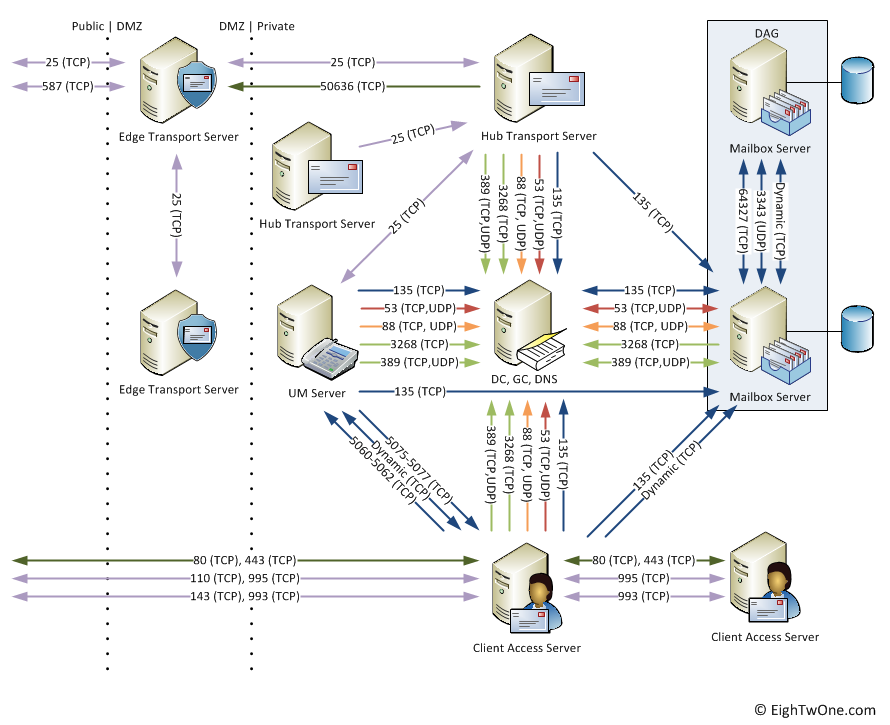
However, at some point, like when discussing things with the network/firewall people or documenting your design, it might be required to visualize things. For this purpose I created the following diagram:
image

Note that it’s a v1 and not all things are included, e.g.

  • Internal clients, e.g. Outlook, OWA;
  • UM connections to PBX;
  • Client Access Server connections to OCS;
  • For Hub-Hub, CAS-CAS or Edge-Edge, I’ve included a 2nd Hub/CAS/Edge server only mentioning ports used for Hub-Hub, CAS-CAS and Edge-Edge communications.

Also, all ports are left at their default values and the diagram doesn’t reflect the fact that you can fix certain ports like the one for the DAG or the MAPI RPC port; that might be added in a later version.

When you got feedback, fill in a comment. Otherwise, feel free the use it; crediting or a reference would be nice.

Updated Exchange 2010 Architecture Poster


Microsoft updated the Exchange 2010 Architecture poster yesterday. No major changes, only a small correction as far as I can tell (Edge Transport Server Role SMTP Send and Receive connectors were mislabeled).

You can download the poster here.

LUN design and Hardware VSS


I had a question why you need to design seperate LUNs for Exchange database and log files when using a hardware based Volume Shadow Copy Service (VSS) backup solution, as mentioned in this TechNet article:

To deploy a LUN architecture that only uses a single LUN per database, you must have a database availability group (DAG) that has two or more copies, and not be using a hardware-based Volume Shadow Copy Service (VSS) solution.

The reason for this requirement is that hardware VSS solutions operate at the hardware level, i.e. the complete LUN. Therefor, if you put the Exchange database and log files on a single LUN, it will always create a snapshot of the whole LUN. This restricts your recovery options, since you can by definition only restore that complete LUN, overwriting log files created after taking the snapshot. So, changes (log files) made after the snapshot are lost and you have no point-in-time recovery options.

For example, with the database and log files on a single LUN, suppose you create a full backup on Saturday 6:00. Then, disaster strikes on Monday. By definition, you can now only restore the database and log files as they were on Saturday 6:00; log files which were created after Saturday 6:00 are lost.

With the database and log files on separate LUNs, you can restore the database LUN, which leaves the LUN with the log files intact. Then, after restoring the database, you can start replaying log files.

So, keep this in mind when planning your Exchange LUNs in conjunction with the backup solution to be used. Note that the Mailbox Role Calculator supports this decision by letting you specify Hardware or Software VSS Backup/Restore as the Backup Methodology to be used.

If you’re interested in more background information on how VSS works, I suggest you check out this TechNet article.

Note: This blog has also been published on Exchange fellow Jaap Wesselius’ ExchangeLabs blog here.

JetStress updated


A quick note to inform you the the JetStress tool has been updated to version 14.1.225.17.

The online documentation on TechNet is currently being revised (article 706601). Currently on the following sentence has been removed from the article:

“You should test Jetstress 2010 with Exchange 2010 ESE binaries, and use Jetstress 2007 for testing legacy ESE versions of Exchange 2007 and Exchange 2003”

The JetStress tool can be used to simulate disk I/O load on a test server running Exchange to test and validate performance and stability of the disk subsystem, prior to moving them into a production environment.

The toolkit page has been updated accordingly.

You can download it here; x86 version is located here.

Exchange Toolkit


I did a write up on the Exchange toolkit, you can find it here or access it through the menu.

If you got feedback, want to report inaccuracies or think something must be added to the list, please send me an e-mail.