KB979744 re-released to fix issues after installing MS11-028


A quick notice on the Exchange Team re-releasing hotfix KB979744 after identifying the issue which could cause problems on Windows Server 2008 SP2 (not R2). The problem can lead to Exchange Management Shell or Exchange Management Console not starting, MRS crashing or Event Viewer not opening after installing MS11-028 (KB2449742 or KB2449741, depending on your Windows Server 2008 level).

If you didn’t install the MS11-028 hotfix yet:

If you have the MS11-028 hotfix installed and you experience the issue:

Forefront Protection for Exchange Rollup 3


Microsoft released Hotfix Rollup 3 for Forefront Protection for Exchange Server (KB2538719).

Here’s the list of fixes included in this rollup:

  1. Mail queues and sluggish Exchange/Outlook performance
  2. Increased “Available Disk Space” Health Point threshold to 250MB
  3. Error: The DNS Blocklist lookup domain blocklist.messaging.microsoft.com could not be contacted
  4. The Exchange Information store crashes with Forefront Protection for Exchange installed
  5. An attempted upgrade of Forefront Protection for Exchange fails with a “Registration Service Failed” error
  6. You receive Forefront Protection Health Notifications indicating a status of “Green to Green”
  7. Forefront generates a MaxDisabledWait error within 15 minutes after starting
  8. A MaxDisabledWait error occurs and Forefront Protection does not recover
  9. Forefront Protection doesn’t apply keyword filtering within hyperlink strings
  10. Forefront Protection for Exchange crashes while scanning a TAR file
  11. An engine update fails in Forefront Protection for Exchange
  12. Emails that are 90 MB or larger are being sent to the Forefront archive folder
  13. The Microsoft Forefront Server Protection Eventing Service will not start following an upgrade from a beta version of Forefront Protection for Exchange
  14. Forefront Protection for Exchange detects files as “Engine Error” when no engines have been enabled for scanning
  15. Messages quarantined due to engine error can now be delivered as complete email
  16. High CPU conditions in EdgeTransort.exe process result in crash
  17. You receive Forefront generated email notification that the Cloudmark engine or Worm list could not update
  18. Exchange email queues at startup following an abnormal shutdown

For more details on the fixes consult the related knowledge base article. You can request the hotfix rollup through the support center here.

VMWare HA/DRS and Exchange DAG support


Last year an (online) discussion took place between VMWare and Microsoft on the supportability of Exchange 2010 Database Availability Groups in combination with VMWare’s High Availability options. Start of this discussion were the Exchange 2010 on VMWare Best Practices Guide and Availability and Recovery Options documents published by VMWare. In the Options document, VMWare used VMware HA with DAG as an example and contains a small note on the support issue. In the Best Practices Guide, you have to turn to page 64 to read in a side note, “VMware does not currently support VMware VMotion or VMware DRS for Microsoft Cluster nodes; however, a cold migration is possible after the guest OS is shut down properly.” Much confusion rose; was Exchange 2010 DAG supported in combination with those VMWare options or not?

In a reaction, Microsoft clarified their support stance on the situation by this post on the Exchange Team blog. This post reads, “Microsoft does not support combining Exchange high availability (DAGs) with hypervisor-based clustering, high availability, or migration solutions that will move or automatically failover mailbox servers that are members of a DAG between clustered root servers.” This meant you were on your own when you performed fail/switch-overs in an Exchange 2010 DAG in combination with VMWare VMotion or DRS.

You might think VMWare would be more careful when publing these kinds of support statements. Well, to my surprise VMWare published a support article 1037959  this week on “Microsoft Clustering on VMware vSphere: Guidelines for Supported Configurations”. The support table states a “Yes” (i.e. is supported) for Exchange 2010 DAG in combination with VMWare HA and DRS. No word on the restrictions which apply to those combination, despite the reference to the Best Practices Guide. Only a footnote for HA, which refers to the ability to group guests together on a VMWare host.

I wonder how many people just look at that table, skip those guides (or overlook the small notes on the support issue) and think they will run a supported configuration.

Updating Exchange 2010 DAG Members


With all the (re-)releases of rollups, the question might rise on how to perform a proper up or downgrade of all DAG configuration members.

Basically, the procedure is straightforward and should be followed per DAG member:

  1. Appoint (next) DAG member;
  2. Move away all active copies on that DAG member;
  3. Prevent copies from activating on that DAG member;
  4. Perform maintenance, e.g. down or upgrade DAG member;
  5. Enable possible activation on that DAG member again;
  6. Optionally redistribute database copies.

Note that in a DAG configuration with 2 members, you need to be aware that during maintenance you have a temporary situation with no fail-over options. If that’s undesirable, consider implementing a 3rd DAG member.

To make the above procedure  easier and automated regarding moves and activation (un)blocking, additional scripts are available since SP1 for Exchange 2010. These scripts are located in the Scripts folder, below the Exchange installation folder. By default the location of the scripts will be C:\Program Files\Microsoft\Exchange Server\v14\Scripts.

Utilizing them, the procedure is quite easy as you can see below. Note that the example uses a DAG named DAG1 with nodes ex2010a and ex2010b as members. They both host 2 databases, ex2010mdb1 and ex2010mdb2; both host 1 active copy and a passive copy of the other database.

  1. Appoint (next) DAG member, e.g. ex2010a;
  2. Run StartDagServerMaintenance.ps1 targeting that DAG member, e.g.:
    .\StartDagServerMaintenance.ps1 –server ex2010a

    image
  3. Perform maintenance;
  4. Run StopDagServerMaintenance.ps1 targeting that DAG member, e.g.:
    .\StopDagServerMaintenance.ps1 –server ex2010a
  5. Repeat steps 2-3 for the other DAG member(s):image
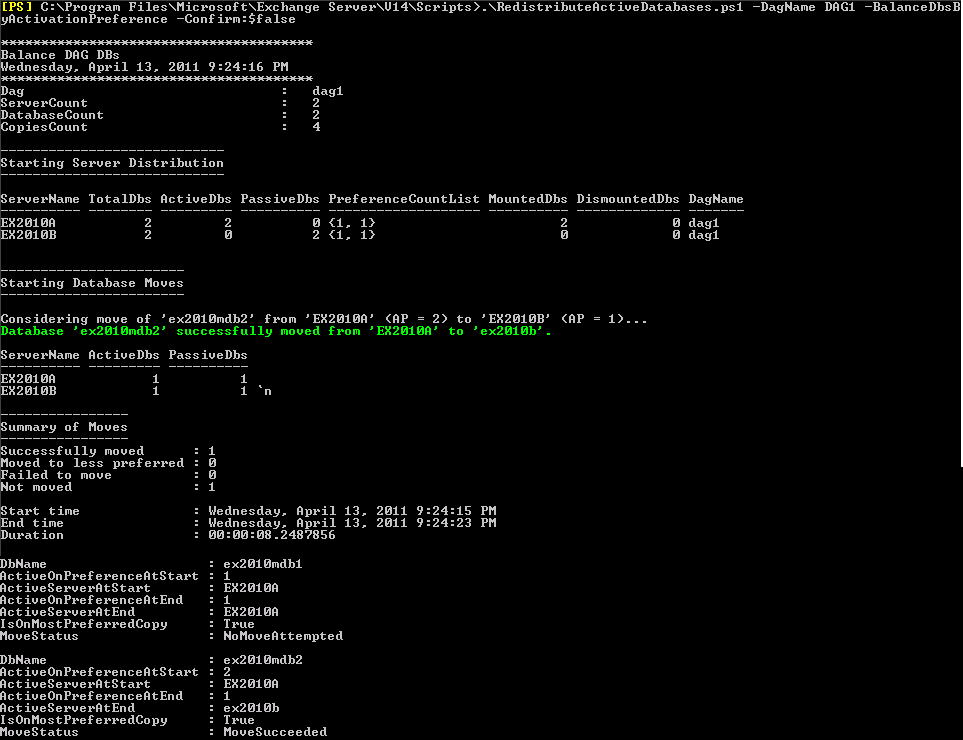
  6. Optionally run RedistributeActiveDatabases.ps1 for the DAG, e.g.:
    .\RedistributeActiveDatabases.ps1 –DagName DAG1 –BalanceDBsByActivationPreference –Confirm:$false

    image

Be advised that when upgrading on major levels (RTM to SP1 or SP1 to SP2), you can’t move a database to a lower level host. This means that when upgrading a node from SP1 to SP2 and moving a database to that SP2 node in the process, you can’t move that database to any SP1 nodes in the DAG. Keep this in mind when planning your upgrade, because it will impact the availability level by limiting your fallback options, albeit temporarily.

Exchange 2010 SP1 Rollup 3 v3


After pulling Rollup 3 for Exchange Server 2010 SP1 after an important Blackberry issue on March 15th, the Exchange team claim to have fixed the issue and and re-released the rollup. So, after re-releasing Exchange 2007 SP3 Rollup 3 after fixing potential store corruption issues, Exchange 2010 SP1 now also gets its own rollup re-release. Note that its officially a v3 release; I don’t know what happened to v2.

Exchange 2010 SP1 Rollup 3 v3 raises Exchange 2010′s version number to 14.1.289.7 (initial release was 14.1.289.3). The related knowledgebase article is kb2529939.

You can download Exchange 2010 SP1 Rollup3 v3 here.