
Unknown's avatar

About Michel de Rooij

Michel de Rooij, with over 25 years of mixed consulting and automation experience with Exchange and related technologies, is a consultant for Rapid Circle. He assists organizations in their journey to and using Microsoft 365, primarily focusing on Exchange and associated technologies and automating processes using PowerShell or Graph. Michel's authorship of several Exchange books and role in the Office 365 for IT Pros author team are a testament to his knowledge. Besides writing for Practical365.com, he maintains a blog on eightwone.com with supporting scripts on GitHub. Michel has been a Microsoft MVP since 2013.

The UC Architects Podcast Ep24


iTunes-Podcast-logo[1]The 24th episode of The UC Architects podcast is online.

This episode is hosted by Steve Goodman, who’s joined by Serkan Varoglu, Johan Veldhuis, John Cook, Michael van Horenbeeck and
Justin Morris.

Amongst the topics discussed in this episode are:

  • Exchange 2013 migration gotchas;
  • Exchange 2013 CU2 announcements;
  • Exchange 2013 InboundProxy NDRs;
  • Log Parser Studio 2.2;
  • Windows 8.1 (Preview) Selective Wipe for BYO;
  • Outlook Connectivity Troubleshooter for Office 365;
  • Lync 2013 Hosting Pack;
  • Lync Features Chart;
  • Lync Supportability Matrix;
  • Lync MX Modern UI App Improvements;
  • Lync 2013 Updates;
  • SNOM partnering HP;
  • Sample Lync 2013 Archiving Report;
  • Las Vegas Connections Conference.

More information on the podcast including references and a link to download the podcast directly here or you can subscribe to the podcasts using iTunes, Zune or use the RSS feed.

About
The UC Architects is a community podcast by people with a passion for Unified Communications; our main focus is on Exchange, Lync or related subjects.

Configuring Anti-Affinity in Failover Clusters


powershellMany customers nowadays are running a virtualized Exchange environment, utilizing Database Availability Groups, load balanced Client Access Servers and the works. However, I also see environments where it is up to the Hypervisor of choice on the hosting of virtual machines after a (planned) fail-over. This goes for Exchange servers, but also for redundant infrastructure components like Domain Controllers or Lync Front-End servers for example.

So, leaving it to “default” is not a good idea when you want to achieve the maximum availability potential. Think about what will happen if redundant roles are located on the same host and that host goes down. What you want to do is prevent hosts from becoming the single point of failure, something which can be accomplished by using a feature called anti-affinity. This will distribute virtual machines over as much hosts as possible. Where affinity means to have an preference for, like in Processor Affinity for processes, Anti-Affinity can be regarded as repulsion in magnetism.

image

For VMWare, you can utilize DRS Anti-Affinity rules; I’ll describe how you can configure Anti Affinity in Hyper-V clusters using the AntiAffinityClassNames property (which by the way already exists since Windows Server 2003). And yes, property means it’s not accessible from the Failover Cluster Manager, but I’ve create a small PowerShell script which lets you configure the AntiAffinityClassNames property (in pre-Server 2012 you could also use cluster.exe to configure this property).

Note: For readability, when you see virtual machine(s), read cluster group(s); In Microsoft failover clustering, a clustered virtual machine role is a cluster group.

Now, before we’ll get to the script, first something on how AntiAffinityClassNames works. The AntiAffinityClassNames property may contain multiple unique strings which you can make up yourself. I’d recommend creating logical names based on the underlying services, like ExchangeDAG or ExchangeCAS. When a virtual machine is moved the process is as follows:

  1. When defined, the cluster tries to locate the next preferred node using the preferred owner list;
  2. Does the designated node host a virtual machine with a matching element in their AntiAffinityClassNames property; if not, the designated host is selected; if it is, move to the next available preferred owner and repeat step 2;
  3. If the list is exhausted (i.e. only anti-affined hosts), the anti-affinity attribute is ignored and the preferred owner list is checked again, ignoring anti-affinity (“last resort”).

Traces of Anti-Affinity influencing failover behavior can be found in the cluster event log:

00000648.00000d54::2013/07/22-10:40:33.162 INFO  [RCM] group ex2 should fail back from node 2 to node 3 now due anti-affinity

Usage
Now on to the script, Configure-AntiAffinity.ps1. The syntax is as follows:

Configure-AntiAffinity.ps1 [-Cluster] <String> [-Groups] <Array> [-Class] <String> [[-Overwrite]] [[-Clear]] [<CommonParameters>]

A small explanation of the available parameters:

  • Cluster is used to specify which cluster you cant to configure (mandatory);
  • Groups specifies which Cluster Groups (Virtual Machines) you want to configure Anti-Affinity for (mandatory);
  • Class specifies which name you want to use for configuring Anti-Affinity (optional, AntiAffinityClassName);
  • When Overwrite is specified, all existing Anti-Affinity class names will be overwritten by Class for the specified Groups, otherwise Class will be added (default);
  • When Clear is specified, all existing Anti-Affinity class names will be removed for the specified Groups;
  • The Verbose parameter is supported.

So, for example assume you have 3+ Hyper-V cluster named Cluster1 consisting of 3+ nodes running 3 virtualized Exchange servers hosting a 3-node DAG, ex1, ex2 and ex3 and you want to configure anti-affinity for these virtual machines using the label PRODEX, you could use the script as follows :

Configure-AntiAffinity.ps1 -Cluster Cluster1 -Groups ex1,ex2, ex3 –Class PRODEX –Verbose

To clear anti-affinity you could use:

Configure-AntiAffinity.ps1 -Cluster Cluster1 -Groups ex1,ex2,ex3 -Clear

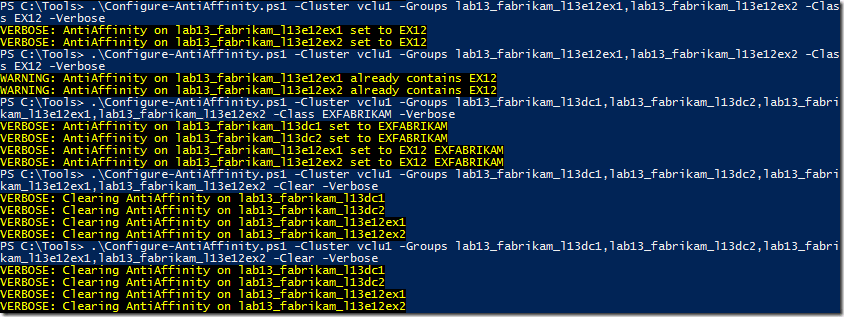
Here’s a screenshot of the script for creating anti-affinity, add additional anti-affinity class names and clearing anti-affinity settings:
image

Feedback
Feedback is welcomed through the comments. If you got scripting suggestions or questions, do not hesitate using the contact form.

Download
You can download the script from the TechNet Gallery here.

Revision History

OWA for iPhone and OWA for iPad are here!


imageToday, the Exchange team announced the immediate availability of the (free) OWA for iPhone and OWA for iPad apps. Exchange fellows Tony Redmond and Dave Stork already hinted earlier this month that something was about to happen in this area.

Users of the Windows 8 Mail app may find the look of the OWA apps to be very familiar:

A quick summary on the app features:

  • Stored credentials for automatic logins;
  • Push notifications;
  • Meeting reminders (even with app closed);
  • Voice activated actions (English only);
  • Contact sync for caller ID function;
  • Remote wipe capability (user data, when the app runs).

That last one is a great, much requested feature when Bring Your Own Device is practiced (apart from that it makes sense due to the sandboxing principle). When required the business can selectively wipe business data without touching your personal information, similar to a feature to be introduced with Windows 8.1 called Remote Business Data Removal.

Besides that you need an iPhone 4S or iPad 2 or higher running iOS 6 or later, the apps are currently only supported for Office 365 subscribers running the tenant on Wave15 (or later). There are reports of the apps working with on-premises Exchange 2013 but that’s unofficial. To find out which version your tenant is running, use Get-OrganizationConfig in a remote PowerShell session, e.g.

$session = New-PSSession –ConnectionUri https://ps.outlook.com/powershell –AllowRedirection –Authentication Basic –Credential (Get-Credential) –ConfigurationName Microsoft.Exchange
Import-PSSession $session
Get-OrganizationConfig | ft AdminDisplayVersion

image

My tenant is running on 15.0.698.10 (15 = Wave 15), so theoretically I’m good to be running OWA for iPhone or OWA for iPad. I say theoretically, as I don’t have any iPhone or iPad available for testing.

An app version for on-premises Exchange 2013 is expected to be released at a later date. More information on configuration and usage of the OWA apps on the Office 365 blog here.

Exchange 2013 Cumulative Update 2


Ex2013 LogoCumulative Update 2 for Exchange Server 2013 was released today by the Exchange Team (KB2859928). This update raises Exchange 2013 version number to 15.0.712.22.

This CU contains the following major changes:

  • CU2 increases the maximum number of supported databases per server from 50 to 100 in the Enterprise Edition;
  • Enables silent redirection for Outlook Web App (OWA) to Exchange 2007 and Exchange 2013 when using multiple internet-facing AD sites or alternative ExternalURL settings (i.e. for legacy purposes);
  • Introduces the DAG Management Service which will offload monitoring and reporting from the Replication Service;
  • Shifting several responders from per-server throttling to per-group throttling;
  • Support for updating local help files using the cmdlet Update-ExchangeHelp;
  • Improvements in OWA Search to indicate search hit locations;
  • Introduction of *-MalwareFilterRule Cmdlets to apply custom malware policies to users, groups or domains.

The majority of the enhancements are in line with announcements at TechEd, on which I reported earlier here. Only exception is the Azure File Share Witness which didn’t make it in CU2 but it’s expected to appear in a later build.

Unfortunately, the list of bug fixes in this CU is undisclosed. However, I was able to assemble the following (incomplete) list with things fixed in this CU:

  • KB2866064 Can’t load OWA Premium by using Internet Explorer 11 in an Exchange Server 2013, Exchange Server 2010 or Exchange Server 2007 environment
  • KB2846288 Information store worker process crashes when you export mailboxes in an Exchange Server 2013 environment
  • KB2842504 EAS users incorrectly throttled in an Exchange Server 2013 environment
  • KB2830765 “MAPI_E_FAILONEPROVIDER” error when you use a MAPI application in a mixed Exchange Server 2013 and Exchange Server 2007 or Exchange Server 2010 environment
  • KB2835562 You can’t disable Outlook Web App access for users in on-premises Exchange Server

This Cumulative Update includes schema and AD changes, so make sure you run PrepareSchema/PrepareAD. Note that Cumulative Updates can be installed directly, i.e. no need to install RTM then CU1 etc. and once installed, you can’t uninstall a CU nor any of the installed roles. The order of upgrading servers is irrelevant, unlike with previous generations of Exchange.

As with any Hotfix, Rollup, Service Pack or Cumulative Update, I’d recommend to thoroughly test this in a test and acceptance environment first, prior to implementing it in production.

You can download Exchange 2013 Cumulative Update 2 here. More details about these changes, preparing Active Directory or installing this Cumulative Update can be found in the original announcement.

Exchange 2013 Server Role Requirements Calculator 5.9


Excel-2013[1]The Exchange 2013 Server Role Requirements Calculator received an update to reflect changed incorporated in Exchange 2013 CU2, like the increased maximum number of databases. The new version number is 5.9.

Changes since version 5.8:

  • DAG script fix

Changes since version 5.6:

  • Fixed VBA error “The object invoked is disconnected from its client” error when recalculating Distribution tab
  • Added validation check for per-server database limit
  • Improved conditional formatting for JBOD disk capacity/type alerts
  • Fixed conditional formatting bug on custom databases input
  • Fixed bugs and improved the CreateMBDatabases.ps1 and CreateDAG.ps1 scripts
  • Fixed disk function display name problem
  • Revised calulation of TotDBVolSpaceDAG on Volume Requirements tab to account for multiple databases per volume
  • Fixed bug when custom database size is set to zero
  • Fixed number of volumes for 48 copies/server in 2 volumes/backup set scenario
  • Removed 2nd site dependency for setting Alt FSW
  • Added support for 100 databases / server
  • Fixed bug with circular logging export
  • Fixed transcript bug in CreateMBDatabaseCopies script
  • Adjusted CI memory calculation for corner case scenarios
  • Fixed Shadow Effect calculation
  • Fixed mistakes in comments
  • Disabled AutoReseed when Log Isolation is enabled

You can download the calculator here. For more information please consult the release notes and read me

