Exchange 0-days: CVE-2022-41040 & CVE-2022-41082


Update (Oct10, 2022): Updated URL Rewrite Rule (again).

End of last week, the Exchange world was made aware of a 0-day vulnerability and exploit through the following tweet by security researcher Kevin Beaumont. The tweet referenced a write-up by GTSC Cyber Security, which published their discovery on a what looked like a variation on ProxyShell, allowing for Remote code execution. The vulnerabilities have been registered by the Common Vulnerabilities and Exposures program as CVE-2022-41040 (ZDI-CAN-18333 at Zero Day Initiative) and CVE-2022-41082 (ZDI-CAN-18802).

The 0-day impacts current versions of Exchange Server 2019, Exchange Server 2016 as well as Exchange Server 2013 when published externally. If you have Exchange Hybrid deployed only for recipient management or mail-flow (i.e. no inbound traffic for https/443), you should be OK. Similar to ProxyShell, the vulnerability consists of sending manufactured requests to Exchange server, e.g.

Read the full of this article on ENow here.

Update (Oct10): The (original) filter to mitigate the situation, as specified originally by the GTSC as well as various websites, is too specific. The filter can easily be circumvented by – but effectively identical – variations on the manufactured request. The latest rule to filter requests is:

(?=.*autodiscover)(?=.*powershell) 

Update any existing mitigation IIS URL Rewrite Rules with this Regular Expressions filter for {UrlDecode:{REQUEST_URI}} blocking (Abort Request) any matching request. When using EEMS, this rule will also be deployed in the most recent update (1.0.9). Microsoft rather silently updated the filter in their published EEMS rules during the weekend.

Microsoft added to their advisory, recommending organizations to disable Remote PowerShell for non-administrators roles (instructions here). For those wanting to hunt for indicators of compromise, check the end of the Security blog.

Vendors are also offering solutions to filter these requests using their network devices:

At the time of writing, Microsoft has not publish a security fix yet.
MEC 2022 Sessions Downloading


Update 9/29/2022: By popular request, I modified the Get-EventSession script so it is now able to also download MEC sessions (-Event MEC). See below for details.

A quick post for those that are looking for a simple way to download the Microsoft Exchange Community (MEC) Technical Airlift 2022 sessions for offline viewing, here’s a simple way to accomplish this:

  1. Get youtube-dl.exe here. Youtube-dl is a tool to download videos or playlists from Youtube.
  2. Get aria2c.exe here. Aria2c can be used to download media using multiple streams, reducing time it takes to download video content.
  3. Put the executables from both downloads in the same folder, and, using a a (PowerShell) command prompt, run the following:

.\youtube-dl.exe -o "C:\MEC2022\%(playlist_index)s-%(title)s.mp4" --external-downloader aria2c --external-downloader-args "-x 16 -k 1M" https://www.youtube.com/playlist?list=PLxdTT6-7g--2POisC5XcDQxUXHhWsoZc9

  • “C:\MEC2022” is the folder where the downloaded files will be stored. Change when needed. For file naming, variables are used with define the name of the downloaded files using a prefix of the sequence number (from the playlist) together with the title of the video (session).
  • –external-downloader tells youtube-dl to use specified download utility (aria2c) instead of its own engine. The external-downloader-args parameters define concurrency and chunk size.
  • The last part is the URL for the MEC 2022 playlist.

9/29/2022: Alternatively, you can now use Get-EventSession (version 3.7 and up) to download MEC sessions. The script will parse the information shared through the playlist, but some usual attributes are missing, but there also some new attributes, such as likes and views. To use the script to download MEC session videos:

Get-EventSession> .\Get-EventSession.ps1 -Event MEC -DownloadFolder c:\MEC20222 -Format 22 -Speaker 'Michel de Rooij'

Few notes:

  • As there are no session codes in the YouTube metadata, session code is set to equal the playlist index.
  • Speaker names will be extracted from the description when present.
  • The session timestamp will be the upload date of the video.
  • Likes, Views and Duration are YouTube specific properties returned.

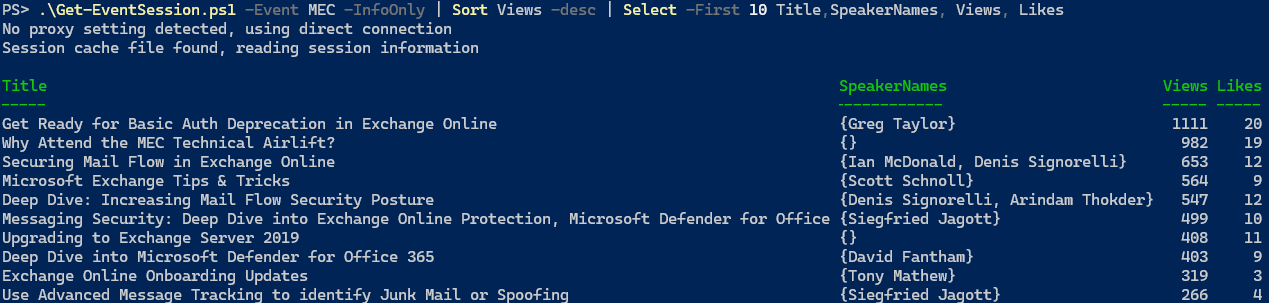
Using views and likes, you can do cool things such as get a scoreboard of the Top 10 most viewed videos from MEC playlist:

.\Get-EventSession.ps1 -Event MEC -InfoOnly | Sort Views -desc | Select -First 10 Title,SpeakerNames, Views, Likes

Note: If you do not specify format, YouTube videos will be downloaded in ‘best’ possible quality, which will be .webm by default. You can prevent this, and download 1080p movies, by specifying -Format 22.

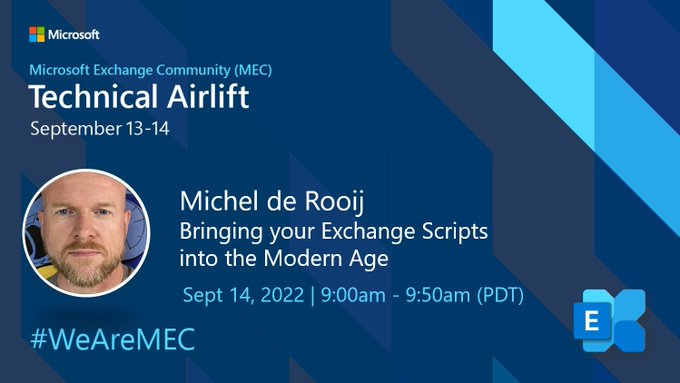
MEC: Bringing your Exchange Scripts into the Modern Age


Yesterday, I had the pleasure of presenting at the Microsoft Exchange Conference Community Technical Airlift 2022. I talked about the challenges that organizations are facing that use Exchange scripts in their work processes or run them scheduled unattended.

Some of the challenges I mentioned, apart from the upcoming demise of Basic Authentication, and resources to methodically assess and make the necessary changes, are:

  • Get your code more secure leveraging Certificate Based Authentication, especially for scheduled tasks.
  • Get current with the most recent version of the Exchange Online Management Module for PowerShell.
  • The same exercise with regards to AzureAD when using MSOnline or AzureAD modules, and the inevitable move to the PowerShell Graph SDK.

In the end I also quickly demonstrated how much easier and secure things can be when utilizing Azure Automation, which might especially appeal to organizations that want to totally get rid of any infrastructure for running jobs.

You can watch the presentation below. All sessions are you published on YouTube, and its playlist can be accessed at aka.ms/MEC2022.

The presentation as well as the deck and script used in the live demonstration can be retrieved from GitHub. The Analyse-ExoScript used in the demo can be found on GitHub as well, or look at the accompanying blog I wrote a while ago here.

Note that during MEC, it was announced that the next GA release of the Exchange Online Management module will be version 3. This jump is likely to prevent any confusion with earlier GA and preview releases. It was said the next GA release might be as early as next week, which should be good news for organizations who’s policy it is to not run Preview software in production environments.

If you have any questions, ask them in the comments or send me a message via the contact form.

MEC Airlift 2022 #WeAreMEC


It seems ages ago – 8½ years to be exact – that the most recent Microsoft Exchange Conference took place in Austin in 2014. Much has happened since then, Exchange Online became a thing and there seemed to be no need for Microsoft to host an Exchange themed conference any longer. All this while events around products such as SharePoint did not slow down a single bit.

Then the pandemic happened, and we went to zero in-person conferences. It did not take long online/virtual/digital conferences took off. But alas, no Exchange conference. Until 2022 arrived, and Microsoft announced continued commitment to Exchange on-premises. Now, early in the FY22/23, a free 2-day online event will take place on September 13th & 14th, the Microsoft Exchange Conference Community Technical Airlift 2022. Target audience are IT professionals working with Exchange Online/On-Premises as well people developing solutions that integrate with Exchange. While nothing comes close to the experience and value of an in-person event, MEC 2022 will take place online. I am guessing that if this event is a success, and there is enough content to talk about as well as interest, that might switch to becoming at least a hybrid event, with a mix of an in-person and online audience, similar to Microsoft Ignite this year.

The agenda for MEC 2022 looks very promising, with sessions from both the Exchange product group as well as some very smart people from the Exchange community. Not totally surprising, there are sessions on the demise of Basic Authentication and how to deal with that, hosted by Greg Taylor. Also have a look at Scott Schnoll’s famous Exchange Tips & Tricks, or Jeff Mealiffe talking about connectivity. The event kicks off with a welcome keynote with Perry Clarke and Rajesh Jha. You can still submit questions for this “Geek Out with Perry!” here.

Yours truly will also present at MEC, presenting “Bringing your Exchange Scripts into the Modern Age” on September 14th, 9:00am PDT. Note that MEC sessions will be recorded, and will be made available for on-demand viewing after the event, which is great in case you cannot attend sessions as they happen. You can still register for MEC at https://aka.ms/MECAirlift.

If I do not “see” you at MEC, there is also an opportunity to have an in-person chat next week in Atlanta, where I will be attending – not presenting as I missed the submit deadline – The Experts Conference, or just TEC. It seems you can still register, but Anyway, it is good to see Exchange themed events pick-up and confereces in general returning to a certain level of pre-pandemic numbers, as there is enough to talk about, discuss and learn from others.

Security Updates Exchange 2013-2019 (Aug2022)


The Exchange product group released Augustus updates for Exchange Server 2013, 2016 and 2019.

Note that per the previous May cycle, Security Updates will be packaged in an executable wrapper. This should trigger the running elevated prompt, thus preventing any potential issues when admins simply double-click the .MSP file. More about the new package format, options for logging and command-line switches are mentioned in an article dedicated to the change of distribution method here.

Windows Extended Protection
Special attention in this cycle for Windows Extended Protection, which needs to be enabled to address certain vulnerabilities. WEP is ONLY supported for specific versions of Exchange server – see the documentation for details regarding requirements and known issues. TLDR; – list might change over time, consult the pages linked earlier:

  • Requirements
    • Supported on Exchange 2013 CU23, Exchange 2016 CU22 and Exchange Server 2019 CU11 or later, with the August 2022 Security Updates installed.
    • Cannot be enabled on Exchange Server 2013 servers hosting Public Folders in co-existence with Exchange 2016/2019.
    • Cannot be enabled on Exchange 2016 CU22 or Exchange 2019 CU11 or older hosting a Public Folder Hierarchy.
    • Does not work with hybrid servers using Modern Hybrid configuration.
    • SSL Offloading scenarios are currently not supported.
    • Consistent TLS configuration is required across all Exchange servers.
  • Known Issues
    • Retention Policies using action Move to Archive stops working.
    • In Exchange 2013, the MAPI over HTTP probe OutlookMapiHttpCtpProbe might show FAILED.

To perform prerequisite checks and implement WEP, a supporting script ExchangeExtendedProtectionManagement.ps1 has been published. Since enabling WEP impacts how clients and Exchange server communicates, it is highly recommended to test this first on your specific configuration, especially with 3rd party products, before enabling it in production.

Security Updates
So, on with the security updates. The vulnerabilities addressed in the Security Updates for August are:

VulnerabilityCategorySeverityRating
CVE-2022-21979Information DisclosureImportantCVSS:3.1 4.8 / 4.2
CVE-2022-21980Elevation of PrivilegeCriticalCVSS:3.1 8.0 / 7.0
CVE-2022-24477Elevation of PrivilegeCriticalCVSS:3.1 8.0 / 7.0
CVE-2022-24516Elevation of PrivilegeCriticalCVSS:3.1 8.0 / 7.0
CVE-2022-30134Elevation of PrivilegeImportantCVSS:3.1 7.6 / 6.6
CVE-2022-34692Information DisclosureImportantCVSS:3.1 5.3 / 4.6

The following Security Updates address this vulnerability:

ExchangeDownloadBuildKBSupersedes
Exchange 2019 CU12Download15.2.1118.12KB5015322KB5014261
Exchange 2019 CU11Download15.2.986.29KB5015322KB5014261
Exchange 2016 CU23Download15.1.2507.12KB5015322KB5014261
Exchange 2016 CU22Download15.1.2375.31KB5015322KB5014261
Exchange 2013 CU23Download15.0.1497.40KB5015321KB5014260

These Security Updates also fix the following issues:

  • KB5017261 Start-DatabaseAvailabilityGroup fails with BlockedDeserializeTypeException
  • KB5017430 E-Discovery search fails in Exchange Online

Be advised that these security updates are Cumulative Update level specific. You cannot apply the update for Exchange 2019 CU12 to Exchange 2019 CU11. Also, the security update download has the same name for different Cumulative Updates, and I would suggest tagging the file name with the CU level, e.g. Exchange2019-CU12-KBXXXXXX-x64-en.msp.

Exchange servers running as part of hybrid deployment are running services, and thus need to be included in the patch cycle. If you are running Exchange 2019 CU12 Management Tools-only (for recipient management), you do not need to deploy this SU.

On a final note, as with any patch or update, I’d recommend to apply this in a test environment first, prior to implementing it in production. However, it is not recommended to wait for regular maintenance cycles when it concerns security updates, and follow a more agile approach; the ratings are an indication of the urgency.