

31Jul: Moved MVPs per country to bottom and expanded table.
Another year, another Microsoft MVP award cycle. Always a great moment to have a quick peek at the MVP population. Note that this year, this post took a while longer to get published. This is due to the date of awards being announced, as well as the vacation period, which caused delays in people confirming their renewal agreement.
The numbers below are taken from the public MVP portal on July 30th. Comparing them to July from recent years should give an idea of trends and what award categories (and thus products) have focus.
A few notes:
- 3.589 public MVP profiles were processed. The overall number went up compared to last year. However, compared to the MVPs of June, the overall number went down by 12%.
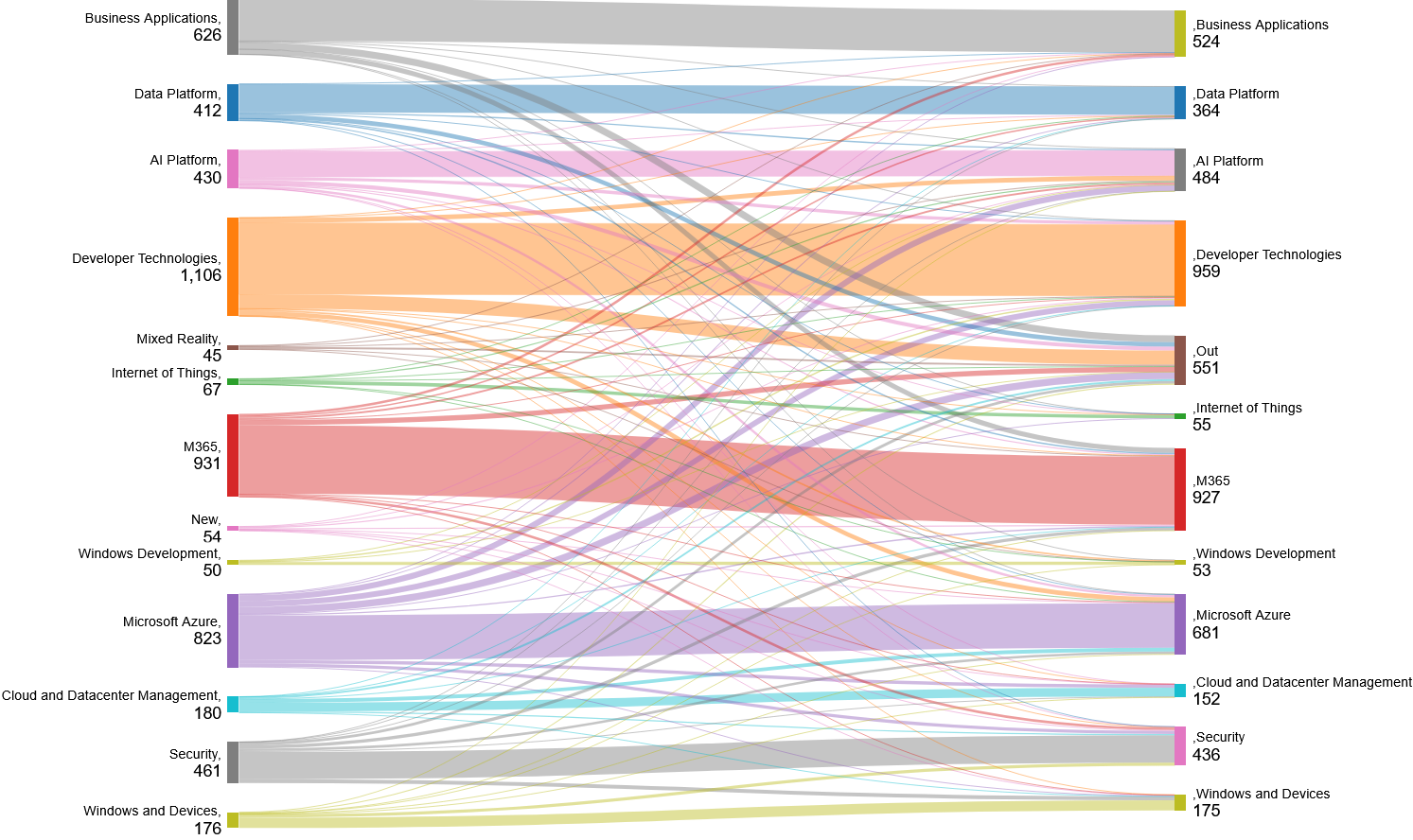
- The award category Mixed Reality has been closed. Have a look at the Sankey diagram further down this article to see where these people went.
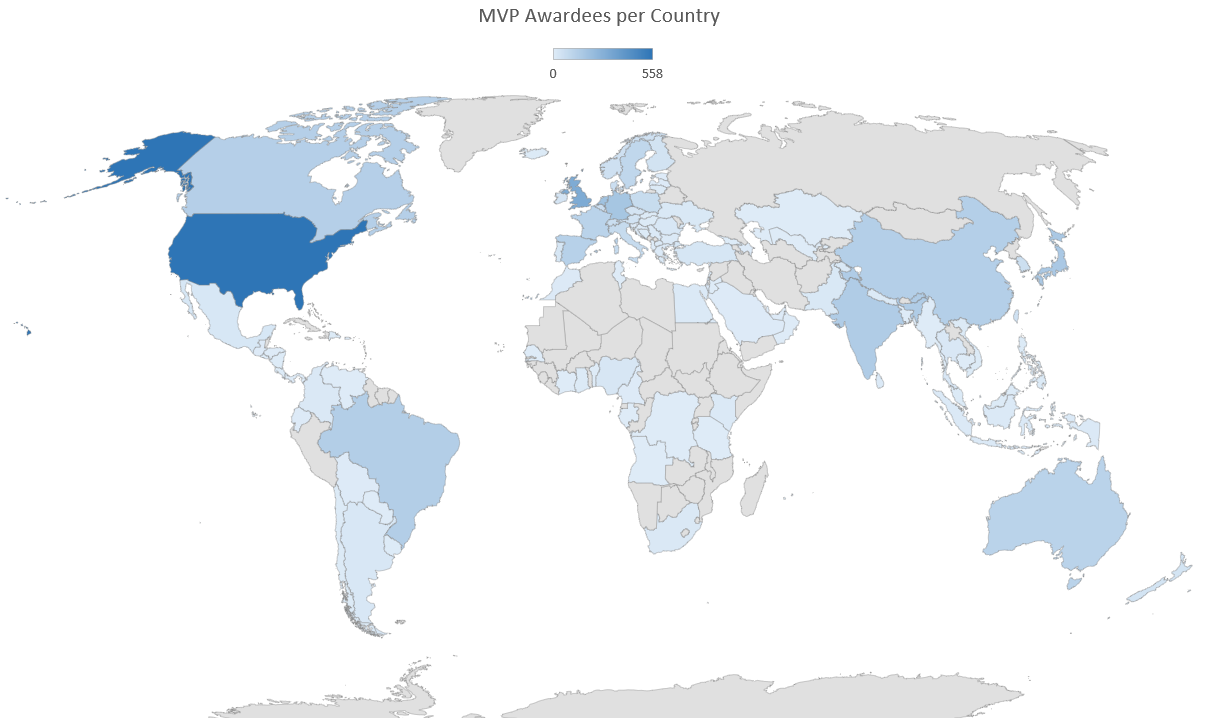
- The number of countries represented went down when compared to last year.
- The number of MVPs with more than one award category has increased by 13%.
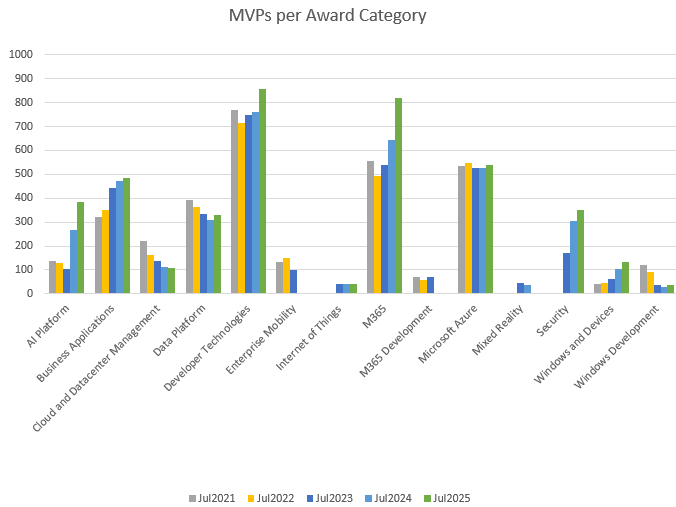
- The MVP award category with the most MVPs is still the Developer Technologies.
MVP Awardees per Category
The following chart and table display the awardees per award category from 2021 to 2025, plus change percentages compared to previous years.
| Award Category | Jul2021 | Jul2022 | % | Jul2023 | % | Jul2024 | % | Jul2025 | % |
|---|---|---|---|---|---|---|---|---|---|
| AI Platform | 138 | 128 | -7% | 105 | -18% | 269 | 156% | 386 | 43% |
| Business Applications | 323 | 351 | 9% | 442 | 26% | 474 | 7% | 483 | 2% |
| Cloud and Datacenter Management | 219 | 164 | -25% | 136 | -17% | 111 | -18% | 106 | -5% |
| Data Platform | 392 | 364 | -7% | 335 | -8% | 307 | -8% | 329 | 7% |
| Developer Technologies | 770 | 715 | -7% | 747 | 4% | 761 | 2% | 859 | 13% |
| Enterprise Mobility | 133 | 149 | 12% | 100 | -33% | 0 | -100% | 0 | 0% |
| Internet of Things | 0 | 0 | 0% | 43 | 0% | 43 | 0% | 39 | -9% |
| M365 | 556 | 492 | -12% | 541 | 10% | 643 | 19% | 819 | 27% |
| M365 Development | 69 | 59 | -14% | 70 | 19% | 0 | -100% | 0 | 0% |
| Microsoft Azure | 534 | 546 | 2% | 526 | -4% | 527 | 0% | 539 | 2% |
| Mixed Reality | 0 | 0 | 0% | 45 | 0% | 35 | -22% | 0 | -100% |
| Security | 0 | 0 | 0% | 171 | 0% | 305 | 78% | 349 | 14% |
| Windows and Devices | 42 | 45 | 7% | 61 | 36% | 102 | 67% | 133 | 30% |
| Windows Development | 120 | 92 | -23% | 37 | -60% | 30 | -19% | 35 | 17% |
| Total Categories | 3296 | 3105 | -6% | 3359 | 8% | 3607 | 7% | 4077 | 13% |
| Total MVPs | 3223 | 3023 | -6% | 3175 | 5% | 3187 | 0% | 3589 | 13% |
Note: The difference between total categories and total MVPs is caused by MVPs that are awarded in more than one category.
Where did they go?
The Sankey diagram below displays the number of awarded categories moving from last year to now. The move is based on the MVP, the categories they had, and the new categories they have currently been awarded in. New awardees are categorized as “New,” and those who are no longer present on the MVP portal (e.g., no longer MVP) are categorized as “Out.”
MVP Awardees per Country
The following chart and table display the awardees per country, plus change percentages compared to July last year. Countries that show a 0 no longer have any published MVPs. This used to be a condensed table, but I have expanded the table and added fun facts such as MVPs per population and area as well, using apicountries.com as a reference.
| Country | Was | Now | Change | MVPs per 1,000,000 | MVPs per 1,000 km2 |
|---|---|---|---|---|---|
| Albania | 1 | 1 | 0% | 0,35 | 0,035 |
| Angola | 1 | 1 | 0% | 0,03 | 0,001 |
| Argentina | 17 | 19 | 12% | 0,42 | 0,007 |
| Australia | 111 | 113 | 2% | 4,40 | 0,015 |
| Austria | 32 | 37 | 16% | 4,15 | 0,441 |
| Azerbaijan | 4 | 3 | -25% | 0,30 | 0,035 |
| Bahrain | 1 | 2 | 100% | 1,18 | 2,614 |
| Bangladesh | 3 | 1 | -67% | 0,01 | 0,007 |
| Belgium | 59 | 64 | 8% | 5,54 | 2,096 |
| Benin | 0 | 1 | 100% | 0,08 | 0,009 |
| Bolivia | 5 | 4 | -20% | 0,34 | 0,004 |
| Bosnia and Herzegovina | 7 | 6 | -14% | 1,83 | 0,117 |
| Brazil | 127 | 136 | 7% | 0,64 | 0,016 |
| Bulgaria | 8 | 8 | 0% | 1,15 | 0,072 |
| Cambodia | 0 | 1 | 100% | 0,06 | 0,006 |
| Cameroon | 1 | 3 | 200% | 0,11 | 0,006 |
| Canada | 115 | 130 | 13% | 3,42 | 0,013 |
| Chile | 4 | 5 | 25% | 0,26 | 0,007 |
| China | 137 | 132 | -4% | 0,09 | 0,014 |
| Colombia | 16 | 14 | -13% | 0,28 | 0,012 |
| Congo (DRC) | 4 | 1 | -75% | 0,01 | 0,000 |
| Costa Rica | 2 | 2 | 0% | 0,39 | 0,039 |
| Côte d’Ivoire | 1 | 1 | 0% | 0,04 | 0,003 |
| Croatia | 13 | 11 | -15% | 2,72 | 0,194 |
| Czechia | 26 | 31 | 19% | 2,90 | 0,393 |
| Denmark | 49 | 60 | 22% | 10,29 | 1,392 |
| Dominican Republic | 3 | 6 | 100% | 0,55 | 0,123 |
| Ecuador | 4 | 4 | 0% | 0,23 | 0,014 |
| Egypt | 8 | 10 | 25% | 0,10 | 0,010 |
| El Salvador | 2 | 2 | 0% | 0,31 | 0,095 |
| Estonia | 4 | 4 | 0% | 3,01 | 0,088 |
| Finland | 33 | 39 | 18% | 7,05 | 0,115 |
| France | 120 | 113 | -6% | 1,68 | 0,176 |
| Gabon | 0 | 1 | 100% | 0,45 | 0,004 |
| Georgia | 1 | 2 | 100% | 0,54 | 0,029 |
| Germany | 143 | 177 | 24% | 2,13 | 0,496 |
| Ghana | 6 | 6 | 0% | 0,19 | 0,025 |
| Greece | 11 | 10 | -9% | 0,93 | 0,076 |
| Guatemala | 1 | 3 | 200% | 0,18 | 0,028 |
| Honduras | 1 | 1 | 0% | 0,10 | 0,009 |
| Hong Kong SAR | 6 | 7 | 17% | 0,94 | 6,341 |
| Hungary | 8 | 6 | -25% | 0,62 | 0,064 |
| Iceland | 5 | 6 | 20% | 16,37 | 0,058 |
| India | 118 | 147 | 25% | 0,11 | 0,045 |
| Indonesia | 7 | 9 | 29% | 0,03 | 0,005 |
| Ireland | 32 | 31 | -3% | 6,21 | 0,441 |
| Israel | 12 | 17 | 42% | 1,84 | 0,818 |
| Italy | 69 | 75 | 9% | 1,26 | 0,249 |
| Japan | 151 | 164 | 9% | 1,30 | 0,434 |
| Jordan | 1 | 1 | 0% | 0,10 | 0,011 |
| Kazakhstan | 0 | 1 | 100% | 0,05 | 0,000 |
| Kenya | 7 | 8 | 14% | 0,15 | 0,014 |
| Korea | 56 | 58 | 4% | 1,12 | 0,579 |
| Latvia | 1 | 3 | 200% | 1,58 | 0,046 |
| Lebanon | 1 | 1 | 0% | 0,15 | 0,096 |
| Lithuania | 6 | 5 | -17% | 1,79 | 0,077 |
| Luxembourg | 1 | 2 | 100% | 3,16 | 0,773 |
| Malaysia | 7 | 5 | -29% | 0,15 | 0,015 |
| Malta | 1 | 3 | 200% | 5,71 | 9,494 |
| Mauritius | 1 | 2 | 100% | 1,58 | 0,980 |
| Mexico | 18 | 21 | 17% | 0,16 | 0,011 |
| Morocco | 4 | 7 | 75% | 0,19 | 0,016 |
| Myanmar | 1 | 1 | 0% | 0,02 | 0,001 |
| Nepal | 4 | 5 | 25% | 0,17 | 0,034 |
| Netherlands | 175 | 195 | 11% | 11,18 | 4,659 |
| New Zealand | 32 | 35 | 9% | 6,88 | 0,129 |
| Nicaragua | 3 | 2 | -33% | 0,30 | 0,015 |
| Nigeria | 26 | 23 | -12% | 0,11 | 0,025 |
| North Macedonia | 5 | 8 | 60% | 3,84 | 0,311 |
| Norway | 40 | 50 | 25% | 9,29 | 0,154 |
| Oman | 0 | 1 | 100% | 0,20 | 0,003 |
| Pakistan | 9 | 15 | 67% | 0,07 | 0,017 |
| Panama | 3 | 1 | -67% | 0,23 | 0,013 |
| Paraguay | 1 | 1 | 0% | 0,14 | 0,002 |
| Peru | 13 | 15 | 15% | 0,45 | 0,012 |
| Philippines | 6 | 6 | 0% | 0,05 | 0,018 |
| Poland | 66 | 73 | 11% | 1,92 | 0,233 |
| Portugal | 23 | 25 | 9% | 2,43 | 0,271 |
| Puerto Rico | 1 | 1 | 0% | 0,31 | 0,113 |
| Qatar | 0 | 1 | 100% | 0,35 | 0,086 |
| Réunion | 1 | 0 | -100% | – | – |
| Romania | 12 | 19 | 58% | 0,99 | 0,080 |
| Saudi Arabia | 4 | 4 | 0% | 0,11 | 0,002 |
| Senegal | 1 | 0 | -100% | – | – |
| Serbia | 7 | 10 | 43% | 1,45 | 0,113 |
| Singapore | 20 | 23 | 15% | 4,05 | 32,394 |
| Slovakia | 4 | 5 | 25% | 0,92 | 0,102 |
| Slovenia | 7 | 7 | 0% | 3,33 | 0,345 |
| South Africa | 11 | 14 | 27% | 0,24 | 0,011 |
| Spain | 103 | 122 | 18% | 2,58 | 0,241 |
| Sri Lanka | 10 | 10 | 0% | 0,46 | 0,152 |
| Sweden | 80 | 96 | 20% | 9,27 | 0,213 |
| Switzerland | 53 | 63 | 19% | 7,29 | 1,526 |
| Taiwan | 45 | 46 | 2% | 1,96 | 1,271 |
| Tanzania | 1 | 1 | 0% | 0,02 | 0,001 |
| Thailand | 16 | 17 | 6% | 0,24 | 0,033 |
| Tunisia | 1 | 0 | -100% | – | – |
| Türkiye | 20 | 24 | 20% | 0,28 | 0,031 |
| Ukraine | 14 | 16 | 14% | 0,36 | 0,027 |
| United Arab Emirates | 3 | 4 | 33% | 0,40 | 0,048 |
| United Kingdom | 273 | 304 | 11% | 4,52 | 1,252 |
| United States | 489 | 558 | 14% | 1,69 | 0,058 |
| Uruguay | 2 | 2 | 0% | 0,58 | 0,011 |
| Uzbekistan | 2 | 1 | -50% | 0,03 | 0,002 |
| Venezuela | 1 | 1 | 0% | 0,04 | 0,001 |
| Vietnam | 5 | 5 | 0% | 0,05 | 0,015 |
| Yemen | 1 | 1 | 0% | 0,03 | 0,002 |
If you have questions or comments, please leave them in the comments below.


 EighTwOne (821)