Geek Out with Perry, Special Edition


In case you missed it, a new video was posted on the Ask Perry blog where Perry Clark, general manager Exchange, answers questions asked by Exchange customers and partners who visited TechEd in Berlin. As always, the lovely Ann Vu hosts the Q&A.

Exchange 2010 Network Ports


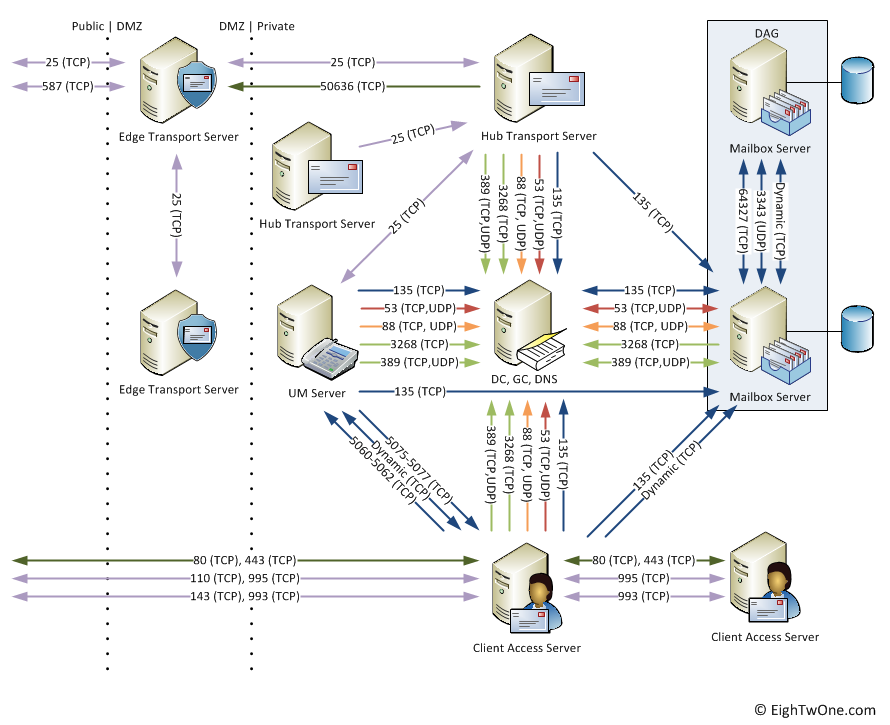
When looking for which ports Exchange 2010 uses, you probably already read the excellent Exchange 2010 Network Port Reference TechNet article located here.

However, at some point, like when discussing things with the network/firewall people or documenting your design, it might be required to visualize things. For this purpose I created the following diagram:

image

Note that it’s a v1 and not all things are included, e.g.

  • Internal clients, e.g. Outlook, OWA;
  • UM connections to PBX;
  • Client Access Server connections to OCS;
  • For Hub-Hub, CAS-CAS or Edge-Edge, I’ve included a 2nd Hub/CAS/Edge server only mentioning ports used for Hub-Hub, CAS-CAS and Edge-Edge communications.

Also, all ports are left at their default values and the diagram doesn’t reflect the fact that you can fix certain ports like the one for the DAG or the MAPI RPC port; that might be added in a later version.

When you got feedback, fill in a comment. Otherwise, feel free the use it; crediting or a reference would be nice.

MS publishes Exchange 2010 Tested Solutions


Microsoft published several technical solution papers on how to design, test and verify Exchange 2010 solutions for a certain number of mailboxes for a few vendors. The papers are as follows:

The documents walk you through the steps regarding design decisions, challenges while meeting customer requirements.

Outlook 2007 archive KB published, omits archive function


After releasing the hotfix for enabling Exchange 2010 personal archives for Outlook 2007 users yesterday, the related knowledgebase article was published today (KB2458611).

What you might notice when reading the list of fixed issued is that the article doesn’t mention the included support for archives. Interesting. One might wonder what that implies from a support perspective.

Update: There are reports of issues with Outlook 2007 after installing update KB2412171, like Loss of Archive/Auto-Archive functions (not to be confused with personal archives), performance issues and Outlook Anywhere/NTLM issues.  Since KB2458611 is based on that update, so you might expect similar issues. More information here by Outlook MVP Ben Schorr.

Update: Official information confirms three issues have been identified with this fix:

  1. Secure Password Authentication issues when configured but server doesn’t support it (e.g. GMail);
  2. If you haven’t configured an Exchange account,
    1. Performance issues;
    2. Inability to configure AutoArchive for IMAP/POP3 or Outlook Live accounts.

More information on the Outlook Product Team blog here.

Update: The Microsoft Exchange team blogged about the December 2010 update for Office 2007 here. They state that “This update extends archive support to Outlook 2007”. In the same blog, the archiving functionality I described earlier here is hereby also officially confirmed.

Update: The Outlook team re-released the hotfix which addresses the 3 issues mentioned above (and on which the Outlook team blogged here). You can download the updated KB2412171 hotfix here.

Outlook 2007 hotfix for Exchange 2010 Personal Archive support


Update: After fixing some issues (see here) the Outlook team re-released hotfix KB2412171 and made it available for direct download here or you can get it through Windows Update.

It seems the Office 2007 Cumulative Update for December 2010 (KB2479671) will contain support for the long awaited support for Exchange 2010 Personal Archives in Outlook 2007. Note that support is limited as not all functionality found in Outlook 2010 is present, but it is usable from a customer perspective.

After applying the Outlook 2007 hotfix (SP2 is a prerequisite), archive-enabled users can do the following:

  • Access and move messages to or from their personal archive;
  • Mailboxes for which you have full access permissions will be automatically added to your Outlook view (known as auto mapping of shared mailboxes) inspecting the msExchDelegateListLink attribute (more info on this at Steve Goodman’s blog here);
  • If you have full access permissions to an archive-enabled mailbox, that archive will be accessible and automatically displayed as well.
    In the screenshot below you’ll the the user’s mailbox (Francis Blake), his Personal Archive and he has full access permissions to Philip Mortimer’s mailbox, who is also archive-enabled:

image

Unfortunately, there are also a few things not implemented, e.g.

  • No support for archiving policies, meaning users won’t be able to override centrally configured retention and archiving policy settings using personal tags in Outlook. More info on archiving policies and personal tags here;
  • Not integral searches, meaning you need to search the mailbox or the personal archive seperately. Searching “all mail items” will not retrieve results from the personal archive, as shown in the screenshot below:

image

It is unknown if these omissions are going to be introduced in a later hotfix, as the initial hotfix for personal archives in Outlook 2007 was set for Q1/Q2 2011.

Be advised that this hotfix will enable personal archive functionality for the following product versions only:

  • Office Ultimate (Retail)
  • Office ProPlus (Volume License)
  • Office Enterprise (Volume License)
  • Outlook Standalone (Retail or Volume License)

Note that the Outlook 2007 update for archive support is still not mentioned on the cumulative update page as the cumulative update package has yet to be released. However, the KB article has been published (KB2458611). You can request and retrieve the individual hotfix here.

Thanks for Ankur Kothari (@ankbomb) from product management for the early update.