Exchange and VMWare Guest Introspection


Ex2013 LogoIn this long overdue article, I would like to share an experience, where a customer was upgrading from Exchange 2010 to Exchange 2013. Note that this could also apply to customers migrating from Exchange 2007 or migrating to Exchange 2016 as well. The Exchange 2013 servers were hosted on VMWare vSphere 5.5U2; the Exchange 2010 servers on a previous product level.

The customer saw a negative impact on the end user experience of Outlook 2010 users, especially those working in Online Mode. Other web-based services like Exchange Web Services (EWS) were affected as well. The OWA experience was good.

Symptoms
After migrating end user mailboxes from Exchange 2010 to Exchange 2013 (but as indicated, this applies to Exchange 2016 as well), end users reported delays in their Outlook client responses, where sometimes Outlook seemed to ‘hang’ when performing certain actions like accessing a Shared Mailbox. Also, when opening up the meeting planner in order to schedule a room using Scheduling Assistant, it could take a significant amount of time, (i.e. minutes) before the schedule of all the rooms was being displayed.

The end users’ primary mailbox was configured to use Cached Mode, except for VDI users who used their primary mailbox in Online Mode. Shared Mailboxes were used in Online Mode due to the size (Outlook 2010, so no slider).

Analysis
First, the overall health of the Exchange environment was checked to exclude it as a potential cause. Exchange performance metrics were monitored, as well as Managed Availability status and events, logs like the RCA logs, and VMWare CPU Ready % to check for potential vCPU allocation issues (read: oversubscription). None of these metrics caused any reason for concern.

After reconfiguring the HOSTS file, in order to bypass the load balancer and direct traffic to a single Exchange server to simplify troubleshooting, the symptoms remained. Then, we checked:

  • TCP/IP optimization settings, e.g. RSS, Chimney, etc.
  • VMWare VMXNet3 offloading, e.g. Large Send Offload, TCP Checksum Offloading
  • VMWare VMXNet3 buffer settings

All those settings were also found to be on their recommended values.

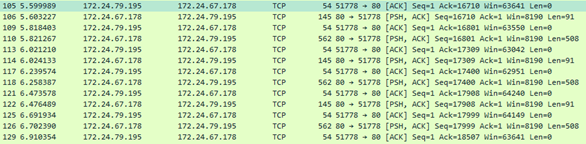
We started digging in from the client’s perspective, and used WireShark to see what was going on on the wire. After filtering on the Exchange host, we saw the following pattern:
image

Note that this customer used SSL Offloading, so mailbox access took place on port 80 instead of 443 (RPC/http).

As you might notice, there is a consistent 200ms delay after the client receives its response (e.g. packets 106 and 110). When searching around for ‘200ms’ and ‘delay’, you may end up with articles describing the effect of the Nagle algorithm (Delayed ACK). Nagle is meant to reduce chatter on the wire, but can have a negative effect on near real-time communications, especially with small packets. Also, while 200ms might seem small, looking at the number of packets exchanged between Outlook and Exchange, this can add up quite quickly. Most of these articles will also describe a fix, recommending to configure a registry key TcpAckFrequency, and set it to 1 (default is 2). For testing purposes, we configured this key and after the mandatory reboot, the end user Outlook experience was snappy. However, setting this key would impact all client communications (real as well as VDI clients); not a recommended long-term solution due to side effects on the network.

After removing the registry key, investigating was continued. Since there was no issue with the Exchange 2010, we started to suspect there was perhaps an issue with VMWare, or there was some form of network optimization or packet inspection going on. This, due to the fact there was no problem with the old Exchange environment, and the elements that changed when migrating were VMWare vSphere version, physical vSphere hosts, and last but not least, the protocol switched. This client didn’t use Outlook Anywhere, so RPC/http was not enabled for Exchange 2010 prior to migration, and clients connected using MAPI. After some more investigating, some potentially related articles on the VMWare knowledgebase were found, talking about latency issues in certain VMWare Tools versions, the VMWare guest driver set, and downgrading these to 5.1 would have the same effect as configuring TcpAckFrequency. Unfortunately, this wasn’t an option as the hardware level of the VMWare guests already was on a certain level.

introRemediation
When installing VMWare Tools, the package comes with some system-level drivers which handle communications between the guest and the host or other guests. One of these drivers is the VMWare Guest Introspection driver (or VMCI Drivers, and formerly VShield Drivers). This component can be identified in the guest in the presence of the system drivers vnetflt and vsepflt, and accommodates agentless antivirus solutions like McAfee MOVE. However, it seems to also interfere with certain workloads in their driver ecosystem, thus negatively impacting real-time communications. I wasn’t able to test if the change from MAPI to RPC/http (or later MAPIhttp) also contributed to this effect, as the Introspection driver may not scan MAPI RPC packets at all, in which case there is no overhead introduced.

Needless to say disabling the Guest Introspection component might be less desirable for some organizations, and in those cases, when you experience this issue, I suggest contacting your VMWare representative, after verifying your VMWare Tools are part of the list of recommended versions.

In the end, in this situation Guest Introspection was disabled and a file-level scanner was introduced (with the required exclusions, of course). Performance for Online Mode was optimal when accessing Online Mode mailboxes, and using Exchange web services like Scheduling Assistant showed room planning in seconds rather than minutes.

image.pngNote that unfortunately, recent versions of VSphere running Exchange virtualized workloads also have this issue. On the plus side, they allow for separate (de)installation of the file system driver (NSX File Introspection Driver) and the network driver (NSX Network Introspection Driver). I am pretty sure removing the network driver would suffice, which might be a viable solution for some folks as well.

If you have any insights to share, please leave them in the comments.
Exchange and NFS – A Rollup


imageA short write-up after some recent articles which were published to clarify and emphasize Microsoft’s current position on virtualization and the support for storing Exchange information on NFS volumes. I will stick to the headlines, as the topic has already been touched several times by people from the Exchange community, after which I would mostly be repeating things that have already been said. Yet, many customers still have the perception that Exchange on NFS is supported or are actually running this configuration, often the result of a push from the storage or virtualization vendor. As it is not, I will repeat key information here to counter misleading information, hoping it might prevent customers from selecting unsupported configurations.

End of last year, a lively discussion was revived on some distribution lists and forums on why NFS was still not supported for storing Exchange information. However, it was all speculation as the creator of the product did not take part. The official support statement was (and is) that Exchange is not supported on NFS and only block-level storage is supported. Tony Redmond did a write-up on that here.

Then, in the preamble of the Microsoft Exchange Conference 2014, a ‘suggestion’ to support NFS was put on the community ideascale site, where people can propose suggestions for Exchange. This site is not an official channel but it does provide a way for the community to gather suggestions and check for demand. So, it allowed to verify if the current lack of NFS support was major thing or not, as people producing the most noise do not necessarily represent the majority. Response seemed limited, except for some hardware vendors who made lots of noise, possibly in an attempt to get traction in the Exchange community.

Then, Tony did a follow-up article after a discussion with Jeff Mealiffe, knowledgeable on Exchange, Sizing and Virtualization and nicknamed ‘The PerfGuy’ for obvious reasons. In the article, the problem areas of NFS are set out. Interestingly (but not surprising), Exchange is similar to SQL Server from a storage perspective, the latter having very specific documentation regarding storage requirements. Also mentioned is that successfully running JetStress by the vendor is no indication on the supportability of storage configurations. After all, that JetStress succesfully runs for a certain amount of hours is great, but it is a storage performance validation tool, not a storage supportability validation tool. At the Microsoft Exchange Conference 2014, using arguments presented earlier in the article, Jeff reaffirmed the non-support of NFS in his presentation.

The discussion seemed to die down until few weeks ago when Tony was in a Twitter conversation with one Josh Odgers, engineer at one of the storage vendors. In the discussion Odgers dropped the rationale and even went so far as to insult people. When searching online, you will find other rants as well, so I guess Josh’ employer does not have any form of social media guidelines for their employees. That does not help when you are trying to lobby for your cause (and potential markets for your storage appliances). Tony wrote an extensive response here, I recommend checking it out.

Now what storage vendors and their employees do or do not do is up to them. However, things like this may become an issue when vendors repeatingly and knowingly position their storage solution as a supported alternative to customers, like for example Odgers does for Nutanix (NDFS is Nutanix’ proprietary distributed NFS implementation). Yes, I’m sure it flies like a rocket and I am sure some customers will be persuaded by sales people to a game of chance by running Exchange on their appliances. As an Exchange consultant however, I prefer supported solutions and so should you. Or have a serious chat with the Risk Manager.

Update (Jul 9,2014): The UC Architects fellow Mahmoud Magdy posted a blog on his experiences and encountered limitations of storage appliances such as Nutanix here.

Exchange and potential Packet Loss on VMWare


technical_support_outage_advisory[1]Yesterday, I noticed a VMware knowledgebase article, updated on November 14th, which could be worth taking notice of when you’re running Exchange – or any other application – in a virtualized environment based on VMware technology.

VMware’s KB article 2039495 mentions that in VMware ESXi 4.x and 5.x, very high traffic bursts may cause the VMXnet3 driver to start dropping packets in the Guest OS. This has been observed on Windows Server 2008 R2 running Exchange 2010 with – as VMware puts it – a high number of Exchange users. What the article fails to mention is the configuration used by customers experiencing the issue. It might for example be valuable to know if a DAG was used, if the traffic (MAPI, replication) was split over multiple NICs or if it occurred with iSCSI storage. I won’t be surprised if the issue occurs with other high traffic situations as well, e.g. seeding. Luckily, Exchange is capable of handling certain hiccups so customers might not be even aware of the issue.

After some more digging I found another article, KB 1010071, which mentions a packet drop issue with VMware Guests known since ESX 3. This article explains a bit more why the issue occurs in the first place, being the network driver running out of receive buffers, causing the packets to be dropped between the Virtual Switch and the Guest OS driver.

One could argue about the impact of a few lost packets. However, as traffic increases the (potential) number of lost packets increases. Each lost packet results in retransmission of unacknowledged packets, which impacts overall throughput causing increased latencies.

VMware’s temporary solution to this problem is:

  1. Open up the Windows guest;
  2. Open the properties of the VMXNET3 NIC;
  3. On the Advanced tab, increase the Small Rx Buffers or Rx Ring #1 Size;
  4. What KB1010071 mentions and KB2039495 doesn’t, is that when using jumbo frames – not seldom used, e.g. replication  – you might need to adjust the Rx Ring #2 size and Large Rx Buffers values.

Now I say temporary, because VMware’s solution of course isn’t  a real solution; it’s only meant to – in their own words – reduce packet drops. Also, the KB1010071 article states you should “determine an appropriate setting by experimenting with different buffer sizes”. That doesn’t sound like an permanent, assuring solution for a virtualization environment running business critical applications now, does it?

All things considered, I’d recommend configuring these parameters to their maximum setting, preferably at installation time, unless anyone knows of a reason not to. In addition, this is another case for the best practice to split MAPI and replication traffic on Exchange using multiple NICs.

Finally, I already learnt of two other applications experiencing the issue. Therefor I think the problem is not Exchange 2010 specific, as KB2039495 might imply. If you have similar experiences, experienced differences between GbE and 10Ge, please use the comments to share.

Microsoft Exchange Conference 2012, a Summary


After being absent for over 10 years, this year the most anticipated conference for Exchange minded people took place in Orlando, Florida (US), the Microsoft Exchange Conference 2012 (MEC).

Despite not being able to attend MEC 2012, I’d like to summarize the news on Exchange 2013 from the event. Some of this information went public as part of the release of Exchange 2013 Preview, which was released in July (yes, almost 2 months ago – time flies). Some statements were new, like for example the expected release date of Exchange 2010 SP3, which is required for co-existence with Exchange 2013.

With all the social media nowadays, you can track most of the statements made at the event. Thanks to people like Jeff Guillet and Devin Ganger and people from our The UC Architects group, like  Dave Stork, Michael van Horenbeeck, Pat Richard, Serkan Varoglu and John A. Cook, who reported live from the sessions they were attending (hastag #iammec), the community was kept up to date with information as it unfolded. At each the end of the day, Tony Redmond gave a nice summary including comments on the event as a whole.

Picture shows some of people behind The UC Architects together
with Perry Clarke (GM Exchange), who you might recognize from
the Ask Perry videos. The picture is taken by Tony Redmond.

The information presented here is a summary of all the information provided through social media and is additional to the information presented at the release of Exchange 2013 Preview; you can read all about that in my Changes in Exchange 2013 Preview article. It is in no way meant to be conclusive or complete.

Ok, now on to the goodness.

Co-Existence
Exchange 2010 Service Pack 3 is expected to be released in the first half of 2013. Not only is it required for co-existence with Exchange 2013, it also supports Windows Server 2012 as Operating System platform. Note that SP3 will require a schema update.

No word on the expected release date of the update required for Exchange 2007 to support co-existence between Exchange 2013 and Exchange 2007. Since Exchange 2007 SP3 Rollup 8 was released in August, thus after the Exchange 2013 Preview became available, I assume we have to wait for Rollup 9 (or 10?).

Storage
Ross Smith from the Exchange Team confirmed the 99% IOPS reduction claim when comparing Exchange 2013 with Exchange 2003; when compared with Exchange 2010 it’s a 50% reduction. That’s down from 1 IOPS per mailbox in Exchange 2003 to .125 IOPS in Exchange 2010 to a 0,0625 IOPS per mailbox in Exchange 2013.

image

Also, passive copies have around 50% reduction in IOPS, mainly due to the increased checkpoint depth (100MB) and less aggressive pre-reading of data to keep in line with the checkpoint depth (I’ll devote a separate article on this at a later date). This means when mixing active and passive copies on a Mailbox server, the passive copies play more nicely from a storage perspective. Also, because of these changes database fail-over times are down from 20 seconds in Exchange 2010 to about 10 seconds in Exchange 2013.

To validate storage for Exchange 2013, JetStress for Exchange 2013 will become available 3 months after Exchange 2013 goes RTM. When required to validate storage in the mean time, it is recommended to utilize Exchange 2010’s version of JetStress since Exchange 2010 and Exchange 2013 will have the same IO pattern.

Databases
In Exchange 2013, multiple databases per storage volume allowed, which allows for active and passive copies on the same volume. Looking at the lower IOPS requirements of Exchange 2013 ESE’s engine and the 50% lower IOPS factor of passive copies, this allows for some serious consolidation on large volumes. The number of volume copies must match the number of databases per copy.

Note that putting databases on SMB3 shares (Windows Server 2012) is not supported; putting a virtualized Exchange server on SMB3 shares is.

Mailboxes
Besides the recommendation to embrace 7,200 RPM disks for Exchange storage, large mailbox implementations are expected to take off (100GB+, including mailbox, archive and recoverable items) in an ongoing battle to get rid of PSTs and 3rd party solutions.

Due to database accounting changes in Exchange 2013, mailboxes may see a 30% increase in size when moved from Exchange 2010 to Exchange 2013. Make sure you adjust mailbox quota settings accordingly.

Client Access
CAS 2013 will proxy client traffic to Exchange 2010 using the CAS 2010 server’s FQDN, i.e. it won’t determine or use internalURL or InternalNLBBypassUrl. You can’t configure CAS-to-CAS proxying per site; it’s an all or nothing setting. At RTM, Exchange 2013 Client Access servers won’t contain support for SSL offloading.

Health Checking
Exchange 2013 will not only check the server’s health looking at the Exchange services, but it will also check the protocols.

CAS 2013 will determine the health of legacy Exchange servers using a simple HTTP HEAD call.

Automatic Reseeding
Besides the ability to seed databases using multiple sources, which prevents the situation where multiple remote copies are seeded over WAN links from the active copy, Exchange 2013 contains a feature called Automatic Database Reseeding or just AutoReseed.

AutoReseed can be utilized to automatically reseed databases when required, e.g. after a storage failure. AutoReseed can even allocate and initialize spare disks to restore database redundancy. AutoReseed requires configuring three new properties, which are part of the DAG:

  • AutoDagVolumesRootFolderPath refers to the mount point containing all available volumes, including spare volumes;
  • AutoDagDatabasesRootFolderPath refers to the mount point containing the databases;
  • AutoDagDatabaseCopiesPerVolume sets the number of databases copies per volume.

So for example, when you’ve configured a mount point C:\Volumes (AutoDagVolumesRootFolderPath) containing mount points for databases, e.g. C:\Volumes\DB1, and mount point C:\Databases (AutoDagDatabasesRootFolderPath) with mount points to Exchange databases, e.g. C:\Databases\DB1 (where C:\Databases\DB1 maps to C:\Volumes\DB1), and DB1 contains folders for database and logfiles, AutoReseed can utilize mount points from C:\Volumes to automatically recreate and reseed databases when DB1 fails.

Site Resilience
Exchange 2013 will feature an automatic site (datacenter) fail-over using a witness server located in a 3rd well-connected site. This enables customers to automate the process of site switchovers, from primary to secondary site. This feature is optional.

This may confuse existing Exchange customers, who perhaps learned with Exchange 2007 a 3rd site for the cluster voter was not recommended, after which it shortly became an option with Exchange 2010. Then, after a while an adjusted recommendation was published not to use a 3rd site and now it’s option again,

Despite this, I think this certainly is a valuable feature. Normally, site outages and datacenter switchovers are stressful situations; if it’s preconfigured and automated, the less prone to error the switchover process is.

Exchange fellow and colleague Jaap Wesselius, who did
2 sessions on Load Balancing Exchange, was interviewed
by F5. Click the image to watch the interview.

Exchange Online
You can use Exchange 2003 with Exchange 2013 Online (when it becomes available) by utilizing an Exchange 2010 CAS server, just like today.

Safety Net
Safety Net is the new transport dumpster in Exchange 2013 and will provide similar functionality. It will also take over the functionality of Shadow Redundancy, which purpose in Exchange 2010 is to guarantee delivery of messages and accommodate for transport failure. Lagged Copy functionality is also enhanced by Safety Net, since you can activate lagged copies by activating the (lagging) copy after which Exchange 2013 will use Safety Net to make the database current. How long Safety Net will hold messages is a configurable setting.

Compliance
Exchange 2013 will support Litigation Hold, Time-based Hold (rolling data, e.g. items aged X days) and In-place Hold (formerly known as Legal Hold).

Unified Messaging
The Exchange 2013 UM role has a 100 concurrent calls limit. As you probably know, in Exchange 2013 Mailbox servers are used for UM as well. Because of that, this limit will have serious consequences when you’re designing an environment using several big servers; you might be forced to distribute the workload over more, lighter servers.

Exchange 2013 and ForeFront Treat Management Gateway
Exchange 2013 will work fine in conjunction with ForeFront TMG, except for maps feature when using TMG’s Forms-Based Authentication (FBA); the only thing you need to adjust is the logoff URL. Note that despite the ForeFront TMG 2010 End-of-Life statement from Microsoft last week, people like Greg Taylor (Program Manager Exchange) emphasized customers shouldn’t avoid using or opting for TMG while it is still available.

Public Folders
Migration of Public Folders from Exchange 2007 or Exchange 2010 is a cut-over scenario, so there will be no co-existence.

When using Exchange 2013 Public Folders next to Public Folders on Exchange 2007 or Exchange 2010, you need to manually map those to related folders in Exchange 2013 using CSV file.

Emphasis was put on being able to control Public Folders and put that data in the same store is worth losing the multi-master functionality.

Exhibitor ENow Consulting held a contest
for collecting the most autographs.

Message Hygiene
Exchange 2013 will include tools to block messages in a certain character set. This is useful in scenarios where you don’t expect messages in one of the Chinese languages and you want to block (potential) spam written in one of those languages.

In-Place Archiving
The new term for Personal Archive or Online Archive is In-place Archiving.

Message Routing
Exchange 2013 won’t use least-cost routing when routing messages, but it will use it to determine if Hub sites are defined. Exchange 2013 will honor Hub site definitions, but there are to be considered legacy.

A Delivery Group is a set of transport servers responsible for delivering messages to a certain routing destination. There are several types of Delivery Groups, depending on the destination, e.g. DAG or Site. Each transport server is used in a Round-Robin fashion when delivering messages.

An MBX server and CAS server listen for incoming messages on port 25 unless co-located; then the MBX server will listen on port 2525.

More background information on message routing in Exchange 2013 also in conjunction with Exchange 2010 is to be found here.

Licensing
It is no longer required to have an Enterprise license for eDiscovery; it is still required to have an Enterprise license when using Legal Hold.

Virtualization
Many statements were made to de-emphasize virtualizing Exchange and only use if for testing purposes. When virtualizing, the same rules apply as for Exchange 2010.

Like with earlier versions of Exchange, the ESE engine will claim memory at startup using the amount of physical ram. Configuring Dynamic Memory is therefor not only pointless but also not recommended, like I stated in an earlier post on Exchange and Dynamic Memory.

It is also emphasized that putting VMDK files on VMWare NFS disks is not a supported scenario, so I assume this is often seen in the field despite not being supported from Microsoft.

Mobile
ActiveSync in Exchange 2013 will cause 65% less RPC communications over Exchange 2010.

Outlook Web Access
When using OWA 2013 in offline mode, the locally generated cache file isn’t secure; use of BitLocker is recommended. Single Sign-On in combination with OWA on Exchange 2013 redirection will be fixed post-RTM. Also, be advised that at RTM, OWA in Exchange 2013 won’t have support for Public Folders.

IAMMEC Portal
A portal for the Exchange community was announced, iammec.com. Here, people involved with Exchange can get information from within Microsoft or other sources. How this will differ from the Exchange related topics on TechNet forum is to be seen.

It is unknown if there will be a MEC in 2013; Microsoft’s director of PM for Exchange, Michael Atalla, said there will a MEC when “theres’s something  to talk about”. It is rumored that recordings of the 1st day of the conference will be made available at a later date, except for the interactive sessions.

PS: The icon accompanying this article is the Exchange 2013 logo.

TechEd North America 2012 sessions


With the TechEd North America 2012 event still running, recordings and slide decks of finished sessions are becoming available online. Here’s an overview of the Exchange-related sessions: