Unknown's avatar

About Michel de Rooij

Michel de Rooij, with over 25 years of mixed consulting and automation experience with Exchange and related technologies, is a consultant for Rapid Circle. He assists organizations in their journey to and using Microsoft 365, primarily focusing on Exchange and associated technologies and automating processes using PowerShell or Graph. Michel's authorship of several Exchange books and role in the Office 365 for IT Pros author team are a testament to his knowledge. Besides writing for Practical365.com, he maintains a blog on eightwone.com with supporting scripts on GitHub. Michel has been a Microsoft MVP since 2013.

Security Updates Exchange 2013, 2016 & 2019


Ex2013 LogoUpdate 14jan: Added Exchange 2010 SP3 RU25

A quick heads-up as during my vacation Microsoft released security updates for supported releases of Exchange Server 2013, 2016 as well as Exchange Server 2019. In addition, a new Rollup was released for Exchange 2010 as well, containing one of the security updates.

The security updates patch issues as reported in the following Microsoft Common Vulnerabilities and Exposures:

  • CVE-2019-0586: Microsoft Exchange Memory Corruption Vulnerability
  • CVE-2019-0588: Microsoft Exchange Information Disclosure Vulnerability

You can download the security updates here:

Notes:

  • Exchange 2010 SP3 RU25 addresses CVE-2019-0588 only.
  • KB4471389 supersedes KB4468741 and KB4459266; KB4468742 supersedes KB4458321.

Be advised that the Security Updates for Exchange 2013 and 2016 are Cumulative Update level specific. Unfortunately, the security update carries the same name for different CU’s, and you cannot apply the update for Exchange 2016 CU10 to Exchange 2016 CU11. I would suggest tagging the Cumulative Update in the file name when you archive it, e.g. Exchange2016-KB4471389-x64-en-CU10.msp.

As with any patch or update, I’d recommend to thoroughly test this in a test and acceptance environment first, prior to implementing it in production.

Exchange 2019 Preferred Architecture


Ex2013 LogoMicrosoft has been promoting Docs as the new home of product documentation for a while now. And now a long awaited piece of Exchange 2019 documentation has been published, the Exchange 2019 Preferred Architecture.

The Preferred Architecture – or PA – contains information on how to plan and deploy Exchange 2019 using commodity hardware. It also contains more guidelines on deploying Exchange 2019 using its new Metacache database (MCDB) feature; SSDs to store meta data to speed up storage access, improving overall performance and user experience.

Still missing in the planning instruments is an updated Exchange role requirements calculator for Exchange 2019, incorporating things like the metacache database etc. I’m pretty sure that is being worked on to be released at a future date.

Also quiet convenient is that GitHub being the platform allows the team to provide a feed on Exchange content updates. Really nice to quickly see latest additions and changes in documentation.

Security Updates for Exchange 2016


Ex2013 LogoA quick heads-up as Microsoft released security update for supported releases of Exchange Server 2016.

The security updates patch issues as reported in the following Microsoft Common Vulnerabilities and Exposures:

  • CVE-2018-8604: Microsoft Exchange Server Tampering Vulnerability
    A tampering vulnerability exists when Microsoft Exchange Server fails to properly handle profile data. An attacker who successfully exploited this vulnerability could modify a targeted user’s profile data.

You can download the security updates here:

Notes:

  • KB4468741 for Exchange Server 2016 CU10 supersedes KB4459266.

As with any patch or update, I’d recommend to thoroughly test this in a test and acceptance environment first, prior to implementing it in production.


Multi-Tenant Administration


imageNote: When writing this blog, the Azure portal received an update which allows for switching directories. Unfortunately, this feature hasn’t been ported to the other Office 365 admin UI’s at this moment.

Being a consultant, you often find yourself having to switch tenants, or having to keep multiple admin portals open to different Office 365 tenants. This may become a nuisance, as you can use only a single set of credentials per browser instance. In other words, if you connect to the Office 365 admin portal using credentials A, opening up the Azure portal will be in the same context.

A typical workaround for this situation would be to open up a new private browser session. From that private browser session, you need to provide credentials B. Any new tabs in that private window will also be in the same context. The whole private session is hosted in a new window.

A more neat solution for this scenario is leveraging browser containers, such as:

Notes:

  • This blog is written based on Firefox Multi-Account Containers, so your mileage may vary if you’re using Chrome or a 3rd party add-on.
  • Firefox also supports a basic version of context switching natively via about:config, setting privacy.userContext.enabled.
  • I’m not aware of similar features or 3rd party add-ons for other browsers.

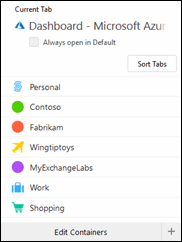
imageUnlike the Chrome extension, FireFox’ Multi-Account Containers allows you to have multiple sessions from within the same browser. For this purpose, tabs are used to arrange sessions in what’s called containers. Each container shares the same set of site preferences, sessions, cookies etc. To identify containers, they can be assigned a (new) name, color and symbol.

After installing the add-in, you will get a button that will open the container selection window. In this example, I have set up 4 containers besides the default ones: one for every customer and one for my lab. Selecting Contoso will open a new blank tab. The right side of the address bar contains a visual reference to the active container, showing label and symbol in the configured color.

Keep Me Signed InNow, when you go to portal.office365.com, the Office 365 account picker may show up when connected before using this container. Pick one, or enter a new set of credentials. This account will be stored in this container. The question of wanting to stay signed in makes more sense now, as the token will be stored within the container, happily coexisting with other Keep-Me-Signed-In settings and sessions from other containers.

Now, when you open a different admin app in that tab, it will be in the same container and thus user context. You can also select to open a blank tab in that container, and navigate to portal.azure.com. You will notice it picks up the Contoso credentials provided earlier. This is because the session information is stored within the Contoso container.

image

Now click the container icon again, and select a different container, e.g. Fabrikam. Navigate to portal.office365.com, and you will notice you can provide new (or re-use) credentials which have a different context than Contoso. Also, opening the Azure portal after that in this container will be in the Fabrikam context.

Having set this up properly, you can easily switch between all admin portals from different tenants by selecting the different container tabs: no need to switch accounts or firing up separate private browser windows. This is a more elegant solution compared to private browsing sessions.

A final note that the above not only can be used to access the Office 365 admin portals of multiple tenants, but web-based applications such as Teams, Outlook Web Access or SharePoint as well.


Exchange 2019 released


Ex2013 LogoToday will be a day long remembered, as it has seen the release of Exchange Server 2019. After the Ignite event in September, release of Exchange 2019 was more or less imminent. Well now it’s out there – on Volume License Center to be exact – and while most details were announced at Ignite as well, there have been some features which didn’t make it in part or entirely to RTM.

To start with formalities: The version number of Exchange 2019 RTM is 15.2.221.12. After preparing your Active Directory forest, the schema version is 17000, while the forest and domain versions will become 16751 and 13236 respectively.

Looking at the VL requirement as well as the dimensioning, it’s clear Exchange server 2019 is positioned as a product for enterprises; small to medium-sized business should aim for Office 365.

Highlights
A detailed summary of Ignite announcements on Exchange 2019 was published earlier here. To recap, some major highlights:

  • Volume Licensing only, and no “Hybrid Server key”.
  • FFL 2012R2 and later.
  • Exchange Server 2019 on-premises is permanently branched from Exchange Online.
  • MetaCache Database (MCDB) storage tiering with SSD’s for improved UX and mailbox density (+20%). Recommended ratio SSD:HDD is 1:3.
  • Dynamic Database Cache to dynamically balance memory over active and passive copies cache.
  • Big Funnel search technology leveraging mailbox database for availability.
  • Supports up to 48 cores, recommended memory 128GB Mailbox/64GB Edge server roles to benefit scaling improvements. Maximum supported memory is 256GB.
  • Requires Windows Server 2019, desktop or core.
  • Requires .NET Framework 4.7.2, VC++ redistributable and UCMA (Mailbox only).
  • Co-existence support with Exchange 2013 and 2016.
  • UM role is gone.

Documentation
The official documentation can be found online on Docs here. For an overview of the sessions presented at Ignite on Exchange and related topics like calendaring, see here.

Notes
If you get a message when trying to install saying (desktop and core):

Setup can’t continue with the upgrade because the taskhostw (<PID>) has open files. Close the process, and then restart Setup. For more information, visit: http://technet.microsoft.com/library(EXCHG.150)/ms.exch.setupreadiness.ProcessNeedsToBeClosedOnUpgrade.aspx

You can close the process with taskkill /f /pid <PID>.

Other articles
Other articles on the release of Exchange Server 2019:

Do make sure you read the release notes, which contains important information on potential issues.

In other news
The following products were also released today: